Blazor Welcomes Open-Source Contributions from Syncfusion
Microsoft and Syncfusion are collaborating on Blazor through a free, open source component toolkit, framework contributions, and developer tooling. The post Blazor Welcomes Open Source Contributions from Syncfusion appeared first on .NET Blog .
We’re pleased to announce our collaboration with Syncfusion to advance Blazor! Syncfusion has released a free, open-source toolkit of Blazor components, and its engineers have contributed fixes and tests to ASP.NET Core and the .NET scaffolding tools. Their investment helps developers building with the toolkit and strengthens the platform for the entire Blazor community.
This collaboration builds on Syncfusion’s contributions to .NET MAUI, where Syncfusion released an open-source toolkit and committed engineering resources to the framework itself. We’re excited to see that commitment extend to Blazor.
Introducing the Syncfusion Toolkit for Blazor
The Syncfusion Toolkit for Blazor provides reusable UI components for Blazor apps under the MIT license. The toolkit includes charts, buttons, calendars, date and time pickers, text and numeric inputs, dialogs, tooltips, and loading indicators.
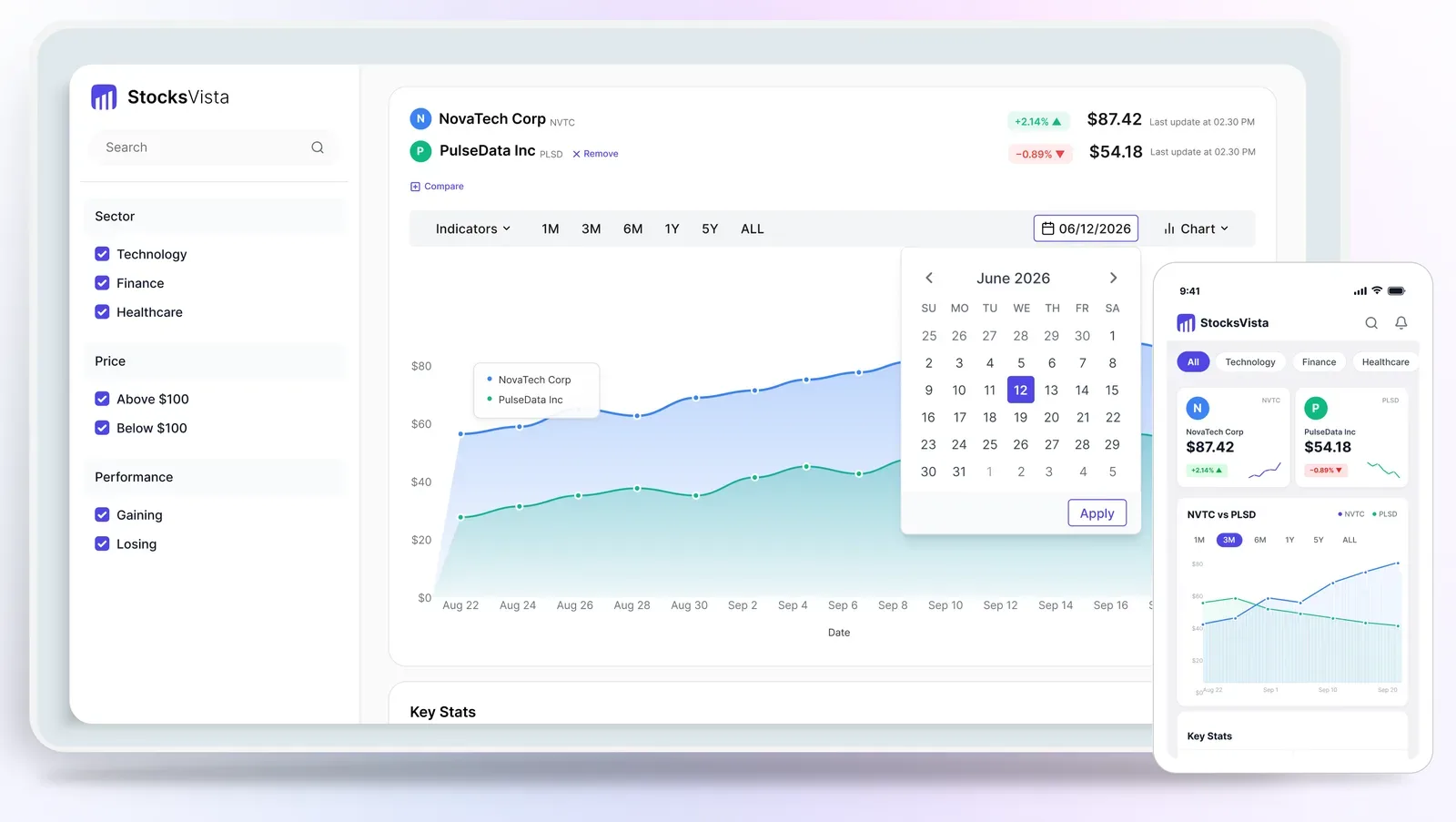
Syncfusion Toolkit for Blazor showcase featuring charts and input controls in desktop and mobile layouts.
The toolkit is free for everyone, including commercial use. It doesn’t require a license key or eligibility for Syncfusion’s Community License. The open-source toolkit is separate from the broader commercial Syncfusion Blazor suite, which includes additional components and features.
You can explore the code, samples, and contribution guidance in the Syncfusion Blazor Toolkit repository.
To add the toolkit to an existing Blazor project, install the Syncfusion.Blazor.Toolkit NuGet package:
dotnet add package Syncfusion.Blazor.Toolkit
Then follow the toolkit’s setup instructions for service registration, namespace imports, and theming. The repository also provides project templates if you’d prefer to start with a preconfigured Blazor app.
We’ve worked closely with Syncfusion on the toolkit to help meet a high quality bar for performance, accessibility, security, and trimmability. Component quality is an important part of the overall Blazor experience, and this collaboration includes reviewing how the components work in real applications as well as how developers get started with them.
Contributing to Blazor and its tooling
Syncfusion’s investment extends beyond its component library. Its engineers have delivered merged improvements across ASP.NET Core and the .NET scaffolding tools, helping make Blazor apps and the tools used to build them more reliable.
Merged changes include fixes for preserving prerendered state on interactive Not Found pages and form validation with inherited models, along with clearer QuickGrid diagnostics. These improvements help developers build and troubleshoot Blazor apps, whether or not they use Syncfusion’s components.
Their merged scaffolding fixes also preserve data in generated edit pages when interactivity starts and add the application configuration needed for scaffolded Blazor Identity pages.
The team has also repaired flaky regression tests across Blazor and ASP.NET Core. Beyond those fixes, they’ve developed and run more than 60 end-to-end validation scenarios for new .NET 11 Blazor features, helping identify issues ahead of release. As maintainers, we value this investment in both the platform and the testing that keeps it reliable.
Streamlining setup with scaffolders and AI skills
Syncfusion is contributing a toolkit setup scaffolder to the .NET scaffolding tools. The contribution is under review and focuses on adding the toolkit package, registering services, and configuring namespace imports in an existing Blazor app. It sets up the toolkit rather than generating application pages.
Syncfusion is also contributing an installation and configuration skill to the .NET skills repository for AI coding assistants. That contribution is under review as well. It provides guidance on the open-source package, service registration, theming, and render modes, including apps with separate server and client projects.
Both efforts aim to reduce setup work and help developers and their coding assistants configure the toolkit correctly.
Join the Blazor Community Standup
Join us and Syncfusion on October 29, 2026, at 10 a.m. Pacific Time for a Blazor Community Standup about our collaboration and the free Syncfusion Toolkit for Blazor. Watch below, or join us on YouTube to ask questions in the live chat.
Try the toolkit and get involved
Explore the Syncfusion Toolkit for Blazor, try the samples, and share feedback in the toolkit repository.
We’re grateful to Syncfusion for contributing its component expertise and engineering time to Blazor. As with its work on .NET MAUI, this collaboration brings more people into the work of improving .NET. We welcome the wider community to participate through bug reports, testing, design discussions, and code contributions.
The post Blazor Welcomes Open-Source Contributions from Syncfusion appeared first on .NET Blog.
Originally published on
.NET Blog
Keep reading


 Supabase Blog
 Anthropic