Building with Stripe Data Pipeline and the Neon backend
Stripe just released real time sync to Postgres for Stripe Data Pipeline, which streams your Stripe data into your own Postgres database within a few seconds. We built two example apps on the Neon backend to put it to use.
Stripe just released real-time sync to Postgres for Stripe Data Pipeline, which streams your Stripe data into your own Postgres database within a few seconds. Every object in the Stripe API with a list endpoint, such as charges, customers, prices, invoices and subscriptions, syncs into a regular table you can join against.
Neon is one of the supported destinations, so we built two example apps on it right away:
- Headshot Studio: An AI headshot generator. Users buy credit packs, upload a selfie, and receive professional studio headshots. Try it · Code
- Bouncer: A prepaid content moderation API that bills customers for each item it checks. Try it · Code
For demo purposes, both apps apply a 100% discount at checkout, so you can complete a purchase without paying anything.
In this post, we walk through how we built both apps, and then show how Stripe Data Pipeline and Neon branches help you debug billing issues in them.
Billing architecture
Neither app has a Stripe webhook anywhere in its codebase. Both apps write to Stripe through its API and read every Stripe object from Postgres.
Writing to Stripe and reading from Postgres
Buying credits starts a normal Checkout Session. The app adds the user ID and credit count as metadata on the payment, and that metadata syncs into Postgres with the charge. Here's the Headshot Studio code:
const session = await stripe.checkout.sessions.create({
  mode: 'payment',
  customer,
  line_items: [{ price, quantity: 1 }],
  payment_intent_data: { metadata: { user_id: user.id, pack: packId, credits: String(pack.credits) } },
  success_url: `${env.APP_URL}/studio?checkout=success`,
  cancel_url: `${env.APP_URL}/studio?checkout=cancelled`,
})
Once the payment goes through, Stripe syncs the charge into
stripe.charges
within a few seconds, and the dashboard polls Postgres until the new credits appear. No webhook handler needs to run in between.
The apps also read prices and promotion codes from the synced tables. Neither app hardcodes a price ID. They look up prices by
lookup_key
in
stripe.prices
and promotion codes by code in
stripe.promotion_codes
, so when you switch from a sandbox to live mode, or to another Stripe account, you don't need to update any IDs in the code.
Computing credits with a SQL view
Neither app stores a balance. A customer's credits are a SQL view: what they bought (from the synced Stripe tables) minus what they spent (from the app's own tables).
Headshot Studio counts credits and computes spending from its jobs table:
create view app.credit_balances as
with purchased as (
  select c.user_id,
         sum(floor(
           coalesce(ch.metadata ->> 'credits', pi.metadata ->> 'credits', '0')::numeric
           * (ch.amount - ch.amount_refunded) / nullif(ch.amount, 0)
         ))::int as credits
    from app.customers c
    join stripe.charges ch on ch.customer = c.stripe_customer_id
    left join stripe.payment_intents pi on pi.id = ch.payment_intent
   where ch.status = 'succeeded' and ch.paid and not ch.disputed
   group by c.user_id
),
spent as (
  select user_id, sum(cost)::int as credits
    from app.jobs
   where status in ('processing', 'succeeded')
   group by user_id
)
select c.user_id,
       coalesce(p.credits, 0) as purchased,
       coalesce(s.credits, 0) as spent,
       coalesce(p.credits, 0) - coalesce(s.credits, 0) as balance
  from app.customers c
  left join purchased p using (user_id)
  left join spent s using (user_id);
Reading a customer's credits is then an ordinary query, and the studio page runs it on every load:
select purchased, spent, balance
  from app.credit_balances
 where user_id = $1;
Handling refunds and chargebacks
Because the app computes credits from Stripe data on every read, the query already handles the edge cases you'd normally write webhook handlers for:
-
Refunds: Suppose a customer bought the 40-credit Pro pack for $29 and you refund half of it in the Stripe Dashboard. A few seconds later,
amount_refundedsyncs, and the same query returns the new number:select purchased, spent, balance from app.credit_balances where user_id = $1; -- before the refund: purchased 40, spent 4, balance 36 -- after the refund: purchased 20, spent 4, balance 16 -
Chargebacks: When a charge is disputed,
disputedis set totruein the synced row and the view excludes the charge. -
Double-crediting: Nothing can be credited twice, because no write ever adds credits.
How the apps are built
Headshot Studio is an AI headshot generator paid for with credits. You buy a credit pack (one credit buys one headshot) and upload a selfie directly from the browser to a private bucket. A few moments later, the headshots appear on the studio page.
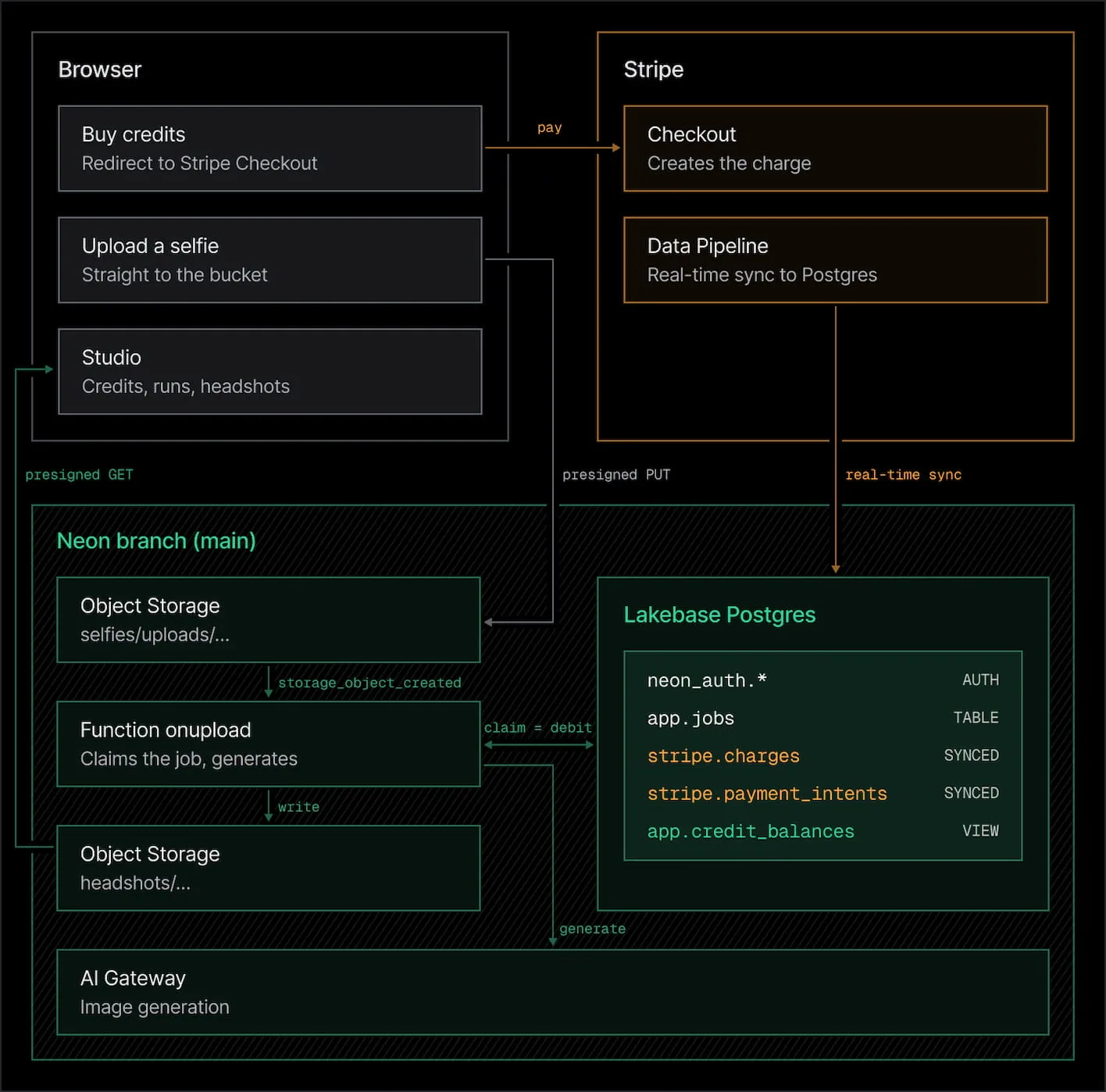
The stack:
- Stripe Data Pipeline syncs
customers,charges,payment_intents,checkout_sessions,pricesandpromotion_codesinto a stripe schema. - Lakebase Postgres holds three schemas:
stripe.*(owned by the pipeline),neon_auth.*(users and sessions) andapp.*(the app's own tables). - Managed Better Auth handles sign-up and sign-in.
- Object Storage has two private buckets, selfies and headshots.
- Functions and triggers run
onuploadwhen a selfie is uploaded, andsweeperon a five-minute cron. - AI Gateway does the image generation, so there are no model provider keys in the app.
- Next.js on Vercel serves the UI.
Preventing double spending
If there's no balance column to decrement, what stops someone from spending the same credits twice? Headshot Studio prevents it with four parts of the stack:
1. Creating the job
When you click generate, the API inserts a row in
app.jobs
with status
awaiting_upload
and returns a presigned upload URL. The browser uploads the selfie directly to a private Object Storage bucket, without passing through the app's server. The object key includes the user and job IDs (
uploads/{userId}/{jobId}.jpg
).
2. Calling a function on upload
Object Storage can call a Neon Function whenever a new object is uploaded, using a storage trigger. The trigger sends the bucket and object key to
onupload
, and since the key contains both IDs, the function knows whose job it is without a queue or an extra lookup.
3. Claiming the job and spending credits
In one Postgres transaction,
onupload
takes a per-user advisory lock and sets the job to
processing
only if the credits view says the user can afford it:
select 1 from pg_advisory_xact_lock(hashtextextended($userId, 0));

update app.jobs j
   set status = 'processing', started_at = now()
  from (select coalesce((select balance from app.credit_balances where user_id = $userId), 0) as balance) a
 where j.id = $jobId
   and j.status = 'awaiting_upload'
   and a.balance >= j.cost
returning j.id;
The balance it checks comes from
app.credit_balances
, which reads the purchases that Stripe Data Pipeline syncs into Postgres. Once the job is
processing
, it counts as spent in that same view, so the update both checks the balance and spends it.
Because the app computes credits from the jobs table, this design also handles three edge cases:
- Two uploads at once can't overspend. The advisory lock makes one user's claims run one at a time, so the second sees the first one's debit.
- Redeliveries do nothing. A job only leaves
awaiting_uploadonce, so a duplicate trigger delivery finds nothing to claim. - Failed jobs return their credits. The view doesn't count failed jobs as spent, so no refund logic is needed.
After the claim,
onupload
reads the selfie, calls AI Gateway once per variant, writes the results to the headshots bucket and marks the job succeeded.
4. Cleaning up stale jobs
A second function,
sweeper
, runs every five minutes on a schedule trigger. It fails jobs stuck in
processing
for over 20 minutes and expires jobs that never got an upload, so the view returns those credits to the balance.
Debugging with Neon branches
Because your Stripe data is in Lakebase Postgres as part of a Neon backend, you can create a branch that contains both your Stripe data and your app data.
A Neon branch is an isolated copy of your project, created in seconds without duplicating any data up front. It shares storage with its parent and stores only the changes made on the branch. You can also create a branch from a past point in time within your project's history window, which lets you inspect production data as it was when a customer reported a bug.
A branch includes the whole backend:
- Postgres, including the
neon_authusers and the syncedstripe.*rows. The customer's purchases, refunds and invoices appear in the branch as they were synced at that point in time. - Object Storage, including the files customers uploaded.
- Triggers, copied but disabled. Inherited triggers don't run on a child branch until you enable them, so a debug branch of Headshot Studio can't process uploads on its own, and a debug branch of Bouncer can't charge anyone's card.
Without Stripe Data Pipeline, you would collect the billing details of a bug report manually from the Stripe Dashboard. With it, the billing data, app data and files are in one place that you can copy, query and modify without affecting production.
Debugging a failed job after payment
Suppose a customer reports that they bought the Pro pack and uploaded a selfie, but received no headshots. The following steps show how to investigate the issue on a branch:
1. Locate the failed job: Each row in
app.jobs
stores the ID of the trigger invocation that claimed it:
select j.id, j.status, j.error, j.invocation_id, j.created_at
  from app.jobs j
  join neon_auth."user" u on u.id = j.user_id
 where u.email = '[email protected]'
 order by j.created_at desc;
2. Review the function logs: Each log line includes
invocation=… key=…
, so you can filter the logs by the invocation ID from step 1:
npx neon logs query --source function
3. Create a branch at the time of the failure: Use the job's timestamp as the branch point, then connect your local environment to the new branch:
npx neon branches create --name debug/headshots-1042 --parent 2026-10-08T10:42:00Z
npx neon checkout debug/headshots-1042   # pulls that branch's env into .env
The branch contains the customer's user record, synced charge, job and uploaded selfie as they existed at 10:42.
4. Reproduce the failure locally: neon dev runs
onupload
on your machine against the branch's data and files. A script sends the same JSON payload that the storage trigger sent:
npx neon dev                                            # serves onupload on :8787
scripts/replay-upload.sh uploads/<userId>/<jobId>.jpg   # in another terminal
To run the function again, reset the job's status on the branch:
update app.jobs
   set status = 'awaiting_upload', error = null, started_at = null, finished_at = null
 where id = '<jobId>';
5. Identify and fix the cause: In this case, the selfie was an iPhone HEIC photo that the image pipeline couldn't process. The fix adds a check that detects the file type and asks the user to upload a JPEG instead. Rerun the upload until the job succeeds. The function writes the generated headshots to the branch's headshots bucket, so production data isn't affected.
6. Deploy the fix and delete the branch: On production, the failed job has already returned its credits, so the customer can upload again.
npx neon branches delete debug/headshots-1042
Testing refunds against the credit balance
A branch also lets you test the balance view against production data without involving Stripe. On a debug branch, simulate a partial refund by updating the synced charge:
-- debug branch only: on main, stripe.* belongs to the pipeline
update stripe.charges set amount_refunded = amount / 2 where id = 'ch_…';
select * from app.credit_balances where user_id = '<userId>';
The balance decreases by half the pack immediately, with no webhook handler involved. Setting
disputed = true
removes the charge from the view entirely. To confirm the behavior end to end on main, refund a test-mode charge in the Stripe Dashboard, check that
stripe.charges._updated_at
changes, and verify that the balance updates within seconds.
Debugging a job timeout
Suppose a customer reports that the sweeper marked their job as failed while it was still running. Each sweeper run logs its
scheduledAt
timestamp, so you can create a branch at that timestamp and query the data the sweeper read:
npx neon branches create --name debug/sweeper --parent 2026-10-08T11:05:00Z
select id, status, started_at, now() - started_at as running_for
  from app.jobs where status = 'processing';
If a four-variant job legitimately ran for more than 20 minutes, the timeout is too short. Increase it, run
neon deploy
on the branch to enable its triggers, and confirm that the next scheduled run behaves correctly before you deploy the change to production.
Building your own app
You can use the same pattern for any product that sells credits, usage or access: write to the Stripe API, read from the synced
stripe.*
tables, and compute billing state with a SQL view.
To build your own app with a coding agent, run
npx neon@latest init
in your project first so the agent has the Neon MCP server and skills. Then paste a prompt like this:
Build a <describe your app> that bills customers through Stripe, using Stripe Data Pipeline's real-time sync to Postgres and the Neon backend. Use these repos as reference for the billing pattern:

- https://github.com/rishi-raj-jain/neon-stripe-sync-realtime-headshot-studio
- https://github.com/rishi-raj-jain/neon-stripe-sync-realtime-bouncer

Follow the same rules:

- No Stripe webhooks. Write to Stripe only through its API, and read every Stripe object from the synced stripe.* tables.
- Keep each customer's balance as a SQL view: purchases from the synced Stripe tables minus usage from the app's own tables. Never store or increment a balance.
- Look up prices and promotion codes in stripe.prices and stripe.promotion_codes by lookup key or code. Don't hardcode IDs.
- Declare the backend in neon.ts (Neon Auth, Functions, triggers, AI Gateway or Object Storage as needed) and provision it with neon deploy.
- Add indexes on the synced Stripe tables for the per-customer lookups the app runs.

Before writing code, list the Stripe objects the app needs synced and sketch the balance view.
If you have questions, you can find us on Discord.
Originally published on
Neon Blog
Keep reading

 Supabase Blog
 Stripe Blog
 Netflix TechBlog