How to host a test version of your app without replacing production (2026)
Deploy the new version from a Git branch to a preview or staging environment with its own URL and test database; only the main branch deploys production.
How to host a test version of your app without replacing production (2026)
Run the new version from its own Git branch in a preview or staging environment with its own URL and test database, and let only the main branch deploy production. This guide covers previews per branch or pull request, staging, test data, feature flags, blue-green and canary releases, the workflow when a coding assistant builds the feature, and how Fly.io, Netlify, Prisma Compute, Railway, Render and Vercel do it.

Gregory BochOctober 15, 2026Updated October 16, 2026
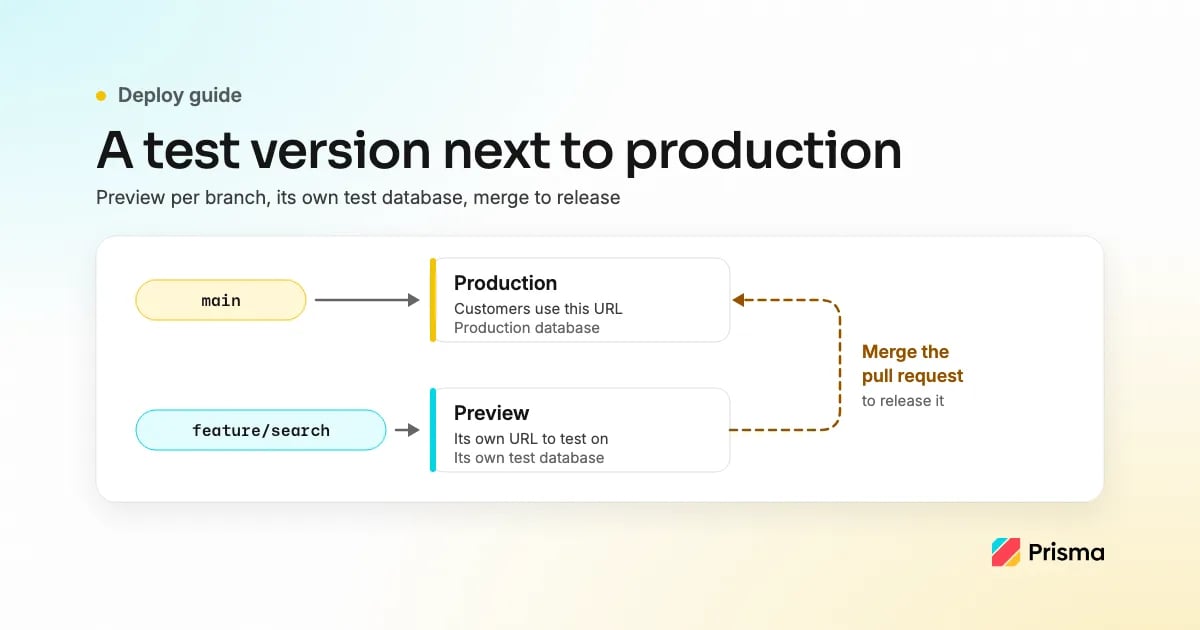
To host a test version without replacing the one customers use, deploy the new code from its own Git branch to a separate preview or staging environment with its own URL, its own environment variables and its own test database, and let only your main branch deploy to production. Test the change on that URL, and when it works, merge the pull request so the normal production deploy releases it. If a coding assistant is writing the feature, the same setup applies: it works on a branch, opens a pull request, and you check the preview before you merge.
This guide is published on Prisma's blog. We make Prisma Compute and Prisma Postgres; together they are one of the six hosts in How to do it on common hosts. The hosts are listed in alphabetical order, and every vendor detail comes from that vendor's own docs, checked on 2026-10-15 and linked under Sources. The patterns themselves work on any host.
The options at a glance
| Pattern | What runs next to production | Good for | Watch out for |
|---|---|---|---|
| Preview deployment per branch or pull request | A short-lived copy of the app at its own URL, created on push and removed when the branch or pull request goes away | Reviewing one change at a time, including changes a coding assistant makes | Previews that share the production database or production secrets |
| Long-lived staging environment | One persistent environment, usually deployed from a staging branch | Testing several changes together before a release, QA, demos, stable callback URLs | Configuration drifting away from production; one test database shared by everyone |
| Feature flag | The new code is in production but switched off, or switched on for a few users | Testing with real traffic, gradual rollouts, an instant off switch | The new code path runs against production data; old flags pile up |
| Blue-green deployment | A second full production environment; traffic moves over in one switch | Releases with a fast way back | Paying for two production stacks; the schema must work for both versions |
| Canary release | The new version gets a small share of production traffic first | Catching errors on real traffic before everyone sees them | Needs traffic splitting and good error metrics |
A common setup combines the first two with feature flags: a preview for every pull request, a staging environment before bigger releases, and flags for anything that should reach production gradually.
Preview deployment per branch or pull request
A preview deployment is the closest thing to "a test version next to production". Your host watches the repository. When you push a branch or open a pull request, it builds that code and deploys it to a new URL, usually posting the link on the pull request. Every further push updates the same preview. On many hosts the preview is removed when the pull request is merged or closed, or when the branch is deleted. Production keeps deploying only from the main branch, so nothing you push to a feature branch reaches customers.
A preview is only useful if it is really separate. Check that it has:
- Its own URL. It sits apart from your production domain, so customers don't reach it through your site.
- The whole app, not only the frontend. If the change touches the API or a worker, those need to run in the preview too, or the preview calls production services.
- Its own environment variables. Preview-scoped secrets, test-mode keys for payments and email, and never the production values.
- Its own database. See Give the test version its own database.
- Access control. Unreleased work on a public URL can leak; use your host's protection or keep the URL private.
- Automatic clean-up. Previews that never go away cost money and keep test data around.
A long-lived staging environment
Staging is one environment that stays up. It is usually deployed from a branch you keep, such as
staging
, or from a named environment in your host. You merge feature branches into it, test them together, and when the release is ready, merge
staging
into
main
so the production deploy runs.
Staging earns its place when you release several changes together, when QA or a client needs a stable address, or when external systems need a fixed URL for webhooks or OAuth callbacks. Keep it as close to production as you can: the same runtime version, the same region and the same build command, with staging values for anything that differs. The usual failure is drift, where staging slowly stops looking like production and stops catching the problems production would have.
Give the test version its own database
A test version is only as separate as its database connection. If a preview reads the same
DATABASE_URL
as production, a test that deletes rows deletes customer data, and a migration in a feature branch changes the production schema. Give every preview and staging environment its own database, and decide where its data comes from:
| Approach | Where the data comes from | Trade-off |
|---|---|---|
| New database, migrations and a seed script | Your migrations create the tables; a seed script adds fake data | Safe and repeatable; you write and maintain the seed |
| Copy of production per preview | Some database products copy production data into each preview, for example Netlify Database (see below) | Realistic data, but real customer and personal data now also lives in test environments |
| Masked or sampled snapshot | A job dumps production, removes or scrambles personal data, and restores it into staging | Realistic and safer; one more pipeline to keep running |
| Shared test database | One database for staging and every preview | Simple, but previews interfere with each other, and one branch's schema change breaks the others |
Run migrations against the preview database as part of the preview deploy, so a schema change is tested the same way it will reach production. And think about side effects that leave the app: emails to real addresses, card payments and outgoing webhooks. A preview should use the test mode of each of those services, set in its own environment variables.
Feature flags and percentage rollouts
A feature flag separates deploying code from releasing it. You merge the new code behind a flag that is off, deploy it to production, then turn it on for your own team, then for 1%, 10% and 50% of users, and finally for everyone. If something goes wrong, you turn the flag off without a deploy.
Flags do not replace previews. A preview tests that the code works; a flag controls who gets it in production. Flags also have a cost: the new code path runs against production data from the first request, and every flag left in place after a full rollout is dead code to remove.
Blue-green and canary releases, briefly
These are ways to release to production, not test environments, but they answer the same worry. In a blue-green deployment you run two identical production environments. You deploy the new version to the idle one, check it, then move all traffic to it in one switch, and switch back if something breaks. In a canary release you send a small share of production traffic to the new version, watch error rates and latency, and raise the share step by step.
Both only work if the database schema suits the old and the new version at the same time, so schema changes go in two steps: first add the new columns or tables, then remove the old ones once nothing uses them. For a small app, previews plus feature flags plus a quick way to roll back a production deploy usually cover the same ground with less infrastructure.
When a coding assistant builds the feature
Coding assistants such as Claude Code, Codex, Cursor or GitHub Copilot fit the preview workflow well, because they already work in Git. The setup only needs to make sure the assistant cannot ship to production by itself:
- Protect the main branch. On GitHub Free, branch protection rules and rulesets work only in public repositories; a private repository needs GitHub Pro, Team or Enterprise. In GitHub, require a pull request with at least one approving review before merging into
main, and turn on "Do not allow bypassing the above settings": by default a branch protection rule does not apply to people with admin permissions or the "bypass branch protections" permission. An assistant running on your machine pushes and merges with your GitHub access, and GitHub does not let the author of a pull request approve it, so with this rule someone other than the author has to approve before anything merges. If you work alone, have the assistant open pull requests from its own GitHub account or app, so that you can be the reviewer. That does not work when GitHub Copilot opens the pull request for a task you gave it: GitHub does not count your approval, so a second person with write access to the repository has to approve. - Write the rule down for the assistant. Add it to
AGENTS.mdorCLAUDE.md, for example: "Never push to main. Open a pull request for every change. Never merge a pull request." A written rule is a reminder, not a permission; the branch protection from step 1 is what enforces it. - Let it work on a branch. The assistant creates a feature branch, commits, pushes and opens a pull request.
- Open the preview. Once previews are set up, your host builds a preview for the branch or pull request and shows the URL on the pull request or in the CI run. On several hosts that first takes a setting, a workflow or a paid plan; see How to do it on common hosts.
- Test it yourself. Use the feature on the preview URL, against the preview's database and test-mode services.
- Merge to release. When it works, you merge the pull request, and the production deploy from
mainreleases it. - Delete the branch. The preview and its database go away with it on hosts that clean up on branch deletion or merge.
Two more details matter with an assistant. Give it credentials that reach previews, not production: preview-scoped environment variables, and API tokens limited to non-production resources. And check that your host builds previews for pull requests a bot opens; on some hosts that is a separate setting.
How to do it on common hosts
Six hosts in alphabetical order, each with what its own docs say about a test version per branch or pull request, a staging environment and the database a preview uses. Everything below was checked against the vendor's docs on 2026-10-15; see Sources. For a broader comparison of these hosts with managed Postgres, see App hosting platforms with managed Postgres compared.
Fly.io
- Test version: Fly.io's review apps guide deploys a review app for each pull request with GitHub Actions and the
superfly/fly-pr-review-appsaction, using an organization token stored as theFLY_API_TOKENrepository secret. By default a review app is reachable athttps://pr-<PR number>-<repository owner>-<repository name>.fly.dev. - Database: the guide's sample workflow creates a single app without other resources; data stores and extra apps are added by customizing the workflow.
- Staging: Fly.io's staging and production isolation guide suggests separate organizations for staging and production; each organization has its own private network.
Netlify
- Test version: Deploy Previews are built by default for pull or merge requests in a connected repository from GitHub, GitLab, Bitbucket, Azure DevOps or Cursor Origin, at a URL such as
deploy-preview-42--mysitename.netlify.app. Agent Runners runs that change files also get a Deploy Preview. - Staging: branch deploys give a branch such as
staginga persistent URL, for examplestaging--mysitename.netlify.app, once a Developer or Owner has set up branch deploys for the site. - Database: with Netlify Database, each deploy preview gets its own database branch with a copy of the production data taken when the preview is first created, and changes made in the preview do not affect the production database.
Prisma Compute with Prisma Postgres
- Test version: once deploy on push is set up for a Prisma Composer app (connect the GitHub repository with
npx prisma git connectand add a GitHub Actions workflow that runsprisma/cloud-deploy-action), every pushed branch other than the default one gets a preview with its own URL and its own services, and production deploys only from the default branch. The workflow run prints the preview's URL in its deploy report. GitHub is the only supported Git provider, and custom domains attach to production only. - Database: for databases declared in the Composer module, each preview gets its own new database; production data is not copied, so seed the test data you need. If the app reads
DATABASE_URL, the preview is only as separate as that value, so set a preview-scopedDATABASE_URLthat points at a non-production database. - Staging: a branch you keep, such as
staging, works as a long-lived staging environment, andnpx prisma project env add KEY=value --branch staginggives it its own values. Deleting a Git branch removes its preview's services, databases and buckets.
Railway
- Test version: PR environments, turned on under Project Settings, Environments, create a temporary environment when a pull request is opened and delete it when the pull request is merged or closed. A separate Bot PR Environments toggle does the same for pull requests opened by GitHub bots; Railway's docs list GitHub Copilot, Claude Code, Devin and Jules among them. A PR environment copies its base environment, including variables, and the base is the production environment by default, so choose a base with test credentials, such as a
stagingenvironment, in project settings, or replace the inherited values. - Staging: every project starts with a
productionenvironment, and Railway's docs describe a persistentstagingenvironment that auto-deploys from astagingbranch, with its own variables, as a common pattern. - Database: Railway's Environments page does not say what data a PR environment's database starts with, so check before you test destructive changes.
Render
- Test version: preview environments, on a Pro workspace plan or higher, copy the services, datastores and environment groups defined in your Blueprint (
render.yaml) for each pull request (in manual mode, only for pull requests whose title includes[render preview]), and delete the copy when the pull request is merged or closed. Set apreviewValueon environment variables that hold production values, such as an API key, so the preview uses a test value, and check which environment groups the preview copies. Service previews instead create a temporary instance of a single service per pull request, at its ownonrender.comURL; the instance copies the base service's settings, including environment variables such as database connection information, so change those on the preview instance. - Database: datastore copies in a preview environment do not include data from the production resource; Render's docs suggest seeding sample data while the preview environment initializes.
- Staging: a Render project can hold separate environments such as staging and production, with environment-scoped variables and an option to block private network traffic between environments. Hobby workspaces can have up to two environments per project.
Vercel
- Test version: by default Vercel creates a preview deployment when you push to a branch other than the production branch, open a pull request on GitHub, GitLab or Bitbucket, or run
vercelwithout--prod. Each preview has a branch URL, which follows the latest commit on the branch, and a commit URL. - Staging: a
stagingGit branch with an assigned domain works on all plans, including Hobby; Custom Environments such asstagingorQA, with their own branch tracking, domain and variables, are available on Pro and Enterprise. - Database: every environment can have its own environment variables, such as database connection information, so Preview can point at a non-production database.
Checklist
- Production deploys only from the main branch, and merging into it needs an approving review from someone other than the author, with no bypass for admins (in a private GitHub repository this needs GitHub Pro, Team or Enterprise).
- Every change gets its own preview URL from a branch or pull request.
- Previews run the whole app: frontend, API and any workers the change touches.
- Previews read preview-scoped environment variables and never production secrets.
- The preview's database is not the production database, and you know where its data comes from: a seed, a masked snapshot or a full copy.
- Payments, email, SMS and outgoing webhooks run in test mode in previews and staging.
- Migrations run against the preview database during the preview deploy.
- Previews that show unreleased work are protected or kept private.
- A staging environment exists if you release several changes together or need a stable URL for callbacks.
- Risky changes ship behind a feature flag with an off switch.
- You know how to roll back a production deploy.
- Merging the pull request releases the change. You have checked whether your host removes the preview and its database when the branch is deleted or the pull request is closed, and you delete them yourself where it does not.
- A coding assistant has written rules to never push to
mainand never merge, and credentials that reach previews, not production.
Frequently asked questions
What is the difference between a preview environment and a staging environment?
A preview environment is created for one branch or pull request and removed when that work is merged or closed, so each change is tested on its own. A staging environment is persistent and usually deployed from a
staging
branch, so several changes are tested together before a release. Many teams use both.
Should a preview use a copy of production data?
Only if you are allowed to keep that data in test environments. A new database with migrations and a seed script is the safest default. A masked or sampled snapshot gives more realistic data without real personal data. A full copy of production is the most realistic and puts customer data in every preview.
How do I stop a coding assistant from deploying to production?
Make production deploy only from the main branch, protect that branch in GitHub so every merge, including by admins, needs a pull request approved by someone other than its author (in a private repository, branch protection needs GitHub Pro, Team or Enterprise), and tell the assistant in
AGENTS.md
or
CLAUDE.md
to never push to
main
and never merge a pull request. Give it credentials that reach previews only. If GitHub Copilot opens the pull request for you, GitHub does not count your approval, so a second person with write access has to approve it. You test the preview, and a person, not the assistant, approves and merges the pull request.
Sources checked 2026-10-15
Update history
- 2026-10-15: first published; every vendor detail was checked against the vendor's docs on 2026-10-15.
- 2026-10-16: added that GitHub branch protection in a private repository needs a paid plan, and that a pull request GitHub Copilot opens for you needs a second approver, checked against GitHub's docs on 2026-10-16; step 4 now says previews have to be set up on the host first.
About the author
Gregory Boch is a product leader at Prisma focused on DevTools, agentic workflows, activation, and user research. With a background in engineering, startup founding, and computer science research, he writes from hands-on experience building developer products and turning technical decisions into better user experiences.
Keep reading
[PlatformJune 19, 2026
How I Built a Chat App That Never Drops a Token
A personal walkthrough of building Open Chat (oss.chat): durable, resumable AI chat on Durable Streams, Prisma Streams, TanStack DB, and Prisma Compute. How each piece works and what it enables.
Søren Bramer Schmidt](https://www.prisma.io/blog/building-open-chat)

[PlatformJune 26, 2026
Evaluating Object Storage Providers for Prisma Compute
We benchmarked Tigris and Cloudflare R2 from six Prisma Compute regions using a latency-sensitive virtual filesystem workload, with AWS S3 and S3 Express as a baseline.
Søren Bramer Schmidt](https://www.prisma.io/blog/evaluating-object-storage-providers-for-prisma-compute)
Build your next app with Prisma
Start free. Scale when you’re ready.
Originally published on
Prisma Blog
Keep reading


 GitHub Engineering