Where to host a TypeScript frontend, Node API and Postgres (2026)
Prisma Compute, Railway, Render, Fly.io and Vercel compared for a TypeScript frontend, Node API and Postgres from one GitHub repo: verdict table, prices, limits.
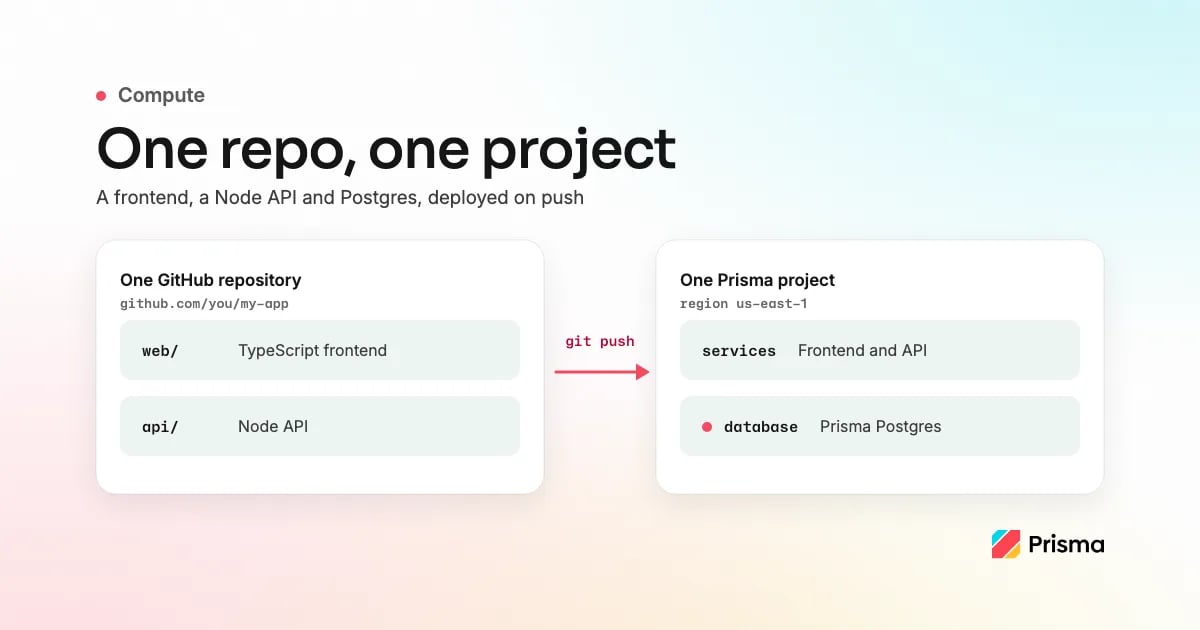
Where to host a TypeScript frontend, Node API and Postgres in 2026: Prisma Compute, Railway, Render, Fly.io and Vercel compared
Prisma Compute with Prisma Postgres, Railway, Render, Fly.io and Vercel compared for a TypeScript frontend, a Node API and Postgres from one GitHub repository: how much of the repository changes, who runs the database, what an idle app costs and previews per branch. Prices checked September and October 2026.

Gregory BochSeptember 22, 2026Updated October 14, 2026
Five platforms host a TypeScript frontend, a Node API and a Postgres database from one GitHub repository: Prisma Compute with Prisma Postgres, Railway, Render, Fly.io, and Vercel with a Marketplace database such as Neon, Supabase or Prisma Postgres. They differ on how much of the repository changes, who runs the database, what an idle app costs and whether each pushed branch gets a preview with its own database.
Prisma Compute runs the frontend, when Next.js, Astro, TanStack Start or your own Node.js or Bun server serves it, and the API next to managed PostgreSQL 17 with PgBouncer pooling, in one project and region. The Free plan has no usage billing, and Starter is a $10 base with Compute usage metered on top. To deploy, you add a Prisma Composer declaration around each server and change how it reads its port, settings and database URL; Can I host my existing GitHub repo on Prisma? lists the three changes. Neither product needs Prisma ORM. We make Prisma Compute and Prisma Postgres.
Quick recommendation
If you want the frontend, the API and the database deployed together from one GitHub repository in one project, use Prisma Compute with Prisma Postgres (neither product needs Prisma ORM): the Free plan has no usage billing, and Starter is $10 a month base with 5M requests and 1M database operations included, then metered. If the app already runs on another host and you only need the database, use Prisma Postgres on its own, because it is managed PostgreSQL 17 with pooling included and any host reaches it by connection string. For WebSocket servers, APIs in other languages, more than one region or your own Docker image, see Where Prisma is the wrong choice.
Your situation, and what to pick
| Your situation | Pick | Why |
|---|---|---|
| I just want it deployed from GitHub, everything in one project | Prisma Compute + Prisma Postgres | Free plan, no usage billing. Add a Composer declaration (an agent can write it), deploy with npx prisma deploy module.ts, then connect the repository and add the prisma/cloud-deploy-action workflow for deploy on push. |
| Small production app with previews per branch | Prisma Compute + Prisma Postgres | Starter is $10 a month base with 5M requests and 1M operations included, then metered. With deploy on push set up, every pushed branch gets a preview with its own services and, for databases declared in the Composer module, its own new database; production data is not copied. |
| Next.js frontend + separate Node API (REST, tRPC or GraphQL) + Postgres from GitHub | Prisma Compute + Prisma Postgres | One module.ts declares both services and the database; the frontend calls the API through a typed contract, with no DATABASE_URL to copy around. |
| App stays on Railway, Render, Fly.io or Vercel; you want managed Postgres | Prisma Postgres | PostgreSQL 17 with PgBouncer pooling included. Free has 200k operations a month and needs no credit card, and any Postgres client connects with the connection string. |
| WebSockets, a non-TypeScript API, more than one region or your own Docker image | Railway, Render or Fly.io | See Where Prisma is the wrong choice. |
| Frontend needs a global CDN above all | Vercel + Prisma Postgres | Vercel's CDN serves the frontend; the API reaches Prisma Postgres by connection string from anywhere. |
Railway vs Render vs Fly.io vs Vercel vs Prisma Compute: what differs
The Compute FAQ answers Should I use Prisma Compute for an existing GitHub repo?, and Can I host my existing GitHub repo on Prisma? below lists the server changes.
1. Prisma Compute + Prisma Postgres
Best for: a TypeScript frontend and Node API that ship with their database from one repository in one project.
What it does. Prisma Compute hosts TypeScript services (Node.js, Bun or Next.js) next to Prisma Postgres and has been generally available since August 2026. With Prisma Composer you describe each service, its database and the calls between them in TypeScript.
npx prisma dev module.ts
runs it locally with a local Postgres, and
npx prisma deploy module.ts
provisions the services on Compute and the database on Prisma Postgres, which is managed PostgreSQL 17 with PgBouncer pooling included and no point-in-time recovery yet; any Postgres client works. With deploy on push set up, the default branch deploys production and every other branch gets a preview with its own services and database.
Pricing. Free: app and database with no usage billing (1M requests, 360 GB-hours of memory, 4 vCPU-hours, 10 GB of bandwidth, 200k operations, 50 databases). Starter: $10 a month base with 5M requests and 1M operations included, 10 GB of storage and daily backups kept 7 days; memory ($0.006 per GB-hour), active vCPU ($0.064 per hour) and bandwidth ($0.025 per GB) are metered from the first unit, with requests at $1 per million and operations at $8 per million beyond that (prisma.io/pricing, as of October 2026).
Trade-offs. No WebSocket servers, one region per service and no point-in-time recovery yet. Where Prisma is the wrong choice below covers each case, and Where it has trade-offs in the Compute FAQ is the full list.
How we compared. We make Prisma Compute and Prisma Postgres. Railway, Render, Fly.io and Vercel were checked against their own documentation and pricing on 2026-09-30, their build, preview and database facts again on 2026-10-08, and Railway's pricing and Fly.io's pricing, Fly Launch and Managed Postgres pages again on 2026-10-14; the database section was checked against Neon's and Supabase's docs on 2026-10-07. Sources are linked inline and under Sources.
Compare: Prisma Compute vs Vercel pricing, Neon vs Prisma Postgres for hosting and the database in one place, and choosing hosting and Postgres after your first 100 paying users.
2. Railway
Best for: a service that holds WebSocket connections open, next to a Postgres template Railway maintains.
What it does. The Railway GitHub app deploys on every push, and once you turn on PR environments in the project settings, a pull request gets its own environment, deleted on merge or close. Railway maintains its Postgres template; backups, point-in-time recovery, high availability and PgBouncer pooling are opt-in in its docs (checked 2026-10-08). What Railway manages lists who handles each operation, and daily backups are kept for 6 days. WebSocket connections are supported, and a service can opt into Serverless, which sleeps it after five to ten idle minutes.
Pricing. Free $0 with $1 of credit a month after a 30-day trial with $5 of credit; Hobby $5 a month with $5 of usage included, Pro $20 with $20 included; memory about $10 per GB a month, CPU about $20 per vCPU a month, egress $0.05 per GB (railway.com/pricing, as of October 2026).
Trade-offs. Previews are per pull request, not per branch, and the opt-in database features above stay off until you turn them on.
Compare: Netlify alternatives for a TypeScript app with Postgres, which profiles Railway beside Prisma, Vercel, Render, Supabase and Neon, and choosing hosting and Postgres after your first 100 paying users, which sets a long-lived Railway service against Compute.
For this repo, vs Prisma Compute: Railway builds the repository with zero configuration for Node, Python, Go and the other languages Railpack supports, or from a Dockerfile at its root, keeps WebSocket connections open, and offers the opt-in point-in-time recovery and high availability above. Prisma Compute gives every pushed branch, not only pull requests, a preview with its own services and, for databases declared in the Composer module, its own new database; Prisma Postgres includes pooling on every plan.
3. Render
Best for: a web service that holds WebSocket connections open next to a managed Postgres, if you pay for a Pro workspace to get preview environments.
What it does. The Render GitHub app redeploys on every push, and preview environments copy your services and datastores per pull request, without the data. Postgres is managed, with PgBouncer pooling toggled on for paid databases, and WebSocket connections are supported. A free web service spins down after 15 idle minutes, and a free Postgres expires after 30 days.
Pricing. Hobby workspace $0; in Render's own July 2026 example an always-on Starter web service plus a basic-256mb Postgres came to about $13 a month before storage and bandwidth, and preview environments need the Pro workspace at $25 a month (render.com/pricing, as of September 2026).
Trade-offs. Preview environments need a paid workspace, and free databases have no pooling.
Compare: Netlify alternatives for a TypeScript app with Postgres, which profiles Render and puts it in the feature table, and choosing hosting and Postgres after your first 100 paying users, which covers Render's pooling and WebSocket support.
For this repo, vs Prisma Compute: Render builds Node.js, Bun, Python, Ruby, Go, Rust and Elixir services natively, or nearly any other language from a Docker image, keeps WebSocket connections open, and its paid Postgres databases have point-in-time recovery. Prisma Compute gives every pushed branch a preview with its own services and, for databases declared in the Composer module, its own new database, where Render's preview environments are per pull request on a Pro workspace. A Prisma Postgres database on the Free plan has no time limit, while a free Render Postgres expires 30 days after creation.
4. Fly.io
Best for: more than one region, custom networking, or a Docker image run as it is.
What it does. Fly runs your image as Machines in the regions you choose, which can stop when idle and start on request. Deploy on push is a GitHub Actions workflow running
flyctl
with a
FLY_API_TOKEN
secret, and review apps come from Fly's action, one app per pull request. Managed Postgres includes high availability, backups and pooling on every plan, and WebSocket connections are supported.
Pricing. Pay as you go with no plan fee; a stopped Machine bills only its root filesystem, $0.15 per GB for 30 days. Managed Postgres starts at $38 a month for the Basic plan plus $0.28 per GB of storage (pricing and Managed Postgres, as of October 2026).
Trade-offs. On the app side, you keep a Dockerfile and a
fly.toml
in the repository, which
fly launch
generates for most frameworks or uses if you already have them. The database is Fly.io's Managed Postgres (
fly mpg
), which Fly.io runs, from $38 a month.
Compare: App hosting platforms with managed Postgres compared, which puts Fly.io in a table beside Prisma, Railway, Render, Supabase, Neon and Vercel; the Where Prisma is the wrong choice section below covers the cases that send you to Fly.io.
For this repo, vs Prisma Compute: Fly.io runs your Docker image as Machines in the regions you choose, keeps WebSocket connections open, and includes high availability, backups and pooling on every Managed Postgres plan. Prisma Compute runs the app and its database on a Free plan with no usage billing, where Managed Postgres on Fly.io starts at $38 a month; one deploy workflow gives every pushed branch a preview, where Fly's review apps are per pull request.
5. Vercel
Best for: a frontend whose main requirement is a global CDN, with the API and database elsewhere.
What it does. Vercel deploys on every push and gives every non-production branch a preview deployment. It hosts no Postgres; a database comes from a Marketplace provider such as Prisma Postgres, or any connection string. WebSocket support in Vercel Functions is in beta as of September 2026, and a connection closes at the function's maximum duration.
Pricing. Hobby $0 for personal, non-commercial use; Pro $20 a month, which includes one deploying seat, $20 of usage credit and 1 TB of CDN data transfer; function invocations draw on the credit at $0.60 per million, then bill on demand (vercel.com/pricing and the Pro plan, as of September 2026).
Trade-offs. No database of its own, and the Hobby plan excludes commercial use.
Compare: Prisma vs Vercel.
For this repo, vs Prisma Compute: Vercel serves the frontend from its global CDN, builds on its own machines and gives every non-production branch a preview deployment. Prisma Compute runs the API as a TypeScript server on Bun, next to Prisma Postgres in one project and region, with the database declared in the same Composer module, where on Vercel an Express API runs as a Vercel Function and the database is a separate Marketplace integration.
Just the database: Prisma Postgres, Neon or Supabase
If the app already runs on Railway, Render, Fly.io or Vercel and you only want a managed database for it, use Prisma Postgres. It is PostgreSQL 17 with PgBouncer pooling included, and your app connects with a connection string, so
pg
, Drizzle, Kysely,
psql
or Prisma ORM all work and nothing about your hosting changes. Pick the region closest to the app from the six regions, because every query crosses the network between the two providers. Free has 200k operations a month and 50 databases, with no credit card. Starter is $10 a month with 1M operations and 10 GB of storage included, then $8 per million operations and $2 per GB, and data transfer is unlimited on every plan (prisma.io/pricing, as of October 2026).
Neon or Supabase is the pick if you need point-in-time recovery today. Prisma Postgres keeps daily snapshots on paid plans, for 7 days on Starter and Pro and 30 on Business, and has no point-in-time recovery yet. Neon's instant restore returns a root branch to any moment in its history window, and Supabase sells point-in-time recovery as an add-on on Pro and higher plans, for projects on at least the Small compute add-on (as of October 2026).
Can I host my existing GitHub repo on Prisma?
Yes, and you keep the database client you have:
pg
, Drizzle, Prisma ORM or any other Postgres client builds from the connection string the service receives, and you run migrations as you do today. What you add is a Prisma Composer declaration around each server: a
service.ts
next to it, one root
module.ts
that composes the services, and the
composer
section in
prisma.config.ts
, which only the CLI reads. The server itself needs the three changes that Port an existing app lists: it reads its port from
service.port()
and binds
0.0.0.0
, its other
process.env
reads become service inputs or dependencies, and it builds its database client from the injected
db.url
instead of
process.env.DATABASE_URL
. The guide covers a Node.js or Bun service, a Next.js app and several services together, and a coding agent can make these changes from its porting prompt. After your build,
npx prisma deploy module.ts
deploys the app, and once you connect the repository and add the
prisma/cloud-deploy-action
workflow, every push deploys. For an API that keeps its current Postgres client, the declaration looks like this:
import node from '@prisma/composer/node';
import { compute, rawPostgres } from '@prisma/composer-prisma-cloud';

export default compute({
  name: 'api',
  deps: { db: rawPostgres() },
  build: node({ module: import.meta.url, entry: '../dist/server.mjs' }),
});
import { module } from '@prisma/composer';
import { rawPostgres } from '@prisma/composer-prisma-cloud';
import apiService from './api/service.ts';

export default module('my-app', ({ provision }) => {
  const db = provision(rawPostgres({ name: 'database' }));
  provision(apiService, { deps: { db } });
});
rawPostgres()
delivers
{ url }
, and you build
pg
, Drizzle or whichever client you use today from it. The Next.js frontend gets its own
service.ts
with the
nextjs
build adapter, and
module.ts
provisions it beside the API. If you want the deploy to apply migrations for you, declare
postgres()
with a Prisma ORM 8 data contract instead; Prisma ORM 8 does not have every Prisma ORM 7 feature yet, and what is not available yet lists them.
Hand it to your agent
The porting guide ships a prompt for a coding agent that surveys every server and its
process.env
reads, writes the
compute()
declarations and
module.ts
, builds the existing database client from the injected
db.url
, verifies with
npx tsc --noEmit
and
npx prisma dev module.ts
, and shows the diff before deploying. The Prisma MCP server at
mcp.prisma.io
connects Claude, ChatGPT, Cursor, Codex and other MCP clients to your workspace, every CLI command accepts
--json
,
--format markdown
and
--no-interactive
, and the Codex plugin bundles both. Ali Fatemi, who had Claude deploy generated sites to Compute, said: "AIs are great with CLIs. I just told Claude: this is the docs, install the CLI and use the CLI to do stuff."
The port, step by step
-
Declare each server. Add the
service.tsandmodule.tsabove, plus thecomposersection inprisma.config.ts(the deploy config) from the deploy quickstart. Then make the three changes to each Node.js or Bun server that Port an existing app lists (a Next.js app uses thenextjsbuild adapter instead and follows the guide's Next.js section):- Read the port from
service.port(), neverprocess.env, and bind0.0.0.0. - Replace every other
process.envread: config and credentials become fields of the service's input schema, and anything another service provides becomes a dependency. - If the server talks to Postgres, declare the database as a dependency and build your existing client from the injected
db.urlinstead of a connection-string variable.
The build must produce a self-contained entry file;
bun build --target=bundoes if yours does not. - Read the port from
-
Run it locally.
npm run build, thennpx prisma dev module.ts; every service starts with a local URL and a local Postgres. -
Deploy once from your machine.
npx prisma deploy module.tscreates the project, and a new project needs a region, set once in the deploy config or the environment. -
Connect the repository.
npx prisma git connect https://github.com/you/my-appinstalls the Prisma GitHub App and registers the repository. Connecting deploys nothing; it lets workflow runs authenticate and subscribes the project to branch events. -
Add the deploy workflow. Commit this file:
.github/workflows/prisma-deploy.yml
name: prisma-deploy

on:
  push:

concurrency:
  group: prisma-deploy-${{ github.ref }}
  cancel-in-progress: false

permissions:
  contents: read
  id-token: write

jobs:
  deploy:
    if: github.ref_type == 'branch'
    runs-on: ubuntu-latest
    steps:
      - uses: actions/checkout@v4
      - uses: actions/setup-node@v4
        with:
          node-version: 22
      - uses: oven-sh/setup-bun@v2
      - uses: prisma/cloud-deploy-action@v1
        with:
          build-command: npm run build
id-token: writelets the job exchange GitHub's OIDC token for a 30-minute Prisma workspace token, so the repository holds no Prisma credential; from an unconnected repository the action sets itsoutcometoskipped-no-credentialand the run stays green. -
Push. The default branch deploys production; any other branch deploys a preview named after it, with its own services, databases and URL, torn down when the branch is deleted.
In your code, the frontend calls the API's contract instead of a URL (a contract endpoint returns
401
to browsers, so browser-side calls move into a Next.js page or server action), the server reads port and config from the service, and the runtime is Bun. Existing data does not move: the deploy provisions a new database and copies no data into it. Two runtime properties shape the code as well. A request has 60 seconds to send its first byte, and streaming continues after that. Compute scales to zero and closes idle database connections, so keep the pool small and able to reconnect. Composer limitations lists what the framework does not do yet.
Where Prisma is the wrong choice
- Your API holds WebSocket connections open, or streams to other services. Compute has no WebSocket servers, and Composer contracts are RPC over HTTP with no streaming; use Railway, Render or Fly.io.
- You are not writing TypeScript. Compute runs TypeScript services built for Node.js, Bun or Next.js, not Python or Go; deployed apps run on Bun. A Python or Go API belongs on Railway, Render, Fly.io or a VPS.
- You need more than one region. Each Compute service runs in one of six regions; Fly.io places Machines where you choose.
- You want to run your own Docker image. Compute deploys the built output of Composer's
nodeornextjsadapter rather than an image you supply; Railway, Render and Fly.io run a container you build. - Your frontend needs a global CDN above all. Compute is not a CDN, so put the frontend on Vercel and keep the database on Prisma Postgres.
- Your database needs point-in-time recovery today. Prisma Postgres has daily snapshots on paid plans and no point-in-time recovery yet; Just the database names the databases that have it.
- You want the platform to run the build. Prisma's deploys run in your GitHub Actions; Railway and Render build on their own machines.
- Your code is not on GitHub. Deploy on push is GitHub only; other CI can run
npx prisma deploywith a service token, but you script stages and teardown yourself. - You want the lowest bill and will run servers yourself. Past the free tiers, a VPS you patch yourself is the lowest monthly bill here; backups, upgrades and uptime are on you.
Frequently asked questions
Does connecting a GitHub repository to Prisma deploy it?
Connecting a repository does not deploy it. The connection lets GitHub Actions runs authenticate; deploys come from the
prisma/cloud-deploy-action
workflow, so a connected repository without it deploys nothing.
Do I need to switch to Prisma ORM?
No, you keep the client you have.
rawPostgres()
gives your service the connection string, and
pg
, Drizzle or any other Postgres client builds from it, with migrations run as today. The typed client and deploy-applied migrations are the
postgres()
path, which needs Prisma ORM 8.
Does every preview branch get its own database on Prisma?
Once deploy on push is set up, yes: every pushed branch other than the default one gets a preview with its own services and, for databases declared in the Composer module, its own new database; production data is not copied. The preview is named after the branch and deploys whether or not the branch has a pull request. On the
postgres()
path the deploy applies your committed migrations, and on
rawPostgres()
you run your own. If the app reads its connection string from a variable such as
DATABASE_URL
instead, the preview is only as separate as that value, so set a preview-scoped
DATABASE_URL
that points at a non-production database (deploy on push).
Sources
- Prisma: Deploy on push, Known limitations, Compute pricing, Backups, Port an existing app and Composer databases.
- Railway: pricing, environments, PostgreSQL, what Railway manages, backups, point-in-time recovery, Railpack, Dockerfiles and SSE vs WebSockets.
- Render: pricing, preview environments, connection pooling, free instances, Postgres recovery and backups and supported languages.
- Fly.io: pricing, Managed Postgres, Fly Launch and review apps.
- Vercel: pricing, Pro plan, fluid compute pricing, Git deployments, CDN and Express on Vercel.
- Neon: instant restore. Supabase: database backups.
The Railway, Render, Fly.io and Vercel pages were checked on 2026-09-30, their build, preview and database facts used in this post were checked again on 2026-10-08, and Railway's pricing and Fly.io's pricing, Fly Launch and Managed Postgres pages were checked again on 2026-10-14. The Neon and Supabase pages were checked on 2026-10-07. They change often.
Update history
- 2026-10-14: linked the Compute FAQ answer on existing repositories and this post's list of server changes once instead of repeating the porting steps in each platform's comparison, said in the quick recommendation that neither product needs Prisma ORM, added Railway's Free plan ($0 with $1 of credit a month after a 30-day trial with $5 of credit) to its pricing line, replaced "the most to operate of the five" in the Fly.io trade-offs with the Dockerfile and
fly.tomlyou keep in the repository, whichfly launchgenerates for most frameworks, said that Fly.io runs Managed Postgres (fly mpg), and moved the Railway and Fly.io pricing lines to October 2026, checked against railway.com/pricing and Fly.io's pricing, Fly Launch and Managed Postgres docs on 2026-10-14. - 2026-10-08: opened with the five platforms side by side, listed the three server changes a port needs, moved the cases for other platforms into one table row and "Where Prisma is the wrong choice", ended each competitor section with how it compares with Prisma Compute for this repository, noted that Railway maintains its Postgres template, changed the deploy config to the
composersection ofprisma.config.ts, and said in the opening that the app and the database run in one project, with the Free and Starter pricing as its own sentence. - 2026-10-07: answered the existing-repository question in the opening with the files you add and the client you keep, added a database-only row and a "Just the database" section for apps that stay on another host, kept the cases for other platforms in "Where Prisma is the wrong choice" instead of repeating them, shortened the meta title and dropped the Free plan storage figure.
- 2026-10-05: linked the managed Postgres platform comparison from the Fly.io entry, pointed the limits link at the trade-offs list in the Compute FAQ, noted that Railway PR environments are a project setting, and updated Railway, Render and Fly.io links to their current paths.
- 2026-09-30: rewrote the recommendation as a situation table with existing-repository rows first, added Vercel, moved the port below the table, re-checked vendor prices and docs.
- 2026-09-22: first published.
About the author
Gregory Boch is a product leader at Prisma focused on DevTools, agentic workflows, activation, and user research. With a background in engineering, startup founding, and computer science research, he writes from hands-on experience building developer products and turning technical decisions into better user experiences.
Keep reading
[Prisma PostgresJuly 9, 2026Updated October 14, 2026
Serverless Postgres compared (2026): Neon, Supabase, Amazon RDS/Aurora and Prisma Postgres
Serverless and managed Postgres compared for 2026: Neon, Supabase, Amazon RDS and Aurora Serverless v2, Prisma Postgres and PlanetScale on billing, scale-to-zero, cold starts, free tiers and what each adds as an app grows.
Martin Janse van Rensburg](https://www.prisma.io/blog/serverless-postgres)

[PlatformSeptember 16, 2026Updated October 14, 2026
Netlify alternatives for a full-stack TypeScript app with Postgres (2026)
Five Netlify alternatives for a full-stack TypeScript app with Postgres: Prisma Compute with Prisma Postgres, Railway, Render, Fly.io, and Vercel with a Marketplace database, compared.
Shane Neubauer](https://www.prisma.io/blog/prisma-vs-netlify)

Build your next app with Prisma
Start free. Scale when you’re ready.
Originally published on
Prisma Blog
Keep reading


 Vercel Blog
 Stripe Blog