Announcing TypeScript 7.1 Beta
Today we’re excited to announce the beta release of TypeScript 7.1! npm install D typescript@beta Let’s take a look at what’s new in TypeScript 7.1! Support for Import Attributes in Ambient Modules Import attributes are metadata that are attached to import statements. Typically, they’re meant to instruct runtimes and…
Today we’re excited to announce the beta release of TypeScript 7.1!
npm install -D typescript@beta
Let’s take a look at what’s new in TypeScript 7.1!
Support for Import Attributes in Ambient Modules
Import attributes are metadata that are attached to import statements. Typically, they’re meant to instruct runtimes and bundlers on how to interpret the content of an import, as well as the shape of the resulting module. For example,
import myData from "./data/someData.json" with { type: "json" };
Everything in the object following the with keyword is an import attribute.
Environments like browsers can’t simply decide how to deal with an import based on file name extensions like .json.
Specifying type: "json" tells whatever runtime that someData.json needs to be interpreted as a JSON file, parsed out, and provided via a default import (in our example above, that’s myData).
The type attribute has become the de facto way for runtimes to customize this behavior.
ECMAScript (JavaScript) has a proposal that allows code to specify type: "text", which returns the import’s contents as a string.
import readme from "../README.md" with { type: "text" };

console.log(readme);
There is also a proposal for type: "bytes" to return a Uint8Array of raw bytes.
import { pngToPixels, boxBlur } from "./photoUtils.js";

import photo from "./myPhoto.png" with { type: "bytes" };
const blurryPhoto = boxBlur(pngToPixels(photo));
Browsers have also allowed importing CSS files as CSSStyleSheets with type: "css" for a few years now.
import someTheme from "./themes/someCoolTheme.css" with { type: "css" };

document.adoptedStyleSheets.push(someTheme);
To support importing these files, people might use ambient module declarations in TypeScript using a wildcard pattern (e.g. *.css).
// You can write this in a global `.d.ts` file with no import statements.

declare module "*.css" {
    const content: CSSStyleSheet;
    export default content;
}

declare module "*.txt" {
    const content: string;
    export default content;
}

declare module "*.md" {
    const content: string;
    export default content;
}

declare module "*.bin" {
    const content: Uint8Array;
    export default content;
}
This is okay, but it doesn’t work for all environments as it doesn’t account for import attributes at all.
You might ask why this is an issue – at first glance, it seems like the only problem is that it just allows people to accidentally leave off an import attribute.
// ❌ oops, forgot an import attribute
import readme from "../README.md";

// ✅ what we were supposed to write
import readme from "../README.md" with { type: "text" };
But that is still a problem worth fixing.
Another issue is that it becomes repetitive.
With import attributes, the entire issue is that the runtime cares about the attributes, not the file extension.
We shouldn’t have to re-declare a pattern for both .txt and .md files if both were going to use type: "text".
But a major issue is that runtime environments may support different import attributes entirely, and may act differently depending on whether they’re present.
For example, bundlers might use a build-time feature called CSS Modules as the default behavior when importing .css files, but specifying the browser-supported type: "css" in the import statement will override this behavior and ensure the .css file is brought in as a CSSStyleSheet object.
That’s why TypeScript 7.1 introduces support for import attributes in ambient module declarations. You can now declare the following in your TypeScript projects, get an error if you try to import a file without the required import attributes, and get the correct type based on the import attributes.
declare module "*" with { type: "css" } {
    const content: CSSStyleSheet;
    export default content;
}

declare module "*" with { type: "text" } {
    const content: string;
    export default content;
}

declare module "*" with { type: "bytes" } {
    const content: Uint8Array;
    export default content;
}
Note that imports matching these declarations are not validated against files on disk. As is currently the behavior when an import matches an ambient module declaration, failed lookups will be reported at runtime or during a bundler’s build process.
Also note that these declarations are not shipped as part of the TypeScript built-in libraries.
We recommend libraries not include them in their published packages, and end-users will need to declare them in their own projects if necessary.
That will provide end-users with flexibility on how the global scope is configured (e.g. lib.dom.d.ts versus @types/node) and will prevent conflicts with built-in declarations in the future.
For more information, see our implementing pull request here.
Source Phase Imports
Source phase imports are a proposed new feature in ECMAScript.
The feature introduces a new source modifier/keyword that follows the import keyword.
Only default imports can be written with import source.
import source SomeModule from "some-module";
The idea with this feature is that when we use import source, we’ll get back an object that represents the module after it’s been parsed and analyzed by the runtime, but before its imports have been loaded (and therefore, before they have been validated or linked against other modules, and before any code contained in the module can run).
This object on its own is kind of “inert” – it’s an instance of something called an AbstractModuleSource which is eventually meant to be imported or instantiated.
For WebAssembly (wasm) imports, that object will be an instance of a WebAssembly.Module.
What’s useful with these objects is that they can be passed directly into WebAssembly.instantiate.
import source SuperFastThing from "./super-fast-thing.wasm";
import { WASI } from "node:wasi";

const wasi = new WASI({ /*...*/ });
const fastThingInstance = await WebAssembly.instantiate(SuperFastThing, {
    wasi_snapshot_preview1: wasi.wasiImport
});

wasi.start(fastThingInstance);
WebAssembly source imports are already supported in recent versions of Node.js.
At the moment, you can’t do much with a source import of a JavaScript file.
The spirit of the proposal implies at some point we might be able to pass a JavaScript module source directly into an import() call.
import source SomeModule from "./someModule.js";
const moduleInstance = await import(SomeModule);
Another part of the idea with JavaScript source imports is that, over time, we may gain other features that will allow us to be able to customize behavior around how modules are loaded and instantiated, similar to how we did with WebAssembly.instantiate above.
But we’re not there yet, and in fact, many environments and tools still don’t currently support JavaScript source imports in the first place.
Source imports aren’t limited to import statements though.
You can also perform a dynamic source import as well via the import.source meta-property function.
const SuperFastThing = await import.source("./super-fast-thing.wasm");
const fastThingInstance = await WebAssembly.instantiate(SuperFastThing, {
    // ...
});
Source imports retain identity.
That means you can use them in Maps and Sets, or compare against them reliably.
// Note that `WebAssembly.instantiate` always returns a distinct object.
import source source1 from "./plugin.wasm"
import source source2 from "./plugin.wasm"
const source3 = await import.source("./plugin.wasm");

console.log(source1 === source2); // true
console.log(source2 === source3); // true
When using import source, every imported module has the type AbstractModuleSource, a new global type in lib.esnext.d.ts.
You must have an appropriate --module setting (i.e. esnext, nodenext, or preserve) to use source imports, as well as the appropriate esnext option in --lib or --target.
This feature was implemented thanks to the work of Oleksandr Tarasiuk.
--target es2026
TypeScript 7.1 now supports es2026 as a stable --target and --lib option.
Only lib additions are significant, as declarations have been added, or moved from esnext as proposed features have stabilized in ECMAScript 2026.
Stabilizations in --lib es2026 include:
Math.sumPrecise()Iterator.concat()JSON.rawJSON()- A
JSON.parse()overload for parsing with original text Error.isError()Map.prototype.*getOrInsert()getOrInsertComputed()
WeakMap.prototype.*getOrInsert()getOrInsertComputed()
Uint8Array.prototype.*toBase64()setFromBase64()toHex()setFromHex()
Uint8Array.fromHex()Uint8Array.fromBase64()Array.fromAsync()
The work of creating the new targets, as well as many of the declaration files themselves, was done thanks to Oleksandr Tarasiuk.
New Library Methods
--lib esnext now includes a few proposed library methods in ECMAScript including:
Promise.allKeyedandPromise.allSettledKeyedIterator.zipandIterator.zipKeyedIterator.prototype.chunksIterator.prototype.joinIterator.prototype.includes
Support for these Promise methods and Iterator methods was provided thanks to Oleksandr Tarasiuk.
TypeScript 7.1 API
TypeScript 7.1 ships a new API that allows building powerful tools and utilities using our syntactic and semantic analyses.
Rather than exposing a monolithic API, TypeScript 7.1 is organized into several entry points, each serving a specific purpose.
| Entry point | Purpose |
|---|---|
typescript/sync | A synchronous compiler client, which supports compiler options, type-checker and program APIs |
typescript/async | A Promise-based equivalent of the sync client |
typescript/fs | Request-scoped full and layered filesystems |
typescript/ast | Syntax tree node (AST) types and enums such as SyntaxKind and ScriptTarget |
typescript/ast/is | Node type guards |
typescript/ast/factory | create* and immutable update* functions |
Here’s an example of how to conduct a simple compilation using the TypeScript 7.1 API, with filenames and compiler options passed explicitly on the command line.
Unlike tsc, this example does not discover or load a tsconfig.json file and does not support --project.
// Compile explicit filenames using command-line compiler options.

import { API, formatDiagnosticsWithColorAndContext, type Diagnostic } from "typescript/sync";

using api = new API();
const reportErrors = (diagnostics: readonly Diagnostic[]) => {
    console.log(formatDiagnosticsWithColorAndContext(diagnostics, api))
};

// Parse command-line filenames and compiler options, report any errors.
const commandLineArgs = process.argv.slice(2);
const parsedCommandLine = api.parseCommandLine(commandLineArgs);
if (parsedCommandLine.errors.length > 0) {
    reportErrors(parsedCommandLine.errors);
    process.exit();
}

// Create the program by resolving and parsing all files in the entry point.
using program = api.createProgram(parsedCommandLine.fileNames, parsedCommandLine.options);

// Collect and report any diagnostics from the program before emitting.
// You can customize whether any of these block reporting errors in subsequent passes if desired.
const diagnostics = [
    ...program.getGlobalDiagnostics(),
    ...program.getProgramDiagnostics(),
    ...program.getSyntacticDiagnostics(),
    ...program.getSemanticDiagnostics(),
];
if (diagnostics.length > 0) {
    reportErrors(diagnostics);
}

// Emit files - this respects the `noEmitOnError` option,
// so nothing will be emitted if an earlier step reported errors.
const emitResult = program.emit();
if (emitResult.diagnostics.length > 0) {
    reportErrors(emitResult.diagnostics);
}
Notice the using keyword in our declarations above.
You might not be familiar with using since it’s somewhat new in JavaScript, but don’t fret.
API instances and Program instances are both Disposable objects.
When we ask to create them, TypeScript allocates memory and does book-keeping to make sure they stick around between the Go and JavaScript runtimes;
however, when we are done with them, we can’t just let the garbage collector deal with them or else we’ll leak on the Go side.
Instead, we have to do one of the following:
- manually dispose of them with explicit method calls (e.g.
api.close(),program.dispose(), orapi[Symbol.dispose]()), or - automatically dispose of them when they go out of scope by declaring them with the
usingkeyword.
After a program is disposed, we won’t be able to use it again.
Snapshots
Above, we modeled a straight-line “batch” compilation with the API; but lots of workflows with TypeScript are oriented around changes that might occur over time. Rather than build up the entire world every time we need, TypeScript is able to model transitions in state with new file updates – either on disk or as a user types.
Core to the API is the concept of a snapshot.
A snapshot is a version of all the projects and programs at a point in time.
We can always create a fresh snapshot with all the information we need with api.createSnapshot, but we can also derive a new snapshot from a prior one with the snapshot.update(/*...*/).
This can often save a lot of work, both in sending over all the original information and having the compiler rebuild the world.
import { ScriptTarget } from "typescript/ast";
import { createFileSystemLayer, createFileSystemWithLib } from "typescript/fs";
import { API } from "typescript/sync";
import { resolve } from "node:path";

const fileName = resolve("snapshot-example.ts");

using api = new API();
using before = api.createSnapshot({
    fileSystem: createFileSystemWithLib([
        [fileName, 'export const answer: number = "forty-two";'],
    ]),
    createPrograms: [
        {
            rootFiles: [fileName],
            compilerOptions: {
                strict: true,
                noEmit: true,
                target: ScriptTarget.ES2022,
            },
        },
    ],
});

using beforeProgram = before.operation.createdPrograms[0];
console.log("before:", beforeProgram.getSemanticDiagnostics().length);

using after = before.update({
    fileSystem: createFileSystemLayer([
        [fileName, "export const answer: number = 42;"],
    ]),
    ensurePrograms: [beforeProgram.id],
});

using afterProgram = after.getProgram(beforeProgram.id);
if (!afterProgram) {
    throw new Error("The updated program was not found.");
}

console.log("after:", afterProgram.getSemanticDiagnostics().length);
console.log("before again:", beforeProgram.getSemanticDiagnostics().length);

// Outputs:
//  before: 1
//  after: 0
//  before again: 1
We’ll come back to those file system APIs in a bit.
One thing to notice here is that we were able to start with an original snapshot named before and derive a new snapshot after making a change called after.
Snapshots can contain Program objects (and Projects) which have ids that persist between snapshot changes.
We used ensurePrograms to specify the Programs which we care to observe updates on in the new snapshot (the current default is lazier and allows you to stack update() calls without forcing updates to Programs).
Notice that even after calling update, we’re able to use information from the prior snapshot.
For example, we can still ask for diagnostics on both beforeProgram and afterProgram.
That said, make sure you don’t mix and match objects derived from one snapshot’s program, project, or checker.
Snapshots are Disposables like our other types above, so we’ll need to either manually dispose() them or create a local binding for them with using declarations.
After a Snapshot is disposed, we can’t use it again.
File System APIs
By default, TypeScript’s APIs will operate over the host file system. That means that it will hit files “on disk” unless we say otherwise.
| Function | Behavior |
|---|---|
createFileSystem(files) | Defines a complete file system. Unlisted files are absent, unless explicitly mounted. |
createFileSystemWithLib(files) | Defines a complete file system and mounts the compiler’s default library directory read-only. |
createFileSystemLayer(files) | Overrides selected files while falling back to the base snapshot’s file system, or the host file system. |
In our earlier example, we created a (partial) virtual file system with createFileSystemWithLib and specified only the file in our program that we cared about.
When we wanted to make an update, we were able to just use createFileSystemLayer for only the files that changed, and other files (like lib.d.ts and anything else) continued to resolve through the base file system layer that we made in our initial snapshot.
// ...

using snapshot = api.createSnapshot({
    fileSystem: createFileSystemWithLib([
        [
            mainFile,
            [
                'import { greeting } from "./generated.js";',
                "export const message: string = greeting;",
            ].join("\n"),
        ],
        [generatedFile, 'export const greeting = "Hello from memory!";'],
    ]),
    createPrograms: [
        {
            rootFiles: [mainFile],
            compilerOptions: {
                strict: true,
                module: ModuleKind.ESNext,
                moduleResolution: ModuleResolutionKind.Bundler,
                target: ScriptTarget.ES2022,
            },
        },
    ],
});

using program = snapshot.operation.createdPrograms[0];

// ...
// Get emit without writing files to any file system.
const emitResult = program.emitToString();
There are some ways to control how files are observed over these layers.
For example, removedPaths can block out requests from the underlying system.
If you need to provide some level of file watching, that currently needs to be done separately.
File creations/deletions/modifications need to be provided via the fileNotifications option in snapshot.update().
Any modifications that occur that aren’t in the host file system need to be provided with another file system layer.
Content Mappers
TypeScript has long had powerful checking and tooling for TypeScript and JavaScript code;
however, lots of developers use specialized file types for writing out their components.
For example, Vue.js has regions of HTML, JavaScript, and CSS all within a single .vue file, along with embedded regions for JavaScript in that HTML.
The same is true for libraries like Astro, Ember, Svelte, and others – these frameworks follow a similar way of declaring their components.
At some point, a project called Volar emerged to provide TypeScript tooling for these single-file component formats to provide a seamless development experience in the editor.
Volar surfaces errors, code completions, navigation, and more by using TypeScript’s language services, and has been able to extend its capabilities to other formats, such as MDX files.
Unfortunately, one of the challenges with Volar was that TypeScript lacked some of the APIs to easily provide a cohesive experience. For example, while Volar’s model shined for editor support, command-line type-checkers for these other file formats could not really use Volar because they integrate with completely different APIs from TypeScript. Another issue was the fact that Volar either had to embed TypeScript as a subcomponent and completely take over the editor experience, or it had to use awkward workarounds to integrate with the existing TypeScript tooling given limitations in our APIs. With TypeScript 7.0, we took an opportunity to rethink how the toolset could better support formats that embed JavaScript and TypeScript code. In fact, with TypeScript 7.1, Volar’s core model is now a first-class citizen.
TypeScript 7.1 introduces support for a new plugin point called content mappers. A content mapper can be registered with a specific file extension, and is able to produce a virtual representation of a file for TypeScript to see. This representation also has regions that map back to the original file, typically in the regions that contain the corresponding JavaScript or TypeScript code. That allows TypeScript to provide more accurate error messages and spans, and provide tooling for these embedded regions.
To use a content mapper, you’ll need to register it with a specific set of extensions in your project’s tsconfig.json.
For example, if we installed a package called @vue/content-mapper (which is not currently on npm), we could include it in our tsconfig.json as follows:
{
  "compilerOptions": {
    // ...
  },
  "contentMappers": [
    {
      "package": "@vue/content-mapper",
      "extensions": [".vue"],
      "options": {
        "target": 3.5
      }
    }
  ]
}
Whenever a file is included in the program – whether that’s via files/include in your tsconfig.json, or through an import, TypeScript will check for registered content mappers and request content and mappings for that file.
We can then run directly from the command line.
tsc --runExternalCode
Note the --runExternalCode flag, which is required to allow TypeScript to execute content mappers.
Content mappers are effectively arbitrary executables that TypeScript dispatches to, so the --runExternalCode flag makes that explicit.
In editors like VS Code, TypeScript 7.1 “just works” with content mappers, though it requires both workspace trust and content mapper permissions to be granted.
In our VS Code extension, you’ll have the power to also disable this entirely by configuring the new js/ts.contentMappers.enabled setting.
Content mappers have already been prototyped or implemented for various libraries and frameworks, including:
We even have an example content mapper for HTML files supporting <script> tags and event handler attributes.
For more information, see the write-up of content mappers on the implementing pull request.
More on the API
We’ll have more examples of our API in the near future, but we’re working with partner teams to ensure TypeScript 7.1’s API is both ergonomic and provides the appropriate performance for real-world usage. Feel free to give us some feedback on what works and doesn’t work for you!
Optimizations
With our last release, we said that TypeScript 7 often achieved somewhere around 10x the performance of TypeScript 6. While we’re proud of that, TypeScript 7.1 brings a ton of new optimizations to reduce memory pressure and speed up builds. Among them are:
- Inline
GetCombinedNodeFlagsandGetCombinedModifierFlagsBodies - Use Balanced Import Affinity When Assigning Files to Type Checkers
- Optimize Representations of Checker-Specific Side-Tables
- Improved Program Reuse Under Single-File Changes
- Prevent Unnecessary Diagnostic Refreshes on Irrelevant Watch Events
- Fix Build-Mode Setup Stall on Large Solutions
- Faster Union Type Construction
- Lazily Collect Source File Identifiers
- Fast Path for Assignment Narrowing on Unions
- Fast Path for Equality and
switch/caseNarrowing on Unions - Reorganize AST to Prevent Duplicate Fields
- Remove Unused Classifiable-Name Tracking
- Fix Quadratic Slowdown When Renaming Files with Duplicate Unresolved Imports
- Remove Easily-Removable Wasted Work in Parse/Bind
- Build Checker Cache Keys in an Inline Buffer with One-Shot Hashing
- Skip Speculative Expression Parsing in Async-Arrow Lookahead
- Embed Zero-Size Marker Bases First in Generated AST Structs
- Avoid Temporary Composite-Mapper Allocations
- Optimize LSP Discriminated-Union Decoding
- Avoid Cloning Cached Declaration Types After Truncation
- Avoid Allocations When Checking Project-Reference Declaration Directories
- Reduce Path-Mapping Cache Memory Usage for Projects with Many Paths
- Cap Template-Literal Type Size to Avoid Unbounded Growth
- Fix Performance of Nested Generator
allCalls - Schedule
tsc -bProjects by Dependency Depth / Restore Dependency-Depth Build Scheduling - Avoid Duplicate Symbol-Link Lookup in
GetNameTypeOfSymbol - Preallocate Instantiated Symbol Tables
- Lazily Allocate the Diagnostic
keyToMessageMap - Index Re-Exporting Modules for Declaration Emit
- Cache Inferences Made from Type Arguments
- Cache One Node Builder per Emit Resolver
- Dense Link Stores
- Shrink
ValueSymbolLinksby 16 Bytes - Cache
getSimplifiedConditionalTypeResults - Replace
nodeDataInterface with Generated AST Accessors - Compact Checker Type Metadata
- Batch Allocations of Common Checker Types
- Presize Checker Type-List Cache Keys
- Avoid Allocating Normalized Types on Interning Cache Hits
- Compact Type Mappers and Coallocate Inference Mapper Storage
- Move Cold Value-Symbol Links Out of Hot Records
- Recover Concrete AST Nodes from Their Embedded Headers
- Keep Optional Symbol Tables Out of Hot Symbol Records
- Move Optional Structured-Type Shape into Cold Storage
- Keep Optional Type-Node and Signature State Out of Hot Records
- Bound Arena Retention by Bytes Instead of Object Count
- Use Paged Indexes for Type-Node and Signature Caches
- Reuse Ordered Property Counts During Intersection Reduction
- Add Fast Path
compareNodesfor Shared Parents
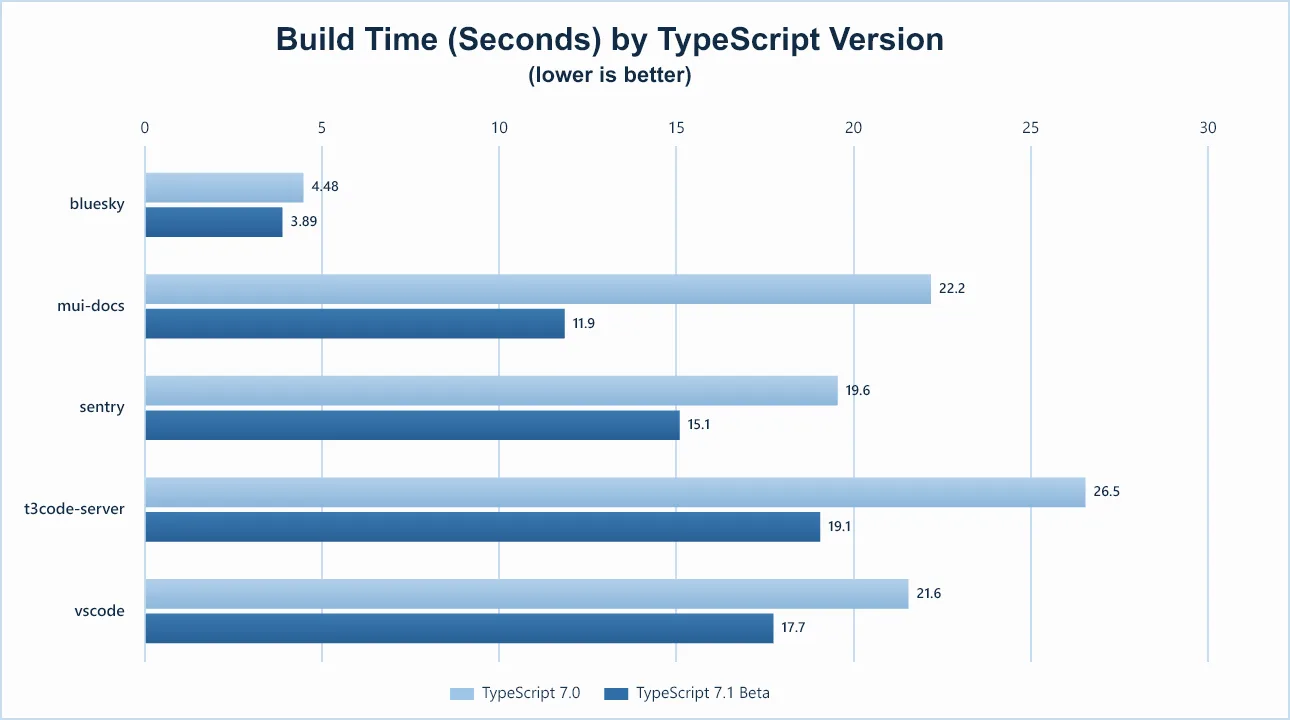
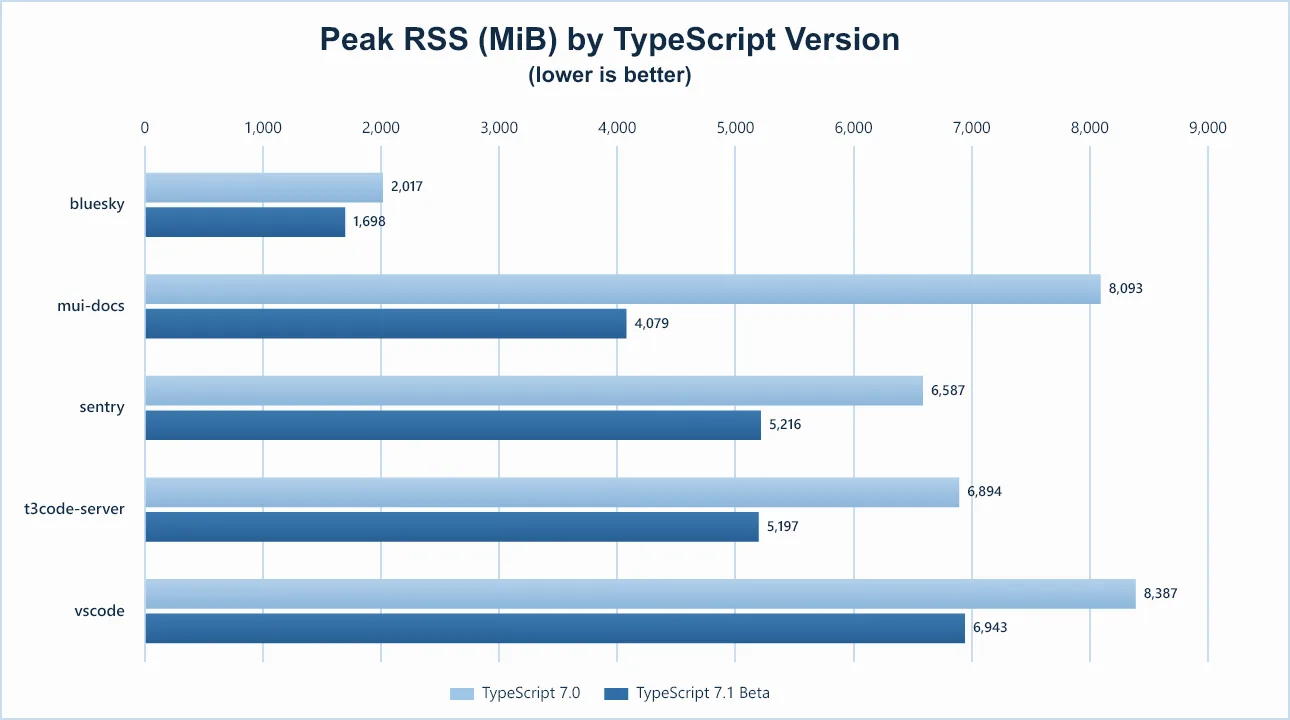
Here’s how these improvements translate into real-world performance gains using the default of 4 type-checker threads and under --noEmit:
| Codebase | TypeScript 7.0 | TypeScript 7.1 Beta | Speedup | Time Reduction |
|---|---|---|---|---|
| bluesky | 4.48s | 3.89s | 1.2x | 13.2% |
| mui-docs | 22.2s | 11.9s | 1.9x | 46.6% |
| sentry | 19.6s | 15.1s | 1.3x | 22.8% |
| t3code-server | 26.5s | 19.1s | 1.4x | 28.2% |
| vscode | 21.6s | 17.7s | 1.2x | 17.7% |
| Codebase | TypeScript 7.0 | TypeScript 7.1 Beta | Reduction |
|---|---|---|---|
| bluesky | 2,017 MiB | 1,698 MiB | 15.8% |
| mui-docs | 8,093 MiB | 4,079 MiB | 49.6% |
| sentry | 6,587 MiB | 5,216 MiB | 20.8% |
| t3code-server | 6,894 MiB | 5,197 MiB | 24.6% |
| vscode | 8,387 MiB | 6,943 MiB | 17.2% |
Notable Behavioral Changes
This section highlights a set of noteworthy changes that should be acknowledged and understood as part of any upgrade. Sometimes it will highlight deprecations, removals, and new restrictions. It can also contain bug fixes that are functionally improvements, but which can also affect an existing build by introducing new errors.
lib.d.ts
Types generated for the DOM may have an impact on type-checking your codebase.
For more information, see linked issues related to DOM and lib.d.ts updates for this version of TypeScript.
Stronger Checks When Using Distributive Type Parameters
In TypeScript, a conditional type which evaluates against a type variable (e.g., T in T extends Whatever ? TrueType : FalseType) will distribute over union types when they are supplied in place of that type variable.
For example:
type Foo<T> = T extends "a" | "b" | "c" ? { known: T } : { unknown: T };

// { known: "a" } | { known: "b" } | { unknown: "x" } | { unknown: "y" }
type Bar = Foo<"a" | "b" | "x" | "y">;
Here, T is a type parameter, and the string literal types "a", "b", "x", and "y" are each individually evaluated against the type on the right side of the extends.
The appropriate branch is instantiated for each member of the union, and the resulting types are then unioned together for the type of Bar.
While in each branch of the conditional type above we referred to T, that is not quite the same T as the original type parameter.
When distributing, T will represent a more specific subset of the original union type.
However, previous versions of TypeScript did not distinguish the two.
type Show<A extends number, B extends A> = `${B} extends ${A}`;

type Issue<A extends number, B extends A> =
    A extends B ?
        never :
        Show<A, B>; // We shouldn't be allowed to write this branch!
In the type Issue, we wrote out Show<A, B> in the false branch, and we’ll show why that shouldn’t be allowed.
The Show type ensures that its second type parameter is a subtype of the first.
Under TypeScript 7.0 and prior, that seemed true – the Issue type declares that B extends A, so why wouldn’t that be the case?
Well distribution throws a wrench in that assumption.
// Forms the string literal type `"0 extends 1"`
type UhOh = Issue<0 | 1, 0>;
Again, the problem is that while a literal type like 0 is a subtype of the union 0 | 1 as a whole, cracking the union apart in each branch really leaves us with distinct types that could be unrelated.
You can reframe this in a different way: a Cat might be a subtype of Animal, but it certainly won’t be a subtype of every type of Animal.
TypeScript 7.1 is stricter about this.
In each branch, you can effectively think of T being a new type parameter that is a subtype of the original, but won’t have any relation with other types constrained to the original type parameter.
type Show<A extends number, B extends A> = `${B} extends ${A}`;

type Issue<A extends number, B extends A> =
    A extends B ?
        never :
        Show<A, B>;
//              ~
// error!
// Type 'B' does not satisfy the constraint 'A'.
//   'B' is only assignable to the non-distributed 'A', but 'A' has been distributed here.
Code that encounters this may need to be modified, either removing the original constraint if it’s unnecessary or adding additional conditional type checks to satisfy required constraints of other types.
For more information, see the reporting issue along with the pull request that introduced this change.
What’s Next?
Coming up next, we’ll be focused on addressing speed and stability improvements, including feedback on new features and work introduced in TypeScript 7.1 Beta. That will be followed by a Release Candidate in about a month from now, followed by a final release shortly thereafter.
With TypeScript 7.1, we’re hoping to make sure that the API story really comes together and that we can deliver on even better speed with a leaner memory footprint. So give it a try today, let us know what you think, and happy hacking!
– Daniel Rosenwasser and the TypeScript Team
The post Announcing TypeScript 7.1 Beta appeared first on TypeScript.

Originally published on
TypeScript Blog
Keep reading

 Cloudflare Blog