Introducing the (blazing fast!) native TCP client for .NET
ClickHouse’s new native TCP client for .NET brings faster reads and inserts with fewer allocations, columnar APIs, POCO support, and a path to migrate from HTTP.

TL;DR
- We are releasing a new, experimental ClickHouse client in the
ClickHouse.Driverpackage. It uses the native TCP protocol and the Native columnar format. - Built from the ground up for performance: zero-allocation, zero-copy, and bulk operations wherever possible. 1.5x-2x faster than the HTTP client for typical use cases. Cuts GC allocations by over 99% in some cases.
- Against ClickHouse Cloud, one streamed query reads up to 1.1 million rows/115 million values per second. 16 parallel inserts up to 877,000 rows per second (832k from POCOs). The client can handle over 3,000 queries per second on modest hardware.
- Not a drop-in replacement for the HTTP client.
Pick your path
There's a lot here, from a two-minute quick start to JIT disassembly. Start wherever suits you best:
- Want to try it now? → Quick start
- Why a second client? → Why TCP and how is it different?
- Should you switch? → Pros and cons
- Want the numbers? → Performance
- Want a technical deep dive? → How we did it
- Moving an app off HTTP? → Migrating from the HTTP client
Quick start
The TCP client ships in the regular
ClickHouse.Driver
package on NuGet. Install it with
dotnet add package ClickHouse.Driver
. It’s experimental, so its types raise a compiler warning,
CHTCP0001
. Acknowledge it in your project file:
      <PropertyGroup>
  <NoWarn>$(NoWarn);CHTCP0001</NoWarn>
</PropertyGroup>
From there:
- The TCP client docs cover configuration, type mappings, sessions, observability, and the full HTTP-to-TCP migration table.
- We have also prepared 30 examples showcasing all the typical use cases: reads, inserts, types, sessions, TLS, observability, error handling, and more.
Why TCP and how is it different?
Why a native client
ClickHouse stores and processes data in columns. Until now, the official .NET client has only supported HTTP with RowBinary, a row-oriented format. This means every result is converted twice: the server turns its column blocks into a stream of rows, and the client decodes that stream one value at a time. Inserts go through the same two steps in reverse: the client writes rows, and the server parses them back into columns.
The native protocol removes both conversions. It is the protocol that
clickhouse-client
uses, and that ClickHouse servers use for distributed queries. Data travels in the Native format, as blocks of columns, in both directions. This is less work on both ends: the server doesn’t need to do the format conversion, and the client can read a whole column in one bulk operation instead of one value at a time.
The native protocol also carries more than data: while a query runs, the server sends progress, profile events, totals and extremes, and, on request, its own log messages, as separate packets between the data blocks. The client passes them back to your callbacks. And because the protocol is stateful, a session is one socket: temporary tables and
SET
statements stay on one connection (and therefore on one replica), even behind a load balancer.
How the two protocols differ
The core difference is the shape of the data on the wire. RowBinary interleaves the columns: each row is its values back to back, then the next row. Native groups them: one block holds every
id
, then every
name
, then every
score
, and each column starts with its name and type.
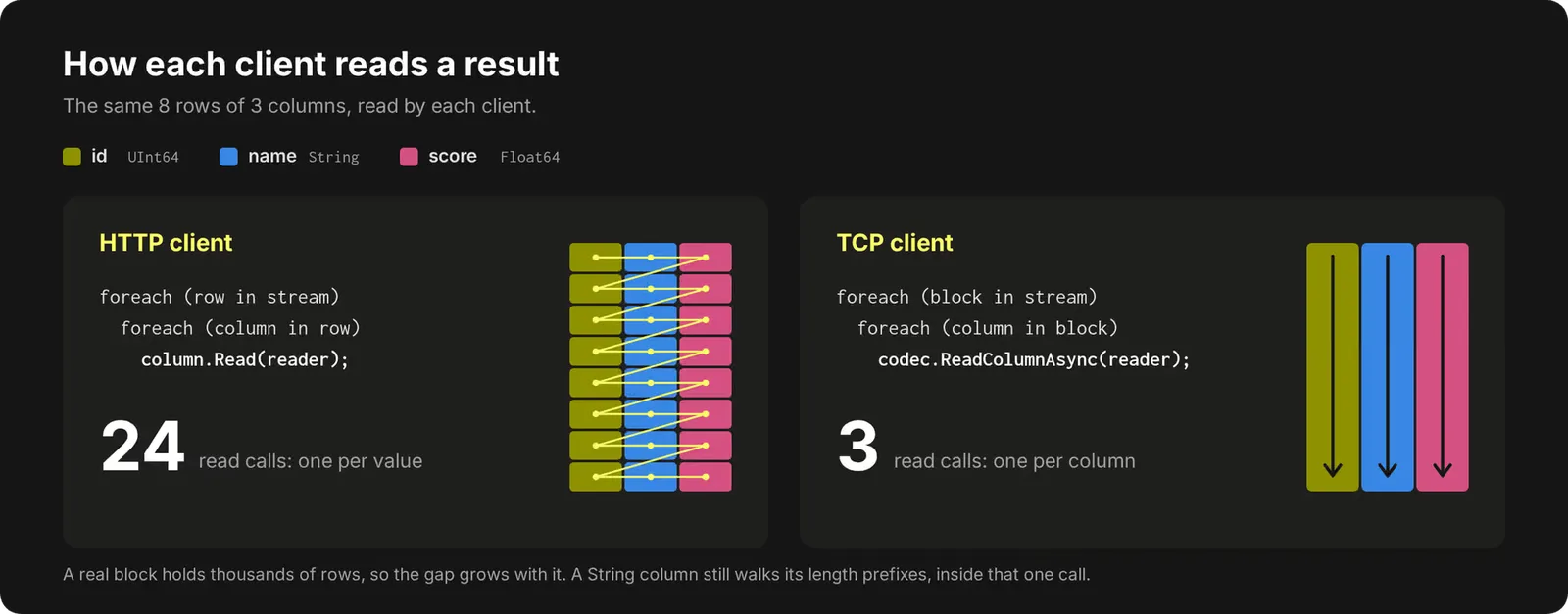
The HTTP client walks the stream value by value. The TCP client makes one call per column per block. For fixed-width types, that call is a single bulk read into a pooled buffer, and the column you get back is a
ReadOnlySpan<T>
. A block usually holds thousands of rows, so this saves a huge number of calls.
Composite types follow the same rule. An
Array(Float64)
column is all of its row offsets, then every element of every row in one contiguous run:
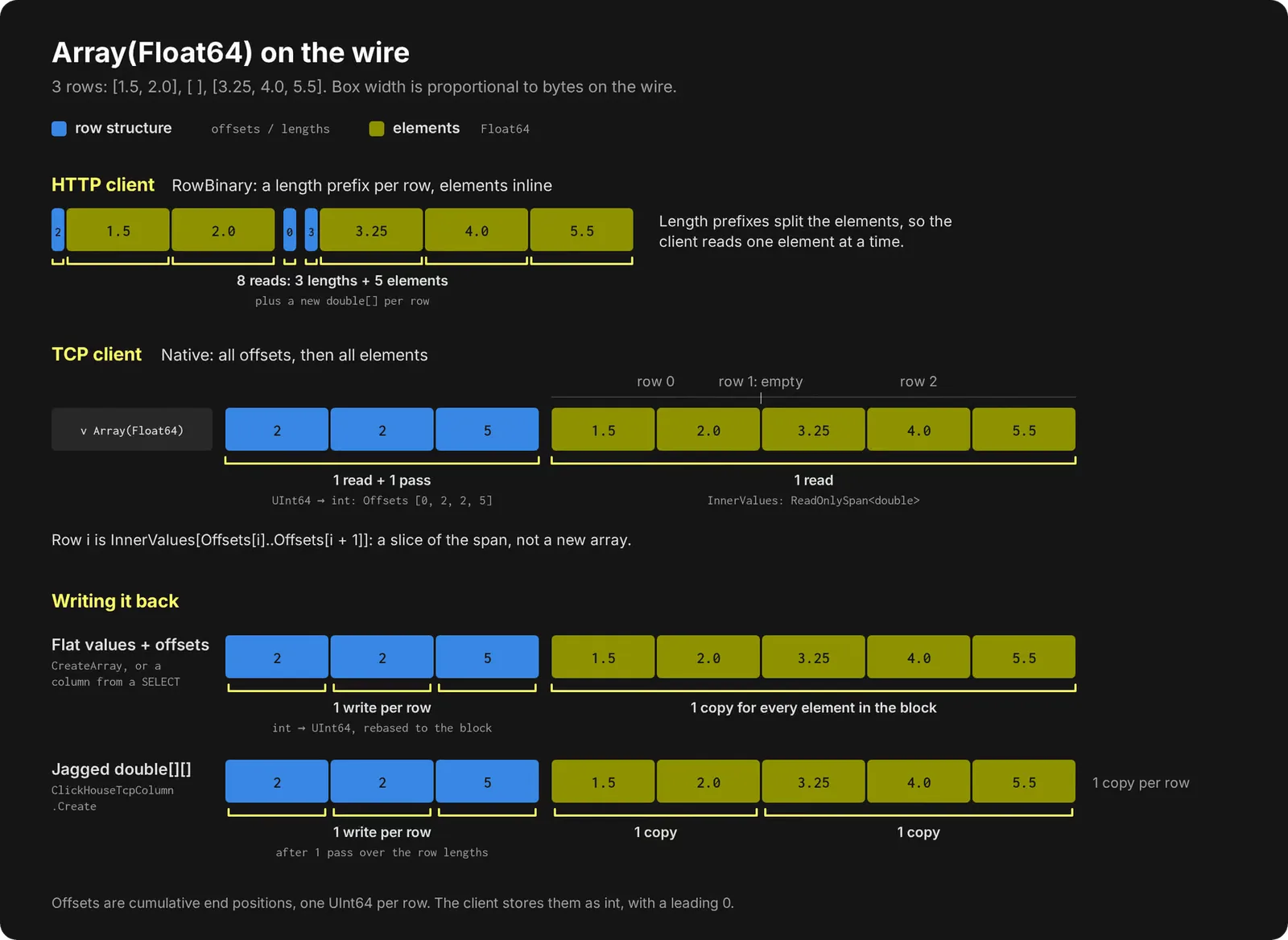
So the client reads the elements of a whole block in one go, and a row is a slice between two offsets. The layout pays off on inserts too: give
InsertAsync
flat values plus offsets (
ClickHouseTcpColumn.CreateArray
, or a column straight from a
SELECT
), and every element goes out in one copy. A jagged
double[][]
works as well, at one copy per row.
You choose how much of the columnar shape to keep. The TCP client supports three different tiers:
| Tier | Read | Insert | Cost |
|---|---|---|---|
| Columns | StreamAsync (borrowed blocks) | InsertAsync | No per-row allocation. Fixed-width columns are read and written in bulk. |
| POCOs | QueryAsync<T> | InsertRowsAsync<T> | One object per row. The mapping is compiled per column, with no boxing. |
object[] | QueryAsync | InsertRowsAsync | An array per row and a box per value. Inserts transpose rows into columns. |
Pros and cons: it is not all roses and rainbows
The native client is fast, but it isn’t a free upgrade. Here’s what you get and what you give up.
What you get
- Speed. Columnar reads with no decoding.
StreamAsyncgives you blocks, and each column’s.Valuesis a span over the buffer the socket read into. And columnar inserts are basically a memcpy. - POCOs with no setup. The mapping is compiled on first use, one loop per column, with no boxing.
- Query metadata. Callbacks for progress, profile events, server logs, and totals and extremes while the query runs.
- Cancellation that reaches the server. Cancelling sends a Cancel packet, so the server can stop the query.
- Sessions. A session is one socket, so temporary tables,
SET, andSET ROLEwork behind a load balancer with nosession_id. - W3C trace context propagation to ClickHouse.
What you give up
- It’s experimental. The API may change before it’s marked stable.
- JSON is text only. JSON columns arrive as strings and you parse them yourself; HTTP gives you a
JsonObjector a POCO. The extra string serialization step on the server is relatively slow, so if you are a heavy JSON user, do not expect great performance. We plan to implement support for the binary JSON format soon, though. - The
object[]tier loses most of the performance benefits. An array per row, a box per value, and a row-to-column transpose on insert mean that all the performance benefits of the columnar format are lost. This means that ORMs (which typically use theobject[]approach for reading and writing objects) will not see any significant improvement. DateTimecomes back as a number. Columns andobject[]rows give you the rawuint/long, which keeps reads zero-copy and at full precision. UseReadAs<DateTimeOffset>to convert, or a POCO property with the right type for auto-conversion.- Blocks are borrowed. To avoid allocations, a block is valid for one loop iteration, then its buffers are reused. If you want to keep any of the data from a block outside the loop, you need to copy it out yourself.
- Missing features:
- No ADO.NET (so no Dapper or Entity Framework Core).
- No support for alternative formats like CSV, Parquet, or JSONEachRow.
- No JWT authentication.
- And only
{name:Type}parameters (no typeless@name).
- .NET 8 or later only.
So, which one?
- For analytical reads, bulk inserts, and performance-sensitive workloads: try TCP.
- For ORMs, different file formats, token auth, or heavy JSON use: stay on HTTP.
Both ship in the same package, so you can use each where it fits.
Performance
We benchmarked both TCP approaches (blocks and POCOs) against the HTTP client.
- Setup: the client on an AWS m7i.8xlarge, the server on ClickHouse Cloud (26.4), over a real network.
- Arms: the HTTP client (
QueryAsync<T>/InsertBinaryAsync<T>), TCP with columns (StreamAsync/InsertAsync), and TCP with POCOs (QueryAsync<T>/InsertRowsAsync<T>). - Data: 1M-row reads and 100k-row inserts of the
hitsdataset (105 scalar columns), of a table withArray,MapandTuplecolumns, and of a table with oneJSONcolumn. - Numbers: each scenario runs 5 times in one process. We report the median of the 4 warm runs.
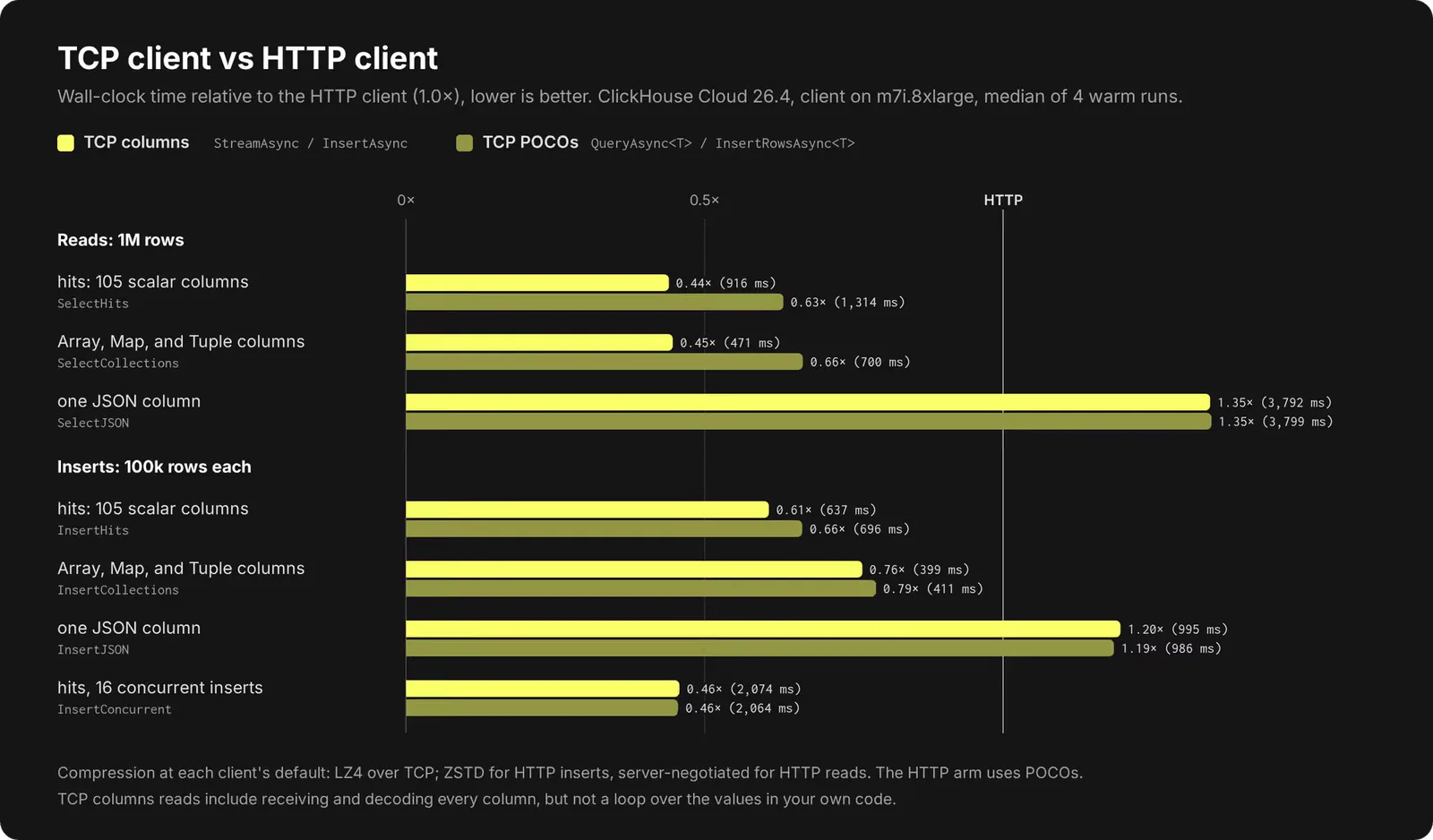
What stands out:
Reads take less than half the time with columns (0.44× on
hits
, 0.45× on collections), and about two thirds with POCOs, which is the like-for-like number.
Inserts are faster across the board.
hits
inserts take 0.61× the time with columns and 0.66× with POCOs. With 16 concurrent inserts, both styles take 0.46×.
JSON is slower, as expected Performance here is worse because JSON has to be serialized/deserialized to and from strings.
In terms of throughput, we can read over 115 million values per second from a single stream. On a 32-vCPU client (best warm run of each):
| TCP columns, up to | TCP POCOs, up to | HTTP, up to | |
|---|---|---|---|
One streamed read of hits (105 columns) | 1.1M rows/s | 764k rows/s | 486k rows/s |
16 parallel hits inserts | 877k rows/s | 832k rows/s | 405k rows/s |
SELECT 1, 16 in flight | 3,100 queries/s | 3,100 queries/s | 1,800 queries/s |
Memory
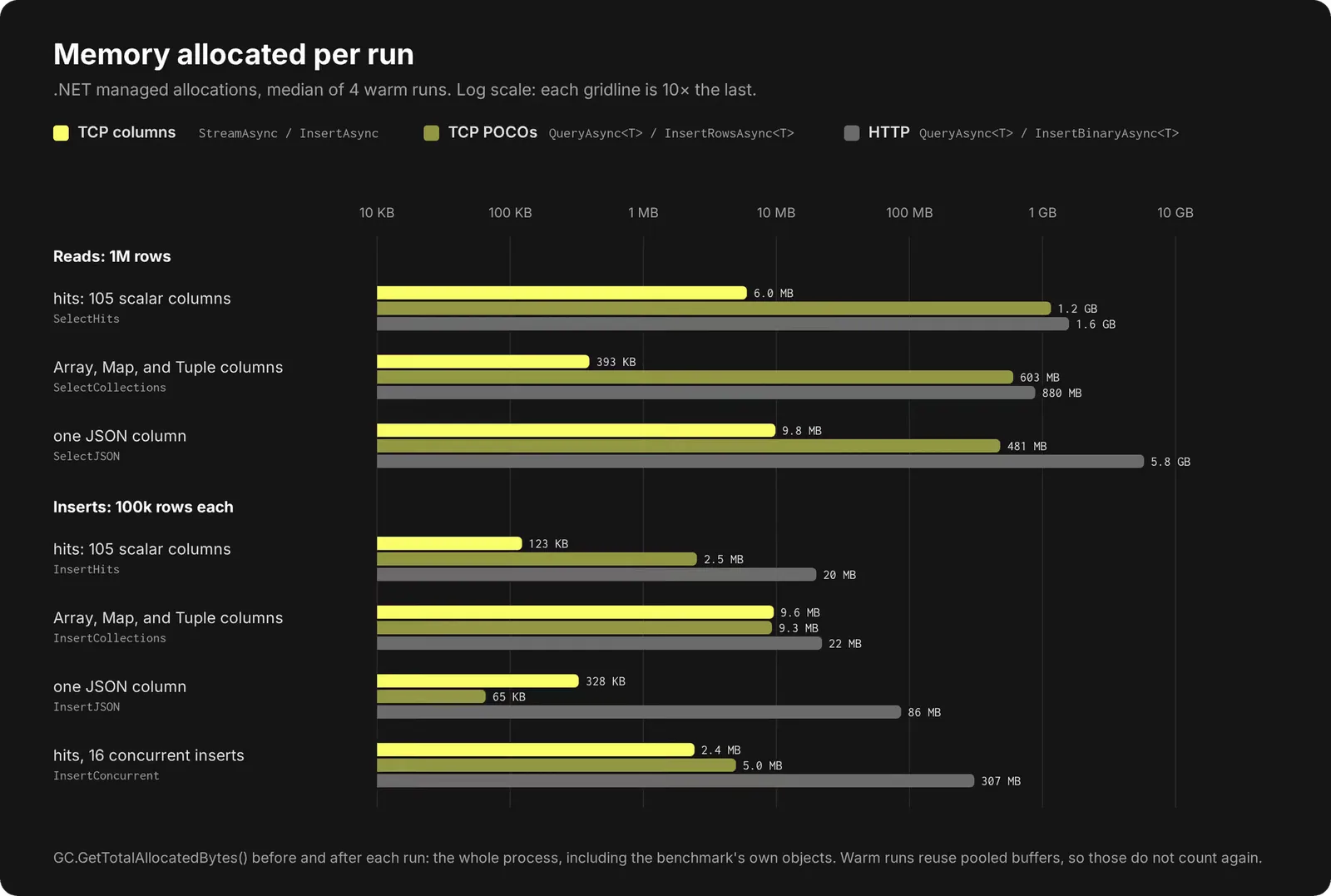
The biggest improvement is in memory. Reading 1M rows of
hits
allocates 1.6 GB with HTTP and 6 MB with TCP columns. Note the logarithmic x-axis on the chart below.
How we did it
Three principles drove every decision in the TCP client:
- Zero copy. Data is copied once, from the socket into the column’s own buffer. Everything above that copy is a view over it. On the way in, a column you already hold goes from your array into the send buffer in one copy. (Compression, which is on by default, adds a decompression pass and one more copy. “Where zero-copy was not possible” below has the details.)
- Zero GC allocations. Nothing is allocated per row on the columnar tier, unless strictly necessary. Column buffers come from a pool and go back to it, and what’s left is a few small objects per block. That’s how reading 1M rows of
hitsallocates 6 MB instead of 1.6 GB. - As little encoding and decoding as possible. For most fixed-width types, the ClickHouse wire layout and the .NET memory layout are identical. So an
Int64or aFloat64isn’t decoded at all.DateTimestays a number and strings stay UTF-8 until you ask for something else.
To implement these principles, we made heavy use of MemoryMarshal to reinterpret in place instead of decoding. A fixed-width column is a pooled
byte[]
filled by a single read. And its
Values
property doesn’t convert anything; it simply reinterprets the bytes as
T
:
      // Reading a fixed-width column (error handling trimmed)
// Borrow the needed space from a pool
int byteCount = checked(rowCount * Unsafe.SizeOf<T>());
byte[] rented = ArrayPool<byte>.Shared.Rent(byteCount);

// A single read copies the entire column from the socket
await reader.ReadBytesAsync(rented.AsMemory(0, byteCount), cancellationToken);

// The column is built around that data
return new PrimitiveColumn<T>(columnName, columnType, rented, byteCount, pooled: true);

// PrimitiveColumn<T>: accessing the values as type T by reinterpreting in place
public ReadOnlySpan<T> Values => MemoryMarshal.Cast<byte, T>(buffer.AsSpan(byteOffset, length));
That covers every integer and float type,
Bool
, the raw
DateTime
counts, .NET’s
Int128
, and our own
Int256
/
UInt256
, which are declared
[StructLayout(LayoutKind.Sequential)]
as four little-endian
ulong
s so their memory matches the wire. There’s no
unsafe
code anywhere in the client; the project doesn’t even enable it.
Span<T>
,
MemoryMarshal
and
ArrayPool<T>
do all the work.
Bulk reads skip the buffer. Small reads, like packet headers and lengths, go through a 16 KiB buffer. Column data doesn’t:
ReadBytesAsync
copies out whatever is already buffered, then reads the rest of the column straight from the socket into its pooled array. A 200 MB column needs a 200 MB destination, not a 200 MB read buffer.
Views, not values. Other types keep their wire shape too. A
Nullable
column is the raw null map plus a zero-copy inner column, so no
T?
array is built, unless it is explicitly requested. A
String
column is one pooled blob plus offsets:
GetBytes(row)
hands you the UTF-8 bytes without a copy, and .NET strings are only created when you ask for them.
LowCardinality(String)
decodes each dictionary entry once per block, not once per row.
The same trick in reverse on writes. A column backed by a contiguous array goes out with
MemoryMarshal.AsBytes
, one copy for the whole slice:
      if (typed is ISpanColumn<T> contiguous)
{
    writer.WriteBytes(MemoryMarshal.AsBytes(contiguous.Span.Slice(start, length)));
    return;
}
Composite columns work the same way. Pass a column you read from a
SELECT
straight to
InsertAsync
, and its null map, offsets or
LowCardinality
dictionary go back out without being rebuilt.
Short-lived buffers on the stack. Where we do have to encode, such as a .NET
string
going out as UTF-8, short values use
stackalloc
and only longer ones touch the pool:
      int maxBytes = Encoding.UTF8.GetMaxByteCount(value.Length);
if (maxBytes <= 256)
{
    Span<byte> scratch = stackalloc byte[256];
    WriteEncodedString(value, scratch);
}
else
{
    // Rent a buffer from ArrayPool<byte>.Shared, encode, return it.
}
Borrow the memory. The buffers behind a
Block
belong to the client. When your
await foreach
moves on, they go back to the pool and the next block reuses them. That’s what makes the columnar tier allocation-free, and it’s why a block is only valid for one iteration. The compiler helps, because a
ReadOnlySpan<T>
can’t live across an
await
. If you keep a column object anyway, reading it after the loop has moved on throws, instead of quietly returning another block’s data.
Columns first, rows on top. The borrowing rules have to live in the bottom tier, so we built the allocation-free columnar API first and then added POCOs and
object[]
rows on top of it. Ownership changes hands exactly twice: from the socket to a block (the client owns it), and from a block to your row or object.
POCOs without reflection or boxing
When reading into or writing from POCOs, we don’t use reflection per row. The first time the client sees a POCO type with a given set of columns, it builds an expression tree for each column, compiles it to a delegate, and caches the plan.
On read, each column gets one compiled loop that fills one property across a whole range of rows. Here’s what goes into that tree for a
DateTime64
column mapped to a
DateTimeOffset
property, and where each piece comes from:
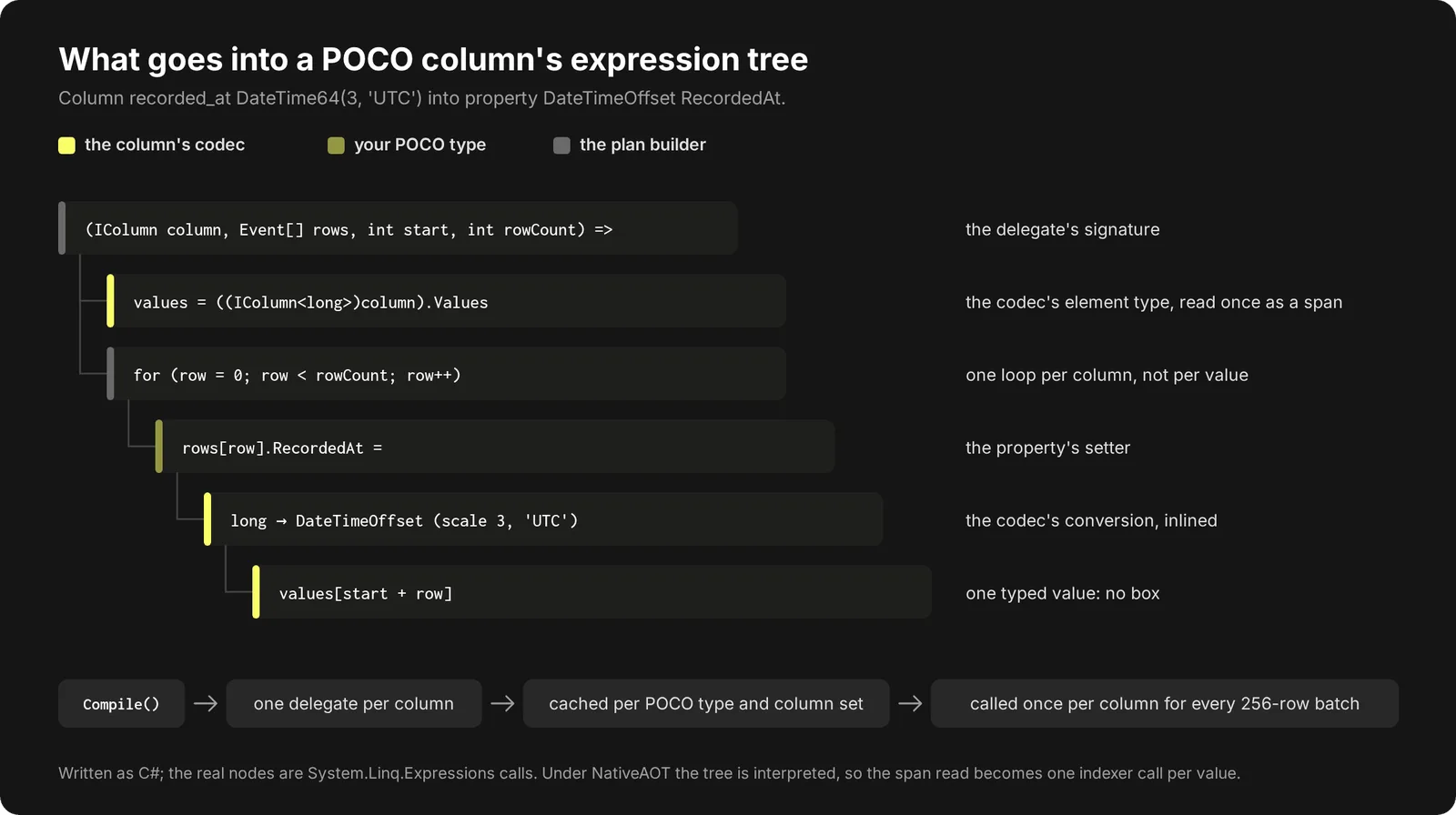
The value stays typed from the span to the property setter, so nothing is boxed, and there is one delegate call per column for each batch of rows instead of one per value.
Conversions go inside the loop. When the property type differs from the column’s type, the column’s codec supplies an expression for the conversion: a
DateTime64
column turns its raw count into a
DateTimeOffset
in the column’s timezone, an
Enum8
becomes your enum, and a
Nullable
column fills a
T?
.
Inserts are the mirror image. Each column gets a compiled loop that reads one property from every row into a pooled, typed buffer (
destination[slot] = rows[start + slot].Id
). For fixed-width types, the codec then writes that buffer in one copy.
One catch: under NativeAOT, expression trees are interpreted rather than compiled, and an interpreted tree can’t hold a
ReadOnlySpan<T>
. There the plan reads through the column’s indexer instead, with one call per value.
SIMD
Most of the client has no use for SIMD. When the wire layout matches .NET’s memory layout, we simply do a single bulk copy. We only use vector code when the two layouts disagree, which creates an opportunity for further optimization.
UUID: the right bytes in the wrong order.
ClickHouse stores a UUID as two little-endian 64-bit halves. .NET’s
Guid
keeps an
int
, two
short
s, and then eight bytes in order. Every byte is there, just somewhere else:
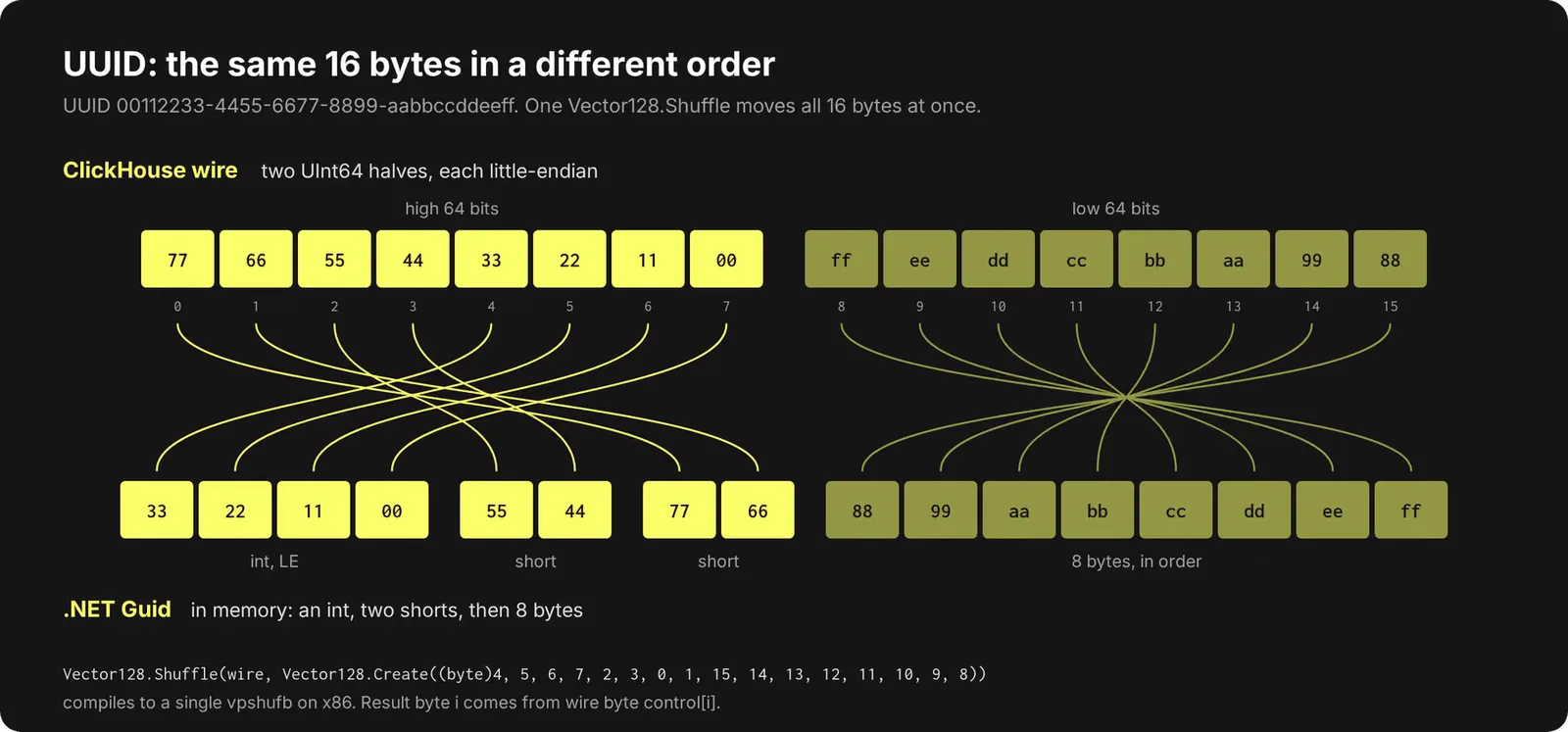
Vector128.Shuffle
with a constant control vector compiles to a single
vpshufb
on x86 (
TBL
on Arm64). On read, we shuffle the whole column straight into the pooled
Guid[]
:
      ref byte src = ref MemoryMarshal.GetReference(source);
ref byte dst = ref MemoryMarshal.GetReference(destination);
for (int i = 0; i < count; i++)
{
    nuint offset = (nuint)i * UuidSize;
    Vector128.Shuffle(Vector128.LoadUnsafe(ref src, offset), control).StoreUnsafe(ref dst, offset);
}
In our micro-benchmark that’s about 9× faster than moving the bytes one at a time, and it allocates nothing. Machines without vector support fall back to a plain scalar loop.
One thing worth knowing if you try this yourself: on .NET 8 and 9,
Shuffle()
only becomes
vpshufb
when the JIT can see that the control vector is a constant. Our loop takes the control as a parameter, and it still gets
vpshufb
because the JIT inlines it into a caller where the
static readonly
field is visible. Pass a plain parameter into a method that isn’t inlined, and you get a call to a software fallback instead. .NET 10 accelerates both. You can check your own code with
DOTNET_JitDisasm
.
QBit: vectors stored sideways.
ClickHouse’s
QBit(T, N)
type exists to speed up approximate vector search. It takes N floating point values and stores them with one plane per bit (32 for float32), most significant first, so a distance function like
L2DistanceTransposed(vec, ref, p)
can read only the first
p
bits of each element and trade precision for speed. On insert, the client has to do that transpose:
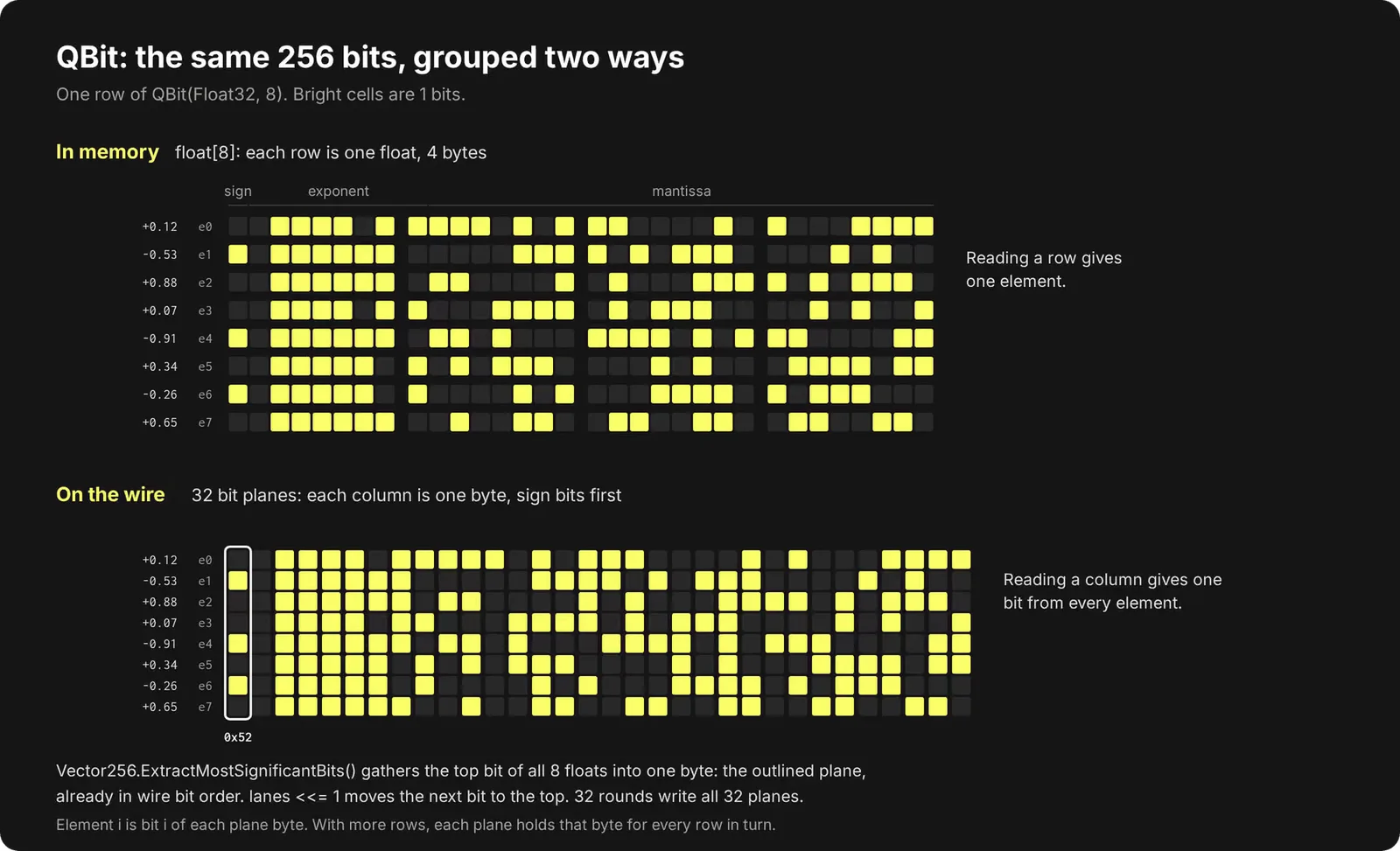
Done one bit at a time, that’s 32 ops per element. With
Vector256
,
ExtractMostSignificantBits
collects the top bit of 8 floats into one byte, which is exactly one plane byte, already in the wire’s bit order. Shift every lane left by one, and the next bit is on top:
      Vector256<uint> lanes = Vector256.LoadUnsafe(ref source, (nuint)(group << 3));
int slot = rowBase + QBitLayout.ByteOfGroup(group, BytesPerRow);
for (int wireIndex = 0; wireIndex < BitWidth; wireIndex++)
{
    scratch[(wireIndex * planeStride) + slot] = (byte)lanes.ExtractMostSignificantBits();
    lanes <<= 1;
}
The JIT turns that loop body into one
vmovmskps
and one
vpslld
. It made the write path 11.7× faster at 1,024 dimensions and 16.5× faster at 768.
Where zero-copy was not possible
Zero-copy is the rule, but when the wire format and the .NET memory layout disagree (or when we have to instantiate an object), it is not possible.
Strings are the biggest case. ClickHouse sends raw bytes (typically UTF-8, but could be in any encoding), and a .NET
string
is UTF-16, so every string you ask for is decoded and allocated. If you can work with UTF-8 directly,
IStringColumn.GetBytes
gets your the raw byte array directly. Strings can't be written in one copy either: every value on the wire has its own length prefix, so the client writes them one at a time. (
FixedString
has no prefixes, so it can.)
Some types change shape when they're read. IP addresses become
IPAddress
objects, one per row,
Date
becomes
DateOnly
, and decimals become
decimal
or our own
ClickHouseTcpDecimal
, all as soon as the block arrives. And on insert,
Nullable
values and tuple fields have no contiguous run in your data, so they're written value by value instead of in one copy.
Migrating from the HTTP client
You don’t have to pick one. Both clients ship in
ClickHouse.Driver
, so you can move your hot paths to TCP and keep HTTP for what the native client doesn’t do yet: ORMs, file formats, and token auth. The checklist:
Connect to the native port. That's 9000, or 9440 with
UseTls=true
. Server settings are strings; in a connection string, prefix them with
set_
(
set_max_threads=4
). With dependency injection,
services.AddClickHouseTcpDataSource(...)
registers one pooled client and hands out
IClickHouseTcpClient
.
Map the methods. Most calls have a direct counterpart:
| HTTP client | TCP client | Notes |
|---|---|---|
ExecuteNonQueryAsync | ExecuteAsync | DDL queries |
ExecuteScalarAsync | ExecuteScalarAsync | One value, first row of first column |
ExecuteReaderAsync | QueryAsync / QueryAsync<T> / StreamAsync | No direct equivalent |
QueryAsync<T> | QueryAsync<T> | POCO reads |
InsertBinaryAsync | InsertRowsAsync<T>, InsertRowsAsync, or InsertAsync | Inserts |
PingAsync | PingAsync | Ping |
Rewrite parameters.
@name
placeholders become
{name:Type}
, and the values move into
ClickHouseTcpQueryOptions.Parameters
. Give instants a timezone, like
{t:DateTime64(3, 'UTC')}
.
Start with POCOs, then move the hot loops to columns.
QueryAsync<T>
and
InsertRowsAsync<T>
are the closest to what you have now:
      // HTTP
using var reader = await http.ExecuteReaderAsync("SELECT id, name FROM events");
while (reader.Read())
{
    Console.WriteLine($"{reader.GetFieldValue<ulong>(0)}: {reader.GetString(1)}");
}

// TCP
await foreach (Event e in tcp.QueryAsync<Event>("SELECT id, name FROM events"))
{
    Console.WriteLine($"{e.Id}: {e.Name}");
}
Once that works, switch the loops that matter to
StreamAsync
and
InsertAsync
.
Finally, check for breaking behavioral changes:
DateTimecolumns come back as raw numbers on the columnar andobject[]tiers. POCO properties convert automatically.- Finish or dispose every enumeration, so its connection goes back to the pool.
- Breaking out of a result early, or cancelling, closes that connection instead of reusing it.
MaxPoolSize(20 by default) caps how many operations run at once.ReadTimeoutmeasures silence between reads, not total query time.- There are no automatic retries. Set a
DeduplicationTokenon any insert you might retry. - Temporary tables and
SETneedOpenSessionAsync, because ordinary calls can land on any pooled connection. - JSON arrives as text.
The migration guide in the docs has the full details, and Tcp_004_MigratingFromHttp.cs runs both clients against the same table.
What’s next
First on the list is ADO.NET: a
DbConnection
over the native protocol, so Dapper, EF Core and linq2db can use it too. After that, binary JSON, so JSON columns don’t need to be forced through an extra layer of serialization and deserialization.
We’d really appreciate your feedback. Point the client at your real workloads and tell us what breaks, what feels awkward, and what’s missing. Let us know in a GitHub issue. The API is still experimental, so this is the best time for your feedback to shape it.
Get started today
Interested in seeing how ClickHouse works on your data? Get started with ClickHouse Cloud in minutes and receive $300 in free credits.
منتشرشده در
ClickHouse Blog
ادامه مطالعه