Shard design doesn't start from your tables
Shard group design starts from your queries, not your tables. Find the key that your most important queries and transactions share, and put every table that carries that key in one group.
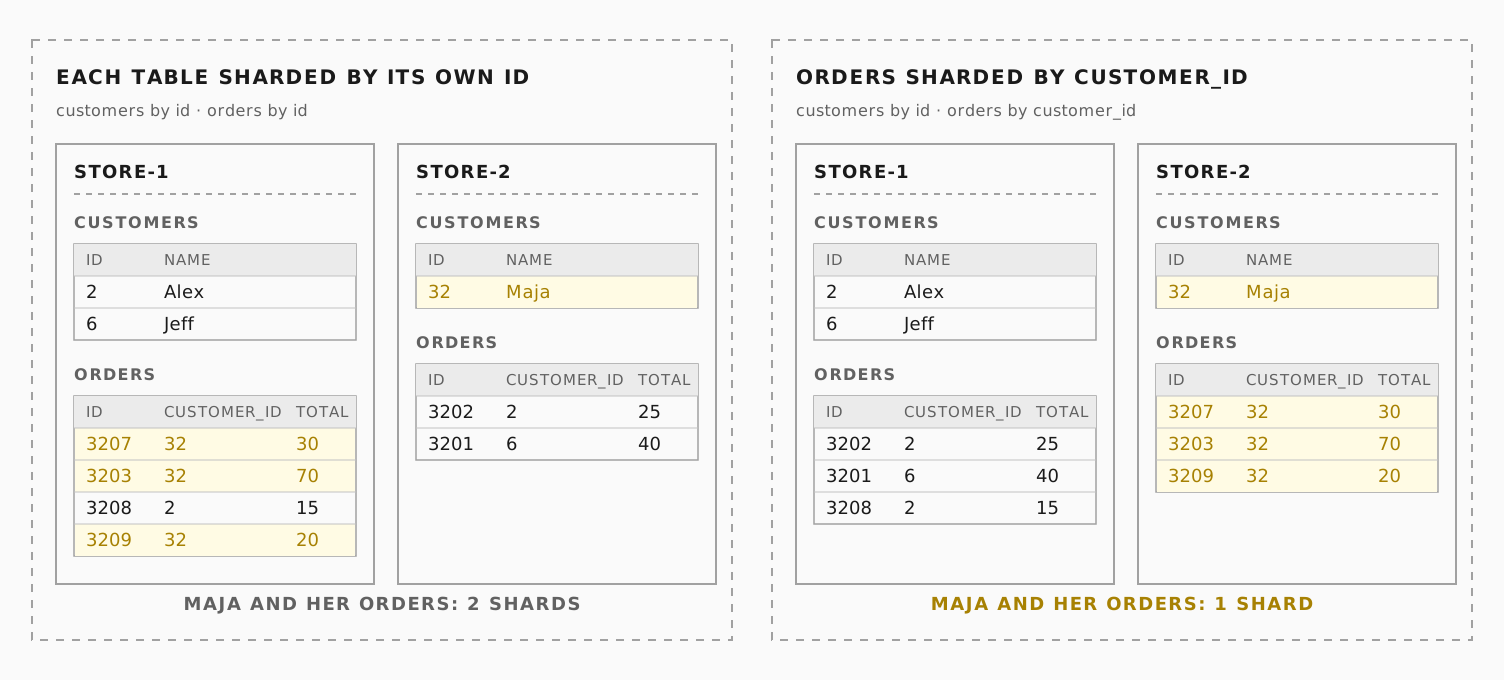
Previously, in The lifecycle of a sharded Postgres query, the router had to join customers and orders itself, because each table was sharded by its own ID. The fix was to shard orders by customer_id, hashed and mapped the same way as customers. In Neki, that fix is called a "shard group."
Sharding splits a table's rows across multiple Postgres clusters, called shards. Each shard holds one subset of the table. For the best performance, you want most of your queries to touch a single shard. Then the Neki router does not have to fan out to multiple shards to collect and aggregate results. To do this, you place all related rows on the same shard, so that joins and transactions stay local.
Neki gives you powerful options to do this with shard groups. A shard group is the unit of co-location in Neki. When two tables belong to the same shard group and hash their shard keys the same way, rows with the same key value always land on the same shard.
Shard groups are worth thinking through when you migrate to Neki, because they decide which queries stay on one shard. But keep in mind, they aren't permanent. The Reshard workflow allows you to change a table's shard key or shard count later, which you'll likely need to do as your queries evolve. In this post, we walk through how to design them, extending the storefront example from the earlier post.
Let's start with a data topology snippet that fully describes the sharding scheme of the storefront. You may want to refer to our earlier post, What is a data topology?
Co-locating related tables
{
  "shard_indexes": {
    "by_customer": { "type": "xxhash", "columns": ["customer_id"] }
  },
  "shard_groups": [
    {
      "uid": "customer_data",
      "default_shard_index": "by_customer",
      "key_ranges": [
        { "shard_uid": "store-1", "end": "80" },
        { "shard_uid": "store-2", "start": "80" }
      ]
    }
  ],
  "databases": {
    "store": {
      "default_shard_group": "customer_data",
      "schemas": {
        "public": {
          "tables": {
            "customers": { "primary_indexes": [{ "columns": ["id"] }] }
          }
        }
      }
    }
  }
}
The customer_data shard group has two key elements.
First, it defines a default shard index. by_customer says that tables in this shard group have a customer_id column. Neki takes the value in that column and hashes it. xxhash maps a number, in this case a specific customer_id, into a 64-bit keyspace.
Second, the shard group's key_ranges split that keyspace across physical Postgres clusters, the shards. Each shard holds one section of the 64-bit space. Here we split the range in two, and the hash decides whether a row goes to store-1 or store-2.
We can now apply this shard group to the tables in our database. Say our store database has the tables customers, orders, items, and addresses. Usually, the primary key of customers is id, and the other tables refer to the customer in their customer_id column.
The default shard index already uses the customer_id column as the shard key. But we need a special case for customers. Neki lets you inherit the default index but use a different column, id. As a result, all of a customer's orders, items, and addresses are on a single shard. Common queries and transactions for a single customer or a single order never leave the shard.
This matters for more than speed. A transaction that stays on one shard keeps full Postgres semantics. A transaction that reaches two shards does not: Neki commits each shard separately, with no atomic commit and no shared snapshot.
Reference tables
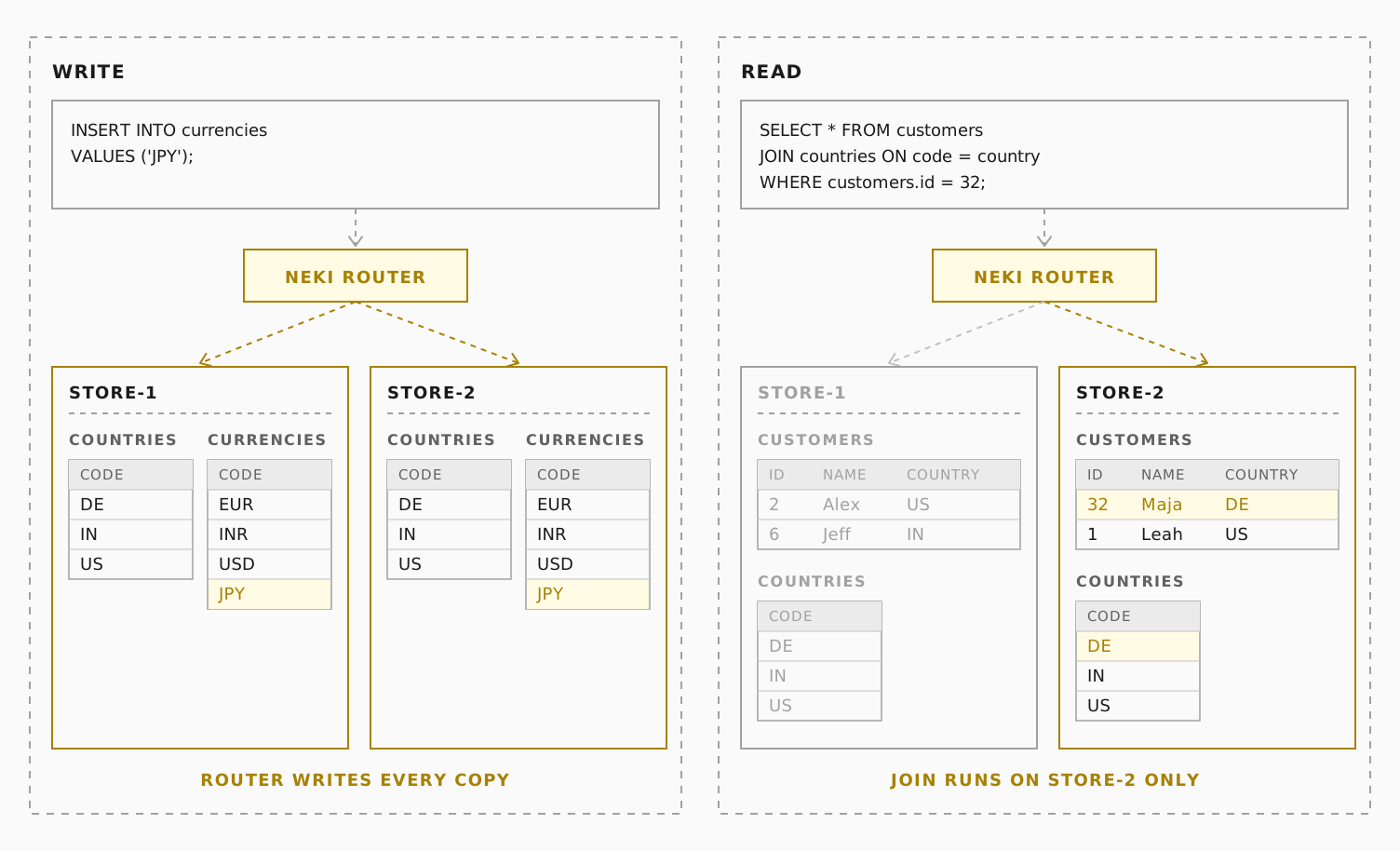
Some tables, such as lookup tables, appear in many queries but are not specific to a customer. For example: countries, states, currencies, and tax_rates. If we place these tables on one of the two shards, or on a third shard, many queries become cross-shard.
Neki lets you declare these as reference tables. Each shard in the shard groups you list then holds a full copy of the table. The MoveTables workflow loads the initial copies. After that, the Neki router sends every insert, update, and delete to all copies, so they stay in sync. A join between a sharded table and a reference table never leaves the shard.
"reference_tables": {
  "countries":  { "shard_groups": ["customer_data"] },
  "currencies": { "shard_groups": ["customer_data"] }
}
Differently sharded tables
Storefronts also have product catalogs, with tables like products, inventory, and prices. The natural key for these tables is a SKU, so we want to co-locate all rows that relate to a SKU. We also want to reuse the same shards. The snippet below adds a new shard group to our data topology:
"shard_indexes": {
  "by_customer": { "type": "xxhash", "columns": ["customer_id"] },
  "by_sku":      { "type": "xxhash", "columns": ["lower(sku)"] }
},
"shard_groups": [
  { "uid": "main", "key_ranges": [{ "shard_uid": "store-1" }] },
  {
    "uid": "customer_data",
    "default_shard_index": "by_customer",
    "key_ranges": [
      { "shard_uid": "store-1", "end": "80" },
      { "shard_uid": "store-2", "start": "80" }
    ]
  },
  {
    "uid": "catalog",
    "default_shard_index": "by_sku",
    "key_ranges": [
      { "shard_uid": "store-1", "end": "80" },
      { "shard_uid": "store-2", "start": "80" }
    ]
  }
]
The main group is the single-shard home for database-wide metadata, such as sequences and schema information. Every data topology names one shard group as its authoritative shard group.
Note that the two shard groups do not have to share shards. It is just economical in our case. If the number of customers and orders grows significantly, we can give the catalog two small shards and the customer data eight big shards, for example. As we will see later, Neki makes it easy to split and merge shards in a shard group.
SQL expressions in shard indexes
In the example above, by_sku hashes lower(sku), not sku. This allows SKUs in mixed case, which often appear when catalogs come from different vendors. AB-1042 and ab-1042 both map to the same shard.
Another common example is an application that encodes a store ID as part of an order ID. You can specify this as "columns": ["left(order_id, 4)"]. Then 4711-00093821 maps to store 4711, and all orders for a store are co-located on the same shard.
Beyond xxhash
xxhash is the recommended sharding algorithm. It distributes rows uniformly across the 64-bit keyspace.
Neki also supports two other index types. They are less common, but some applications already shard their data this way, and these types let those applications move to Neki seamlessly.
The first is range, which routes an integer key range directly to shards. For example, a system can allot merchant IDs based on geographical location. Here, merchant IDs 0 to 10,000 (hex 0000 to 2710) go to eu-1, and IDs 10,000 to 20,000 (hex 2710 to 4e20) go to us-1:
"shard_indexes": {
  "by_merchant": { "type": "range", "columns": ["merchant_id"] }
},
"shard_groups": [{
  "uid": "merchants",
  "default_shard_index": "by_merchant",
  "key_ranges": [
    { "shard_uid": "eu-1", "start": "0000", "end": "2710" },
    { "shard_uid": "us-1", "start": "2710", "end": "4e20" }
  ]
}]
The second is modulo, a pattern common in many sharding textbooks. modulo maps an integer key to a fixed number of buckets with value % modulus. Placement is predictable, but a change to the modulus moves nearly every row. For that reason, we do not recommend it for most systems at scale.
"shard_indexes": {
  "by_region": { "type": "modulo", "columns": ["region_id"], "index_params": { "modulus": "4" } }
},
"shard_groups": [{
  "uid": "regions",
  "default_shard_index": "by_region",
  "key_ranges": [
    { "shard_uid": "store-1", "start": "00", "end": "02" },
    { "shard_uid": "store-2", "start": "02", "end": "04" }
  ]
}]
Queries without shard keys
In our example, say support gets a ticket about a specific order. A query like SELECT * FROM orders WHERE id = 84213; fans out to every shard, because Neki hashes orders on customer_id. Neki supports this query pattern with a global secondary index (GSI).
A GSI is a lookup table that Neki maintains. It maps one or more columns of a table to that table's shard key. In our case, we define it in the data topology like this:
"global_secondary_indexes": {
  "orders_id_idx": {
    "table": "orders_id_lookup",
    "owner_table": "orders",
    "columns": ["id"],
    "owner_sk_columns": ["customer_id"],
    "unique": true,
    "enabled": true
  }
}
The lookup table is an ordinary Postgres table. It needs its own shard index on the order id, and a table entry that uses it:
"shard_indexes": {
  "by_order_id": { "type": "xxhash", "columns": ["id"] }
},
"orders_id_lookup": { "primary_indexes": [{ "shard_index": "by_order_id" }] }
The orders table also names the GSI. This switches the GSI on for reads and writes on orders:
"orders": { "secondary_indexes": [{ "name": "orders_id_idx", "columns": ["id"] }] }
Now id = 84213 costs two single-shard reads. The first read gets the lookup table row, which gives us the customer_id. The second read gets the actual row from orders, with both the customer_id and the order id.
Neki writes the lookup row in the same request as the orders row. Here, orders is the owner of the lookup table. Only DML statements on orders change the lookup table.
If orders already has rows, a Neki workflow backfills the lookup table before you enable the GSI.
Changing data placement
Neki workflows change where your data lives. Use them to shard an unsharded table, to change the number of shards, or to change the shard key.
The MoveTables workflow imports your external Postgres databases into Neki and can shard them in the process. The Reshard workflow changes the shard key or the number of shards.
Putting it all together
With all the concepts above, the final data topology for our example looks something like this:
Shard group design starts from your queries, not your tables. Find the key that your most important queries and transactions share, and put every table that carries that key in one group.
Need help designing your shard groups?
It can be difficult to find a good sharding strategy for your data shapes and query patterns. PlanetScale can help. We have tools that you run in your environment. They examine your live schemas and query logs and give you suggestions.
Contact us to get help designing your data topology, or sign up for a PlanetScale account to start using Neki today.
منتشرشده در
PlanetScale Blog
ادامه مطالعه

 Fly.io Blog
 Supabase Blog
 Vercel Blog