Supabase Middleware: composable, reusable middleware for Web Fetch handlers
Type safe, composable middleware for Web Fetch handlers. Write it once, use it on any fetch runtime or inside a framework.
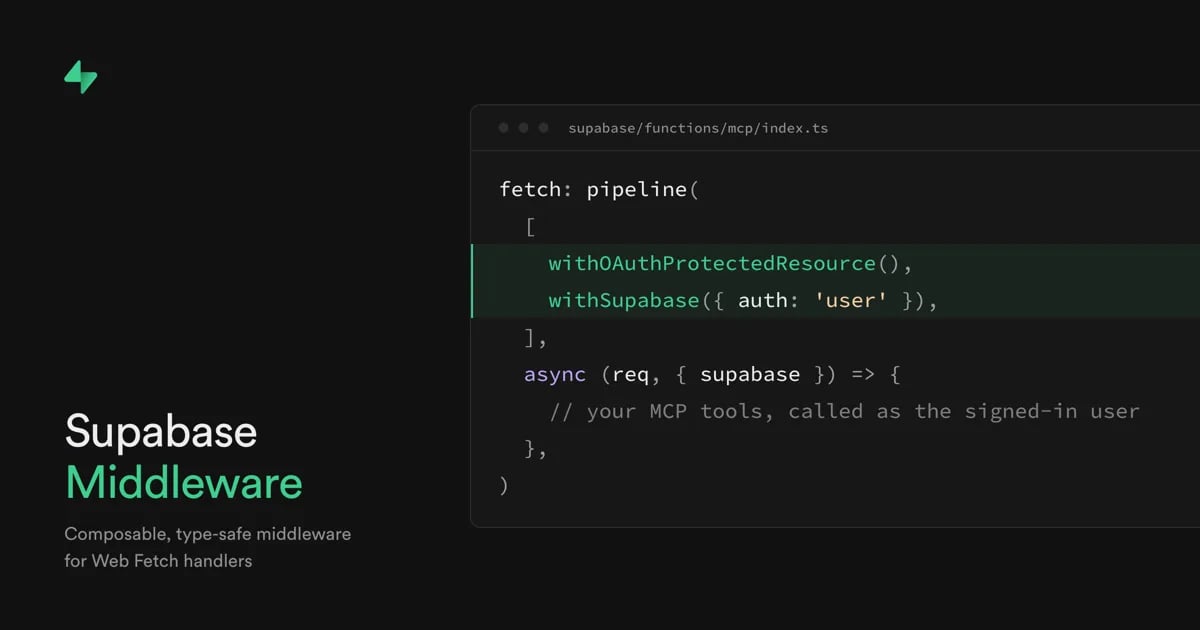
On October 2 at Supabase Select we shipped
@supabase/middleware
, composable, type-safe middleware for Web Fetch handlers. You can now write per-request logic once and run it on any runtime that supports fetch. The same middleware also works inside frameworks like Hono, H3, Elysia, NestJS, and TanStack Start. To use it in a framework, you copy a short bridge file into your project.
@supabase/middleware
is free, MIT-licensed, and built for TypeScript developers who write fetch handlers.
Why we built Supabase Middleware#
@supabase/server
has covered the setup step since May: one wrapper gives your handler a client scoped to the caller, an admin client, and verified identity and claims. But your handler still carries its own per-request logic on top: checking a flag, handling CORS, deciding what a request needs before your code runs. That logic stays stuck in the handler where you wrote it.
Move to another runtime, and you write it again. Adopt a framework, and you rewrite it as that framework's middleware, and it stays there. Start a second project and you copy the file, or your coding agent writes it from scratch, a little different each time. Every version is another chance for a security mistake.
We wanted that logic to live in one place and go wherever your handler goes. So we built Supabase Middleware. You define each piece once, compose them in order, and use them on any fetch runtime or inside a framework.
How Supabase Middleware works#
Here's what that looks like in a handler. The setup from
@supabase/server
and the logic you add on top become entries in the same list.
_12import { pipeline } from '@supabase/middleware'_12import { withCors } from '@supabase/middleware/cors'_12import { withSupabaseClient } from '@supabase/server/middleware/client'_12import { withRequiredClaims } from '@supabase/server/middleware/required-claims'_12_12export default {_12 fetch: pipeline([withCors({}), withRequiredClaims(), withSupabaseClient()], async (req, ctx) => {_12 // ctx.supabase is scoped to the caller_12 const { data } = await ctx.supabase.from('todos').select()_12 return Response.json(data)_12 }),_12}
A request goes through the entries in order.
withCors
answers the preflight and adds CORS headers to responses.
withRequiredClaims
verifies the caller's JWT; if it's invalid, the chain stops there and the caller gets a 401.
withSupabaseClient
adds
ctx.supabase
, a client scoped to that caller. Then your handler runs, and all it contains is the part that's yours.
Each entry does one job and doesn't know about the handler it sits in. It adds one typed key to a shared
ctx
, and your handler sees everything added before it, with the right types. An entry can also return a
Response
and stop the chain, or read and change the response on its way out. That's why you can move an entry to another handler without rewriting it.
What Supabase Middleware ships#
@supabase/middleware
is the engine behind the pipeline above, and
withSupabase
in
@supabase/server
runs on it.
@supabase/server
also ships the middleware below as standalone entries. Two of them,
withSupabaseClient
and
withSupabaseAdminClient
, are the same pieces
withSupabase
is built from. The engine adds
withCors
and
withFeatureFlag
.
| Middleware | What it does |
|---|---|
withCors | Handles CORS for the request |
withFeatureFlag | Adds ctx.featureFlag, admits when the flag is on, returns 404 otherwise |
withClaims | Adds ctx.jwtClaims, null when the request has no token. Anonymous requests pass through. An invalid token still gets a 401 |
withRequiredClaims | Verifies the caller's JWT and adds ctx.jwtClaims. Rejects with a 401 if it's invalid |
withSupabaseClient | Adds ctx.supabase, a Supabase client scoped to the caller |
withSupabaseAdminClient | Adds ctx.supabaseAdmin, a service-role client that bypasses RLS |
withPostgresClient | Adds ctx.postgres, a Postgres connection with RLS applied. The caller's claims apply only within the transaction |
withPostgresAdminClient | Adds ctx.postgresAdmin, a Postgres connection that bypasses RLS. Queries run as the role in the connection string |
withOAuthProtectedResource | Answers the OAuth protected-resource metadata request for MCP clients and adds an OAuth challenge header to a 401 |
Most of these aren't new capabilities.
ctx.supabase
, for example, has been documented as RLS-scoped since May. What's new is the engine. Every piece is an entry in the same list, so you can add one, drop one, or write your own, and the same list goes wherever your handler goes.
Where Supabase Middleware runs#
You can pick the runtime or framework that fits the job and change it later without rewriting your per-request logic. This section shows how that works on other runtimes and inside a framework.
Export the pipeline as a fetch handler#
Moving to another runtime doesn't mean rewriting your logic. That matters when your code doesn't all run in one place. Say some of your functions run on Supabase Edge Functions and others on Vercel Functions or Cloudflare Workers, and the auth and CORS rules should match on both. You write those rules once, and each runtime runs them.
This works because the
pipeline
in the example above is a standard fetch handler: a function that takes a
Request
and returns a
Response
. Supabase Edge Functions, Vercel Functions, Cloudflare Workers, Deno, Bun, and Node 22 or newer can all run one, and the engine is plain Web Fetch.
Using the engine doesn't tie you to Supabase. It needs no database, no Supabase project, and no account, and it's MIT-licensed. So if you leave Supabase, the engine and everything you wrote with it go with you.
Note that one middleware doesn't run everywhere.
withPostgresClient
and
withPostgresAdminClient
don't run on Cloudflare Workers, because
pg
needs a TCP socket. The limit comes from
pg
. The engine itself runs wherever fetch does. On Workers, use
withSupabaseClient
and
ctx.supabase
instead.
Inside a framework with a bridge#
Adopting a framework doesn't require rewriting your logic either. For example, say your Edge Functions are plain fetch handlers, your API runs on Hono, and the same auth and CORS rules should apply to both.
Each framework has its own middleware format and its own context object, so middleware written for one doesn't work in another. Without a bridge, adopting a framework means rewriting your logic as that framework's middleware. A bridge removes that step. It's a short file you copy into your project, not a package, so the only thing to install is
@supabase/middleware
. It runs the middleware you already wrote inside the framework's own middleware slot, and the file is yours to edit.
Bridges for Hono, H3, Elysia, NestJS, and TanStack Start are available now, each typechecked with a minimal example app. Here's the Hono version. Copy hono/supabase-middleware.ts into your project, then pass
toHono
the same array of entries you'd give
pipeline
on Edge Functions. The entries stay as you wrote them, and the bridge is the only new piece.
_16import { withSupabaseClient } from '@supabase/server/middleware/client'_16import { withRequiredClaims } from '@supabase/server/middleware/required-claims'_16import { Hono } from 'hono'_16_16import { toHono } from './lib/supabase-middleware.js'_16_16const app = new Hono()_16 .use('*', toHono([withRequiredClaims(), withSupabaseClient()]))_16 .get('/todos', async (c) => {_16 const { data, error } = await c.var.supabase.from('todos').select()_16 if (error) return c.json({ error: error.message }, 500)_16 return c.json(data)_16 })_16 .get('/me', (c) => c.json({ id: c.var.jwtClaims.sub }))_16_16export default { fetch: app.fetch }
Hono has its own middleware, which stays in Hono. Middleware written on the fetch standard works there too, and in any other framework with a bridge.
Build with the same engine we use#
We built the Supabase middleware with
defineMiddleware
, the same public API you get, and no private API sits behind it.
Give your app its own MCP server#
Say your users want to use your app from their own agent. That means an MCP server for your app, and an MCP server needs authorization: the OAuth protected-resource flow. It takes a metadata route, its preflight, a challenge header on the right responses, and URLs that match what the client called. Every part has to match. If one part is wrong, nothing errors, and the client fails to connect.
With Supabase Middleware, that whole flow is one entry.
withOAuthProtectedResource
handles OAuth discovery for MCP clients, and
withSupabase({ auth: 'user' })
verifies the user's token and hands your handler a client scoped to them.
_14import { pipeline } from 'npm:@supabase/middleware@1'_14import { withOAuthProtectedResource, withSupabase } from 'npm:@supabase/server@1'_14_14export default {_14 fetch: pipeline(_14 // 1. OAuth discovery for MCP clients, 2. verify the user's token and scope a client to them_14 [withOAuthProtectedResource(), withSupabase({ auth: 'user' })],_14 async (req, { supabase }) => {_14 // RLS scopes this query to the signed-in user_14 const { data } = await supabase.from('tasks').select('id, title')_14 return Response.json(data)_14 }_14 ),_14}
withOAuthProtectedResource
answers the metadata request before the auth check, and on the way back out it adds the OAuth challenge header to a 401. Because the client is scoped to the signed-in user, every tool call runs as that user, so your tools can be plain queries. We checked this in a working MCP server on Edge Functions, and the Bring your own MCP guide builds a full one on the same two entries.
Your RLS policies apply to an agent the same way they apply to a browser session. You don't need to copy them into each tool, and when a policy changes, the agent's access changes with it.
Write your own middleware#
Supabase doesn't ship everything your handlers need to do on each request. Your own auth flow, the way you call another service, and telemetry are per-request logic too, and without middleware you copy them from handler to handler.
defineMiddleware
turns each one into an entry you write once and use anywhere in a pipeline. It works like the ones we ship, because it's the same API we use.
You give it a
key
and a
run
function.
run
takes your config and returns the function that handles each request, and that function returns an object with your key. Here's one that adds a request ID:
_10import { defineMiddleware } from '@supabase/middleware'_10_10const withRequestId = defineMiddleware<'requestId', void, Record<never, never>, string>({_10 key: 'requestId',_10 run: () => async (req) => ({_10 requestId: req.headers.get('x-request-id') ?? crypto.randomUUID(),_10 }),_10})
The type arguments are the key, the config, what the middleware needs from earlier middleware, and what it adds to
ctx
. The types catch mistakes before you ship, and a mistake in per-request logic is easy to ship and slow to find. A duplicate key fails to compile, and so does a middleware placed before the one it needs. These checks are type-level, so they need TypeScript 5.4 or newer. Plain JavaScript gets the same runtime behavior without them.
An example custom middleware would be to extract the org ID from the caller's JWT.
_23import { defineMiddleware, pipeline } from '@supabase/middleware'_23import type { JWTClaims } from '@supabase/server'_23import { withSupabaseClient } from '@supabase/server/middleware/client'_23import { withRequiredClaims } from '@supabase/server/middleware/required-claims'_23_23// Needs ctx.jwtClaims from an earlier entry, adds ctx.orgId_23const withOrg = defineMiddleware<'orgId', void, { jwtClaims: JWTClaims }, string>({_23 key: 'orgId',_23 run: () => async (_req, ctx) => {_23 const orgId = ctx.jwtClaims.app_metadata?.org_id_23 if (typeof orgId !== 'string') {_23 return Response.json({ error: 'No organization' }, { status: 403 })_23 }_23 return { orgId }_23 },_23})_23_23export default {_23 fetch: pipeline([withRequiredClaims(), withOrg(), withSupabaseClient()], async (_req, ctx) => {_23 const { data } = await ctx.supabase.from('projects').select().eq('org_id', ctx.orgId)_23 return Response.json(data)_23 }),_23}
Share your middleware across projects as a package#
Your logic isn't tied to one project either. Instead of copying a file into the next project, you publish your middleware as a package and install it. Logic in a package has a version, so when you change your auth flow or add telemetry, you publish a release instead of editing every repo.
For example,
@supabase-labs/middleware-openfeature
is a vendor-neutral package that depends only on the engine and
@openfeature/core
. We wrote it outside the engine repo from the authoring guide, with the same
defineMiddleware
as the rest.
Get started#
Install the package, then try the MCP server example.
_10npm install @supabase/middleware
- Build an MCP server for your app with the Bring your own MCP guide
- Write your own middleware
- Use it in a framework, or move off the framework adapters, with the frameworks guide
- Browse the API reference and the GitHub repo

منتشرشده در
Supabase Blog
ادامه مطالعه

 Cloudflare Blog
 Supabase Blog
 Netflix TechBlog

 AWS News Blog
 Deno Blog