From production problem to proposed fix: Implement autonomous operations with Grafana AI
You've just finished a deployment, and though your service is up, you start to notice some requests are getting slower. To address the lag, someone—or, more likely, some group of people on your team—needs to watch the dashboards, decide whether the change matters, investigate what happened, and turn the findings into…
%3Aquality(90)%2F&w=3840&q=75) %3Aquality(90)%2F&w=3840&q=75)
From production problem to proposed fix: Implement autonomous operations with Grafana AI
%3Aquality(90)%2F&w=3840&q=75)
You've just finished a deployment, and though your service is up, you start to notice some requests are getting slower. To address the lag, someone—or, more likely, some group of people on your team—needs to watch the dashboards, decide whether the change matters, investigate what happened, and turn the findings into a fix.
At each step you're gathering context—and often explaining that context again to the next person or tool. To make matters worse for the team responsible for the service, all this work is getting in the way of everything else they need to build.
With Grafana Assistant in Grafana Cloud, you can bring more of those tasks together in one place, helping you resolve incidents faster so you can get back to building. And you're doing it with AI features that automate much of the undifferentiated heavy lifting while still keeping you in control.
Assistant Watchers (generally available today as part of ObservabilityCON 2026) provides ongoing attention to the conditions you care about. Assistant Investigations (generally available) gathers evidence about what changed. And Grafana Managed Sandboxes (public preview as of today) uses that context to prepare changes in a controlled cloud environment, giving your team something concrete to review. In this blog post, I'll show you how you can use these features collectively for better observability outcomes.
Give the service ongoing attention
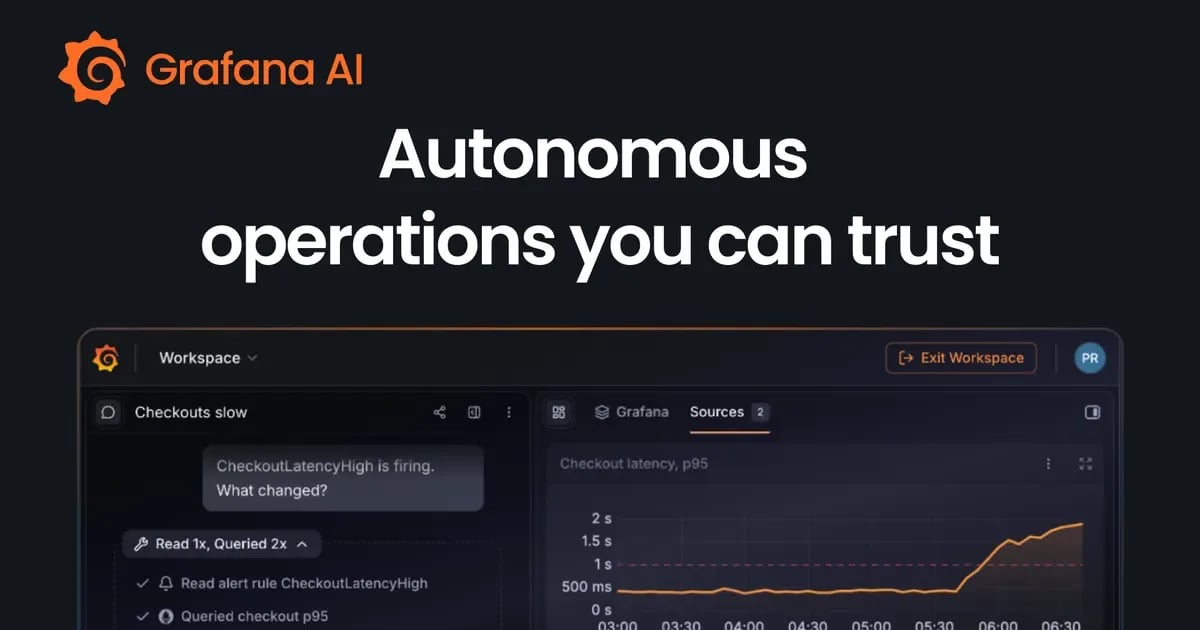
Consider a checkout service after a release. You want to know whether customers are encountering sustained errors or slower responses, while also accounting for the brief disruption you expect during deployment.
With Watchers, our always-on agents, you describe that concern and select the relevant data sources. Assistant then analyzes your historical telemetry to establish a baseline and calibrate the checks. From there, the watcher periodically assesses those signals and provides reporting along with the evidence behind its findings.
%3Aquality(90)%2F&w=3840&q=75)
If a watcher finds a critical issue, it can automatically start an investigation with Investigations, our agent designed to help you go really deep into your incidents. That way, you can delegate recurring health checks to Assistant so your team can focus on other tasks instead. Existing alerts continue to cover known conditions that require dependable paging, while the watcher adds contextual assessment around the service.
The best part: With support for Google BigQuery alongside operational telemetry sources, your watchers aren't limited to traditional observability scenarios. They can also monitor business signals, helping your entire organization keep tabs on critical changes that could impact the bottom line.
Start investigating with the evidence attached
Of course, a notification is just the beginning of the response. The next questions are familiar: Which requests are affected? When did the behavior change? Is the database involved, or is another dependency slowing down?
Investigations can explore metrics, logs, traces, and profiles, test hypotheses, and assemble findings with supporting source queries. From there, your responders can inspect the evidence and steer the investigation as they learn more.
In our checkout example, suppose the evidence points toward repeated database calls in a request path. The useful handoff to a developer now includes the affected service, the symptoms, and the evidence supporting that hypothesis. The user has a starting point for checking the code.
Turn the findings into a proposed change
Managed Sandboxes, which give Assistant a controlled cloud environment to develop proposed fixes using repository code and live telemetry, carry that investigation context into your codebase. With the relevant repository connected and coding enabled, an agent can inspect the code, prepare changes, and run available checks in a Grafana sandbox.
%3Aquality(90)%2F&w=3840&q=75)
For our example, the task could be to examine the database access pattern, prepare a targeted change, and add a regression test. Managed Sandboxes' repository-specific environments can provide the tools and dependencies needed to build and test the project.
The goal should be for Assistant to deliver a proposed pull request that the team can evaluate: what changed, why it addresses the suspected cause, which checks ran, and what still needs verification. So when you respond, the investigation is already underway, with supporting telemetry and, as the workflow progresses, a proposed fix to review.
Keep the decisions visible, and stay in control
A passing test is useful evidence, but your team still needs to confirm recovery in production as part of its release process. Your reviewers need to decide whether the diagnosis fits, whether the proposed change is appropriate, and how to deploy it. After rollout, they can use production telemetry to check the outcome and keep monitoring for recurrence.
That makes autonomy practical: delegate recurring observation, evidence gathering, and preparation of changes, while retaining clear decisions about what reaches production. You decide which parts you want to inspect, whether it's with Managed Sandboxes, Assistant Automations (to run recurring tasks), or Watchers. For some tasks, you might opt to hand it off to Assistant completely.
It also creates a useful way to judge the workflow. Did your responder spend less time gathering context? Did the developer receive enough evidence to act? Was the proposed change easier to review?
Start with one service, then scale
You can implement a similar level of automation with Assistant today. To start, choose a service your team already watches manually after releases. Define the behavior that matters, calibrate a watcher, and review its findings. Configure investigation escalations where appropriate.
Then, where Managed Sandboxes are enabled, connect a relevant repository and try a bounded task with a clear review outcome. Start with a problem your team understands. Use each run to improve the checks, context, and verification. Expand the work you delegate as the results earn your confidence.
After you collected some experiences and found the mode you want to work in, you can scale this to your liking. Assistant features are all interoperable; you can use Automations to set up Managed Sandboxes or Investigations, chat in Slack about the results of the latest incidents, and analyze all your alerts in the last 30 days periodically to improve the ones that don’t perform.
We’re excited to see what you can automate to help improve your operations.
Grafana Assistant is the easiest way to get started with metrics, logs, traces, dashboards, and more in Grafana Cloud. We have a generous forever-free tier and plans for every use case. Sign up for free now!
Originally published on
Grafana Labs Blog
Keep reading