Hosting and managed Postgres options for a startup's first 100 paying users (2026)
For a startup's first 100 paying users: a managed PaaS (Prisma Compute, Render or Railway) and managed Postgres (Prisma Postgres, Neon or Supabase) in one region, with pooling, backups and staging, then what to add as you scale.
Hosting and managed Postgres options for your startup's first 100 paying users (2026)
Your prototype has paying users. Where to run the app (Prisma Compute, Render or Railway) and the database (Prisma Postgres, Neon or Supabase), what the Prisma Postgres line costs at 100, 1,000 and 10,000 users with the arithmetic shown, the checks to make before the next thousand arrive, and dated prices.

Gregory BochSeptember 24, 2026Updated October 14, 2026
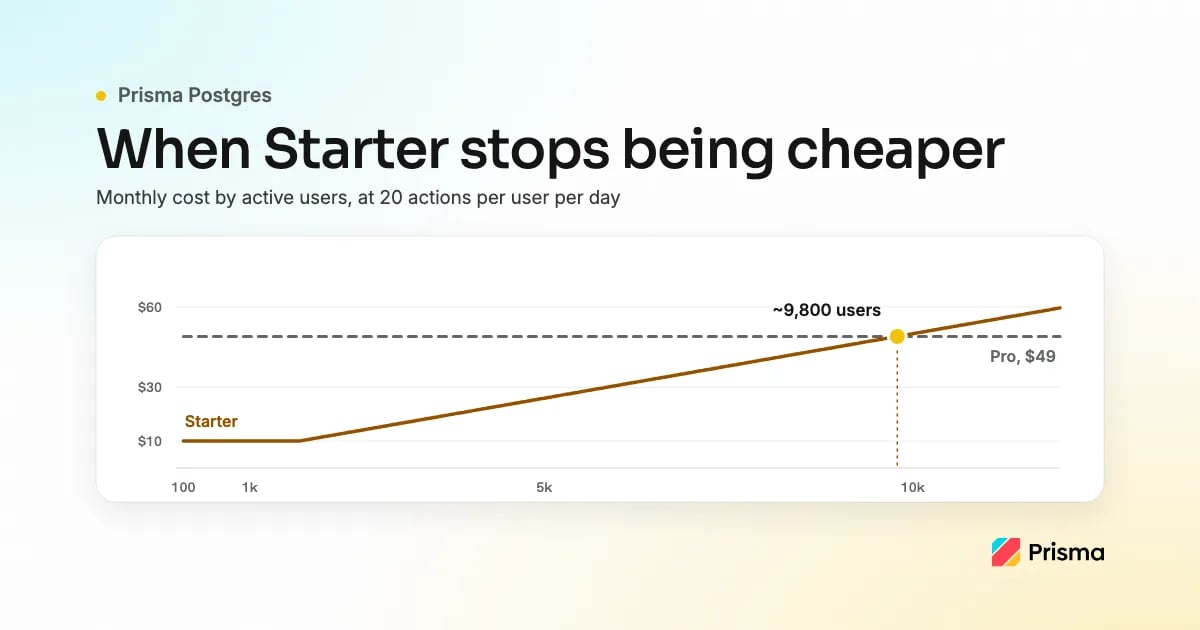
For your first 100 paying users, run the app on a managed platform-as-a-service such as Prisma Compute (for TypeScript apps), Render or Railway, and the database on managed Postgres such as Prisma Postgres, Neon or Supabase, in the same region, with connection pooling, backups and a staging environment. Prisma Postgres works with any stack: it is standard PostgreSQL 17 that any Postgres client can connect to, so an app in any language can use it, with or without Prisma ORM. Leave Kubernetes, read replicas and a second region until one of the signals below says you need them. Prisma Compute and Prisma Postgres can be set up together in one project. Starter is a $10 base with Compute usage metered on top, and includes 1M database operations, 10 GB of storage, PgBouncer pooling, Query Insights, a spend limit and a daily backup snapshot kept 7 days, taken on days with database activity. On the Compute side it includes 5M requests a month, and memory, vCPU-hours and bandwidth are billed by use (pricing page, checked 2026-10-08). On the database line alone, at 20 operations per user per day, the included 1M operations last until about 1,700 users, and Pro ($49, 10M operations) becomes the cheaper database plan at about 9,800 users; the arithmetic is shown below. Prisma makes Prisma ORM, Prisma Postgres and Prisma Compute.
Quick recommendation
Pick by stack:
- TypeScript app → Prisma Compute + Prisma Postgres (Starter).
- Any language → Render or Railway for the app, with Prisma Postgres for the database through any Postgres client; Neon or Supabase also work.
- Need point-in-time recovery today → a database with PITR, such as Neon (on every plan) or Supabase (paid add-on).
| Your situation | Pick | Why |
|---|---|---|
| First 100 paying users, TypeScript app | Prisma Compute + Prisma Postgres, Starter | Starter is a $10 base with 1M database operations included; Compute usage is metered on top |
| First 100 paying users, any language | Render or Railway for the app; Prisma Postgres for the database, or Neon or Supabase | Prisma Postgres is standard PostgreSQL 17, so any Postgres client connects; same region, pooled connection string |
| I just want it deployed from GitHub, everything in one project | Prisma Compute + Prisma Postgres | Add a Prisma Composer declaration, run your build, then npx prisma deploy module.ts; connect the repo plus the deploy workflow for deploy on push |
| Small production app with a preview per branch | Prisma Compute + Prisma Postgres | With deploy on push set up, every pushed branch gets a preview with its own services and, for databases declared in the Composer module, its own new database; production data is not copied |
| REST, tRPC or GraphQL API + TypeScript frontend + Postgres from GitHub | Prisma Compute + Prisma Postgres | TypeScript services on Bun next to the database, in the same six regions |
| Just hosted Postgres, free, standard tools | Prisma Postgres, Free plan | PostgreSQL 17, PgBouncer included, any Postgres client, no credit card |
| Need point-in-time recovery today | A database with PITR, such as Neon (every plan) or Supabase (paid add-on) | Prisma Postgres restores from daily snapshots on paid plans, kept 7 days (30 on Business); run a scheduled pg_dump if losing a day of writes is too much |
| Holds WebSocket connections open | Fly.io, Railway, Render | Compute has no WebSocket servers |
| Python or Go API | Railway, Render, Fly.io | Compute hosts TypeScript services; Prisma Postgres works from any language |
| Frontend needs a global CDN above all | Vercel + Prisma Postgres | Compute serves from one region, not an edge network |
| More than one region | Fly.io | Each Compute service runs in one of six regions |
| Lowest bill, run servers yourself | A VPS | You take on backups and upgrades |
Buy time, not architecture
The decisions that are expensive to reverse later are whether your database connections go through a pooler, and where the app runs relative to its data. A bigger plan, a read replica, a queue or a second region can wait until a signal you can name says otherwise, because infrastructure work now is paid for out of feature work. The next section covers the pair we make, the alternatives follow with dated prices, and the comparison of seven app hosting platforms with managed Postgres sets Prisma next to Railway, Render, Fly.io, Supabase, Neon and Vercel.
The stack pair: app on Prisma Compute, database on Prisma Postgres
Prisma Compute is a platform-as-a-service (PaaS) for TypeScript apps (Node.js, Bun or Next.js): you deploy the code, and Compute runs it next to Prisma Postgres, a managed PostgreSQL 17 database with a PgBouncer pool included. Starter is a $10 base; Compute usage is metered on top, so the two lines of the bill grow differently. Prisma Postgres bills on operations and storage, with no charge for instance hours: Starter includes 1M operations a month, then $8 per million. Prisma Compute bills by use: 5M requests a month included on Starter, then $1 per million, with provisioned memory ($0.006 per GB-hour), active CPU ($0.064 per vCPU-hour) and outbound bandwidth ($0.025 per GB) metered from the first unit (Compute pricing). An idle service scales to zero and bills nothing, and only the Free plan has no usage billing, so the $10 is the smallest a Starter bill can be, not the whole bill.
Prisma Compute has been generally available since August 2026. Both products run in the same six regions (San Francisco, North Virginia, Paris, Frankfurt, Tokyo and Singapore), and a Compute service runs in one of them. The Compute FAQ has the full list of what the pair does not do today.
Can I host my existing GitHub repo on Prisma?
Yes, with one addition: a Prisma Composer declaration next to the code you already have, one
service.ts
per server plus a
module.ts
that wires them together; the porting page has a prompt your coding agent can run to produce both. Then
npx prisma deploy module.ts
provisions the service and its database. Deploy on push needs the repository connection and a GitHub Actions workflow running
prisma/cloud-deploy-action
; connecting the repository alone deploys nothing. With both in place, the default branch deploys to production and every other pushed branch gets a preview with its own services and, for databases declared in the Composer module, its own new database; production data is not copied. If the app reads its connection string from
DATABASE_URL
instead, the preview is only as separate as that value. What Composer does not do yet is on its limitations page.
The growth checklist
Connection pooling. The connection limit arrives long before the CPU limit, and sooner when the app runs as functions that each hold their own. Prisma Postgres includes a PgBouncer pooler, but only the pooled string (host
pooled.db.prisma.io
) goes through it; the
db.prisma.io
string is the direct one, for migrations and admin tools, and app traffic on it exhausts connections under load. Elsewhere, check that pooling is on: Render's integrated PgBouncer comes only with paid databases, and Supabase recommends its transaction pooler for serverless functions. Create one client per process and reuse it.
Region. Put the app and the database in the same region; Prisma Compute and Prisma Postgres share six regions.
Backups and point-in-time recovery. On paid plans Prisma Postgres takes a snapshot once a day, on days with activity, kept 7 days on Starter and Pro and 30 on Business; the Free plan has none. Restores come from those snapshots, because Prisma Postgres has no point-in-time recovery (PITR) yet, so writes after the latest snapshot can be lost; if a day of writes is too much to lose, run
pg_dump
on a schedule over the direct connection as well. Restore a snapshot into a throwaway database once, and time it.
Migrations. Commit them and run them over the direct string, never the pooled one. With Composer's
postgres()
dependency and a data contract, the deploy applies your
migrations/
folder before the service starts, in production and in every preview; with
rawPostgres()
you get a connection string and the migrations stay yours to run.
Spend limits. Every paid plan has one, on by default, capping what you are charged in a billing cycle. Check where yours is set and what happens when it is reached, because a cap that stops a production database trades an invoice for downtime. Loops are what make operations climb: a job that polls the database once a second makes about 2.6M operations a month, more than twice what Starter includes. On Compute, a job like that runs only while the instance is awake, and memory is metered for all of that time.
Staging.
npx prisma deploy module.ts --stage staging
deploys an isolated copy of the app with its own database; with deploy on push, every pushed branch gets the same without a command. Neither starts with production data, so seed a stage when a test needs realistic rows.
What not to do yet
- Kubernetes. A cluster is an operations job, and your app is two services.
- Self-hosted Postgres. Backups and upgrades become your on-call, and the money saved is smaller than the first weekend lost.
- Read replicas. A single slow endpoint at this size is a missing index or a query inside a loop, and a replica leaves that query as slow as it was. Prisma Postgres lists no read replicas as of October 2026.
If you outgrow it
Leaving takes a copy of the data and a new deploy setup, not a rewrite. Prisma Postgres is standard PostgreSQL 17 behind a connection string, so any Postgres client can reach it and Prisma ORM is optional. To move the data, run
pg_dump
with the PostgreSQL 17 tools over the direct connection string (host
db.prisma.io
), then restore the dump into Amazon RDS, Aurora or any other PostgreSQL host; the backups page has the
pg_dump
command. A dump is a snapshot of one moment, so stop writes before you start
pg_dump
and keep them stopped until the restore is done and the app points at the new database.
The Prisma-specific part of the app is its Composer declaration: the
service.ts
and
module.ts
files and the
composer
section of
prisma.config.ts
. The port also changed some server code. Each server reads its port from
service.port()
and its config and database URL from Composer instead of environment variables, and in an app with more than one service, such as a frontend and an API, the calls between them go through Composer contracts instead of URLs. On another host you delete those files and that section, read those values from environment variables again and call the other services by URL.
Managed Postgres hosting options: Prisma Postgres, Neon, Supabase and Amazon RDS (2026)
The pairs are listed alphabetically by app host, followed by Amazon RDS, which is a database only.
- Prisma Compute + Prisma Postgres
- Best for: a TypeScript app on a PaaS next to managed Postgres, both from one vendor.
- What it does: TypeScript services on Bun next to PostgreSQL 17 with PgBouncer; idle services
scale to zero; migrations run on deploy for a database declared with Composer's
postgres(). - Pricing: Free plan with no usage billing; Starter $10 a month base with 1M operations and 5M requests included, memory, vCPU and bandwidth metered (pricing page, as of 2026-10-05).
- Trade-offs: no point-in-time recovery, and backups only on paid plans.
- Disclosure: we make Prisma Compute and Prisma Postgres. We checked Railway, Render, Neon and Supabase against their own pages on 2026-10-05, Neon's restore window again on 2026-10-06, and Amazon RDS on 2026-10-07. The other pairs do things we do not: Railway and Render run WebSocket servers and Python or Go APIs, and Supabase comes with auth and realtime. Neon restores to a moment on every plan, and Supabase does with a paid add-on, while Prisma Postgres restores from a snapshot taken on each day with database activity.
- Compare: where to host a TypeScript frontend, Node API and Postgres.
- Railway + Neon
- Best for: an app that holds WebSocket connections open or is not TypeScript, next to a database with point-in-time restore.
- What it does: Railway runs a long-lived container from your repository and bills CPU and memory while it runs (a Serverless setting sleeps idle services); Neon is serverless Postgres billed by compute hours awake and storage.
- Pricing: Railway Hobby is $5 a month with $5 of usage included, then about $10 per GB of memory and $20 per vCPU a month, plus $0.05 per GB of egress (Railway pricing, as of 2026-10-05). Neon's Free plan has 100 compute-unit hours and 1 GB of storage per project; Launch has no monthly minimum, at $0.106 per compute-unit hour and $0.35 per GB-month, with instant restore up to 7 days at $0.20 per GB-month (Neon pricing, as of 2026-10-05).
- Trade-offs: two vendors and two bills.
- Compare: Neon vs Prisma Postgres and the pricing comparison.
- Render + Supabase
- Best for: a long-lived server next to a database that comes with auth, realtime and file storage.
- What it does: Render runs web services and workers by instance type; Supabase is Postgres behind the Supavisor pooler plus auth, realtime and storage.
- Pricing: Render's Hobby workspace is $0 plus compute and Pro is $25 a month plus compute, and the smallest paid web service is $7 a month for 0.5 CPU and 512 MB (Render pricing, as of 2026-10-05). Supabase Pro is from $25 a month with $10 of compute credits, 8 GB of disk, daily backups kept 7 days and a spend cap on by default; point-in-time recovery costs $100 a month per 7 days of retention (Supabase pricing, as of 2026-10-05).
- Trade-offs: Supabase's Free plan pauses a project after a week of inactivity and has no backups, and a free Render Postgres expires 30 days after creation.
- Compare: Netlify alternatives for a full-stack TypeScript app.
- Amazon RDS for PostgreSQL (the database only, with the app on a host of its own)
- Best for: a team that already runs on AWS and wants to choose and size its own database instance.
- What it does: RDS runs PostgreSQL on an instance class you pick and bills it in instance hours for as long as it runs; RDS Proxy is a separate pooler, and automated backups restore to any point within the backup retention period.
- Pricing: the cheapest instance, db.t4g.micro (2 vCPUs, 1 GiB of memory) in a single Availability Zone, is $0.016 an hour on demand in US East (N. Virginia), about $11.68 over a 730-hour month, plus $0.115 per GB-month of gp3 storage with a 20 GiB minimum, so at least $2.30 (RDS for PostgreSQL pricing, as of 2026-10-07). RDS Proxy is $0.015 per vCPU-hour of the database instance with a 2-vCPU minimum, so pooling for that instance adds about $21.90 over the same month (RDS Proxy pricing, as of 2026-10-07). T4g instances run in Unlimited mode, so if average CPU over a rolling 24 hours stays above the instance's baseline, AWS adds CPU credits at $0.075 per vCPU-hour on top of those figures.
- Trade-offs: the instance bills while it runs whether or not the app is busy, the pooler is a second line on the bill, and the app needs a host of its own.
Growth path: 100, 1,000 and 10,000 users
The database line and the metered Compute line are shown separately; add them only with your own numbers.
The database line. Prisma Postgres counts one operation per query, and the pricing FAQ estimates a month as
users x operations_per_user_per_day x 30
. Assume 20 operations per user per day, for example four page views that run five queries each, with storage inside each plan's allowance.
| Users | Operations a month | Database plan | Database line |
|---|---|---|---|
| 100 | 60,000 | Starter | $10 |
| 1,000 | 600,000 | Starter | $10 |
| 5,000 | 3,000,000 | Starter | $26 |
| 10,000 | 6,000,000 | Pro | $49 |
Starter's 1M included operations divided by 600 a user a month is about 1,700 users, so the line is the base fee until then; past it, each extra million costs $8, so 3M operations are $26. Starter reaches Pro's flat $49 at 5.875M operations a month, about 9,800 users, and Pro's 10M allowance covers the 10,000-user row. Your own queries per page move these thresholds a long way, so rerun the formula with your numbers.
The Compute line, as an example. Requests and operations are different counts: one page view can be several requests, each running several queries. Suppose those 1,000 users make four page views a day of three requests each, about 360,000 requests a month, inside Starter's 5M. A service awake 12 hours a day at 1 GB uses 360 GB-hours of memory ($2.16); add 20 active vCPU-hours ($1.28) and 20 GB of outbound bandwidth ($0.50), and the meters come to about $4. At 10,000 users, 3.6M requests fit inside Pro's 20M, and a service awake around the clock at 1 GB with 100 vCPU-hours and 200 GB out meters about $16.
The signals that you have outgrown a setup are not user counts: connection errors under normal load mean a client created per request, operations growing faster than users mean a loop, and one slow endpoint is a missing index that Query Insights will show. Only traffic far from your region justifies a move.
How we compared
The criteria are what a small production app needs from a plan: pooling, backups and point-in-time recovery, a spend limit, staging or previews, the starting price, and what the bill does when the app is idle. Prisma figures come from the pricing page and the docs linked above; the other vendors' figures come from the pages under Sources, checked 2026-10-05, Neon's restore windows again on 2026-10-06, Amazon RDS on 2026-10-07, and the table's any-language and point-in-time recovery rows on 2026-10-08.
Frequently asked questions
When should I move off the Starter plan?
When the database line alone passes about 5.9M operations a month, where Starter's $10 plus $8 per million beyond the first exceeds Pro's flat $49: about 9,800 monthly active users at 20 operations per user per day. Pro also allows five times as many pooled and direct connections as Starter.
Can I keep paying users on the Free plan?
The docs describe the Free plan as for evaluation, not production: 200,000 operations a month, no backups and no spend limit to set. The first paying user is the point to move to Starter, where the $10 base buys backups (a snapshot on each day with database activity) and a spend limit before the extra operations matter.
Does Prisma Postgres have point-in-time recovery?
Not yet: paid plans take a snapshot on each day with database activity, kept 7 days on Starter and Pro and 30 on Business, and you restore from a snapshot in Prisma Console, so changes after the latest one may not be restored. Neon offers point-in-time restore on every plan, and Supabase offers it as a paid add-on.
Does caching reduce my database bill?
It can, because Prisma Postgres counts an operation each time your app reaches the database, so a read served from your app's own cache never counts. Prisma Postgres has no query cache of its own; cached reads can be out of date, so leave permission checks and balances uncached.
Sources
- Railway pricing and the Serverless setting, checked 2026-10-05.
- Render pricing, free instance limits and connection pooling, checked 2026-10-05.
- Neon pricing, checked 2026-10-05, and Neon's plans page for the instant restore window on each plan, checked 2026-10-06.
- Supabase pricing and connecting to Postgres, checked 2026-10-05.
- Amazon RDS for PostgreSQL pricing, RDS Proxy pricing and restoring to a point in time, checked 2026-10-07. Prices are on-demand in US East (N. Virginia).
- The table's WebSocket, language and region rows: Railway's specs and limits and Railpack, Render's WebSockets and native runtimes, and Fly.io's WebSockets with Next.js, language guides and regions, checked 2026-10-05.
- The table's any-language and point-in-time recovery rows: Railway's Railpack, Render's native runtimes, Neon's instant restore and Supabase's backups, checked 2026-10-08. Prisma Postgres backups, the pricing page and deploy on push, checked 2026-10-08.
Update history
- 2026-10-14: the opening and the any-language recommendation say that Prisma Postgres works from any language through any Postgres client, and the quick recommendation and the point-in-time recovery row say that Supabase's point-in-time recovery is a paid add-on.
- 2026-10-12: the title now reads "Hosting and managed Postgres options for your startup's first 100 paying users (2026)", and the meta description ends on what to add as you scale.
- 2026-10-08: the opening names Prisma Compute, Render and Railway for the app and Prisma Postgres,
Neon and Supabase for the database, and the note that Prisma Postgres has no point-in-time recovery
moved to the backups check. The quick recommendation is now by stack, with a row for apps in any
language, and the point-in-time recovery row, the FAQ and this history no longer list Neon's restore
windows. Renamed the alternatives section and stated its order, added a same-region check, and
described Composer's config as the
composersection ofprisma.config.ts. The summary under the title names the same app hosts and databases. - 2026-10-07: the opening now gives the answer first: run the app on a managed platform-as-a-service (PaaS) and the database on managed Postgres with pooling, backups and staging, and Prisma Compute is described as a PaaS for TypeScript apps. Removed the opening sentence that pointed readers who need point-in-time recovery to Neon or Supabase, and the same pointer in the backups check, because the table and the FAQ cover that case. Starter is described as a $10 base with Compute usage metered on top, in place of the earlier plan wording. Added "If you outgrow it" and an Amazon RDS for PostgreSQL entry with RDS Proxy pricing. Removed the Free plan storage figure.
- 2026-10-06: Neon's instant restore is on every plan, so the post no longer says it needs a paid plan. Prisma Postgres backups are described as a snapshot on each day with database activity, on paid plans. Added that Prisma Compute has been generally available since August 2026, cut the caching answer to two sentences and shortened the meta title. Removed the line that almost nothing needs to change at 100 paying users, and the failover mentions for a VPS and self-hosted Postgres.
- 2026-10-05: rechecked every vendor price against its own page; Neon's Free plan now includes 1 GB of storage per project, up from 0.5 GB, and Supabase's point-in-time recovery is named as a paid add-on. The disclosure now lists what the runners-up do that we do not, with their pages under Sources. Removed the per-plan query timeout and response size figures. Linked the seven-platform comparison and the Compute FAQ's list of trade-offs.
- 2026-09-30: retitled around the Starter plan and scoped the user-count arithmetic to the database line; added the situation table, the migrations and staging checks, the alternative pairs with dated Railway, Render, Neon and Supabase prices, the Compute line example, a FAQ, "How we compared", Sources and this history.
- 2026-09-24: first published.
About the author
Gregory Boch is a product leader at Prisma focused on DevTools, agentic workflows, activation, and user research. With a background in engineering, startup founding, and computer science research, he writes from hands-on experience building developer products and turning technical decisions into better user experiences.
Keep reading
[PlatformSeptember 16, 2026Updated October 13, 2026
Prisma vs Vercel: where should you build your next TypeScript app?
Prisma vs Vercel compared for TypeScript apps: what each platform provisions and checks for you, preview databases, migrations, runtime limits, and pricing.
Shane Neubauer](https://www.prisma.io/blog/prisma-vs-vercel)

[AnnouncementJune 19, 2026
Deploy Prisma Apps with create-prisma
create-prisma now scaffolds Compute-ready Prisma apps with prisma.compute.ts, compute:deploy, Prisma Postgres, and Prisma Skills add-ons.
Aman Varshney](https://www.prisma.io/blog/create-prisma-deploy-prisma-compute)

Build your next app with Prisma
Start free. Scale when you’re ready.
منتشرشده در
Prisma Blog
ادامه مطالعه
 Netflix TechBlog