MagicRoute: Routing without physical routers
Smarter routing for subnet routers, app connectors, exit nodes, and Services.
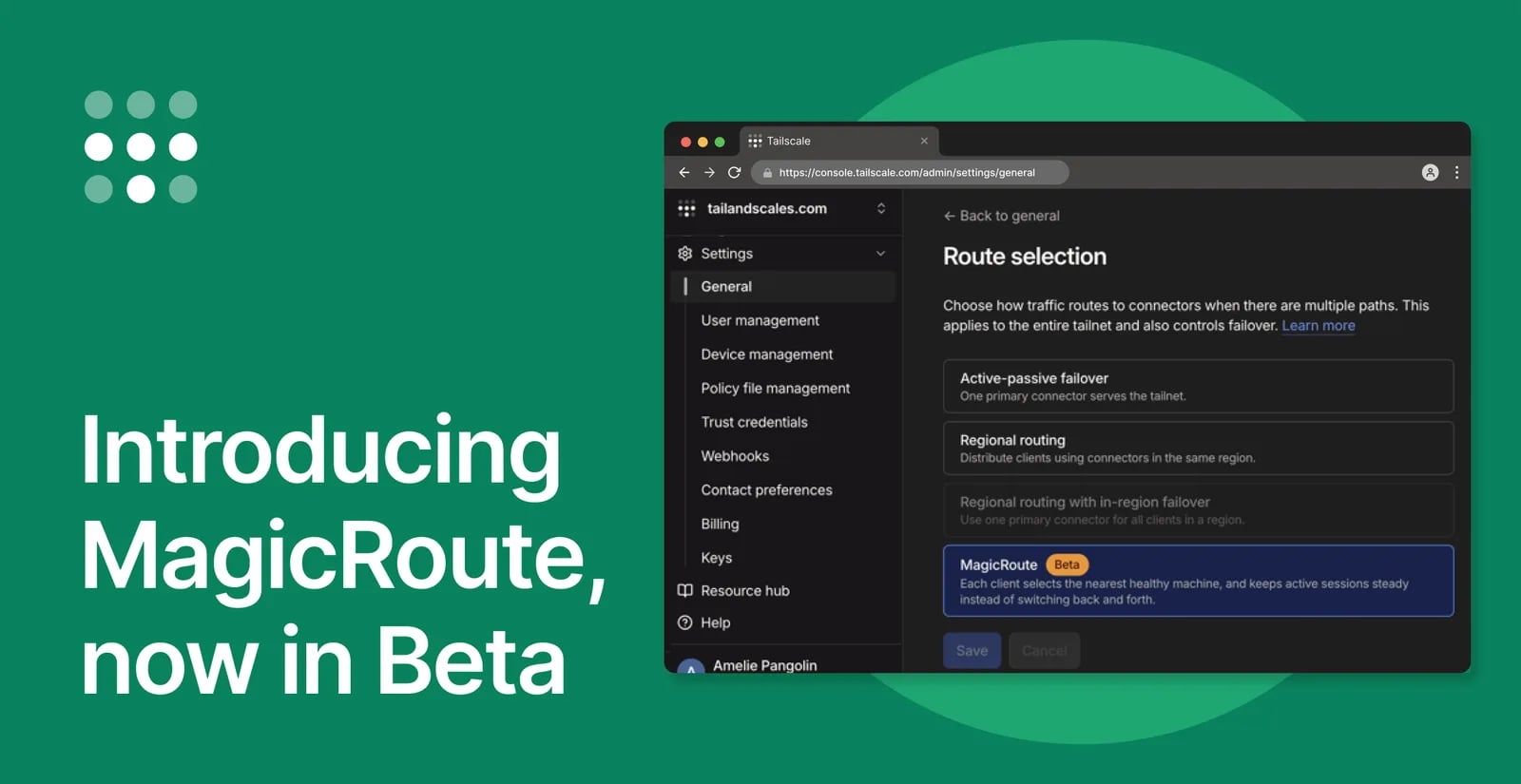
Today we’re announcing MagicRoute, a new way to select the best available backend when you’re running more than one. MagicRoute uses signals, like location, to find the best subnet routers and app connectors, and stick with them more reliably. It’s available now, in beta, for Premium and Enterprise customers.
The best kind of technology is the kind you never think about. DNS and routing are network features that very much want you to think about them, and which nobody wants to configure or troubleshoot. We designed MagicDNS to Just Work like people expect it to. Now we’ve designed MagicRoute with the same goal, to Just Work for modern teams with distributed workforces and architectures.
Why MagicRoute?
Let’s say you have two overlapping subnet routers—advertising the same routes on different machines. You might add a second subnet router for redundancy, so a crashed machine doesn’t take down the subnet. Or for capacity, when one subnet router can’t handle all the traffic. Or for proximity, by spreading subnet routers around the world.
Once you introduce the second subnet router, how does your client choose?
Our last attempt was regional routing. This grouped subnet routers, app connectors, and Tailscale Service hosts (just “connectors” from here onward) into regions based on their home DERP servers. Your client would be matched with connectors in the same, or the nearest, DERP region.
But as more customers adopted regional routing, we learned that relying on DERP regions would sometimes lead to bad matches. When a connector is sitting on a fast backbone or major exchange point, its latency to several DERP regions could be nearly identical, often within a couple milliseconds of each other. Minuscule amounts of jitter can lead to the connector flapping between those regions: choosing one as its home, jumping to the other, and then bouncing back.
When a connector flaps, every client on it breaks existing connections, dropping SSH sessions or interrupting large file transfers partway. And if a client switches connectors, the other clients on its DERP home will also make that switch, causing a cascade of failures. We like fast connections, but usually not at the expense of stability.
Even if your connectors aren’t in a fancy datacenter, bad internet weather would also break regional routing for similar reasons. A temporary slowdown could cause your connector to pick a DERP home in another country, triggering clients to switch connectors and break connections.
And if you’re hosting custom DERP servers, you’ve been excluded from regional routing because their DERP regions are incompatible with our public regions.
All of this made it clear that DERP regions were the wrong criteria. The internet is too complex to make routing decisions based on one set of data points. So we asked ourselves what it would take to make routing Just Work. That’s where MagicRoute comes from.
How MagicRoute works
MagicRoute scores and ranks each connector in a tailnet from the client’s point of view. Clients are matched to their top choice for each subnet route and app. When there’s a tie for first place, clients are spread fairly among those top connectors.
In this example below, client A has two top choices, but only one of them is healthy. Client C also has two top choices, but since they’re both healthy, it has an even chance of picking either one.
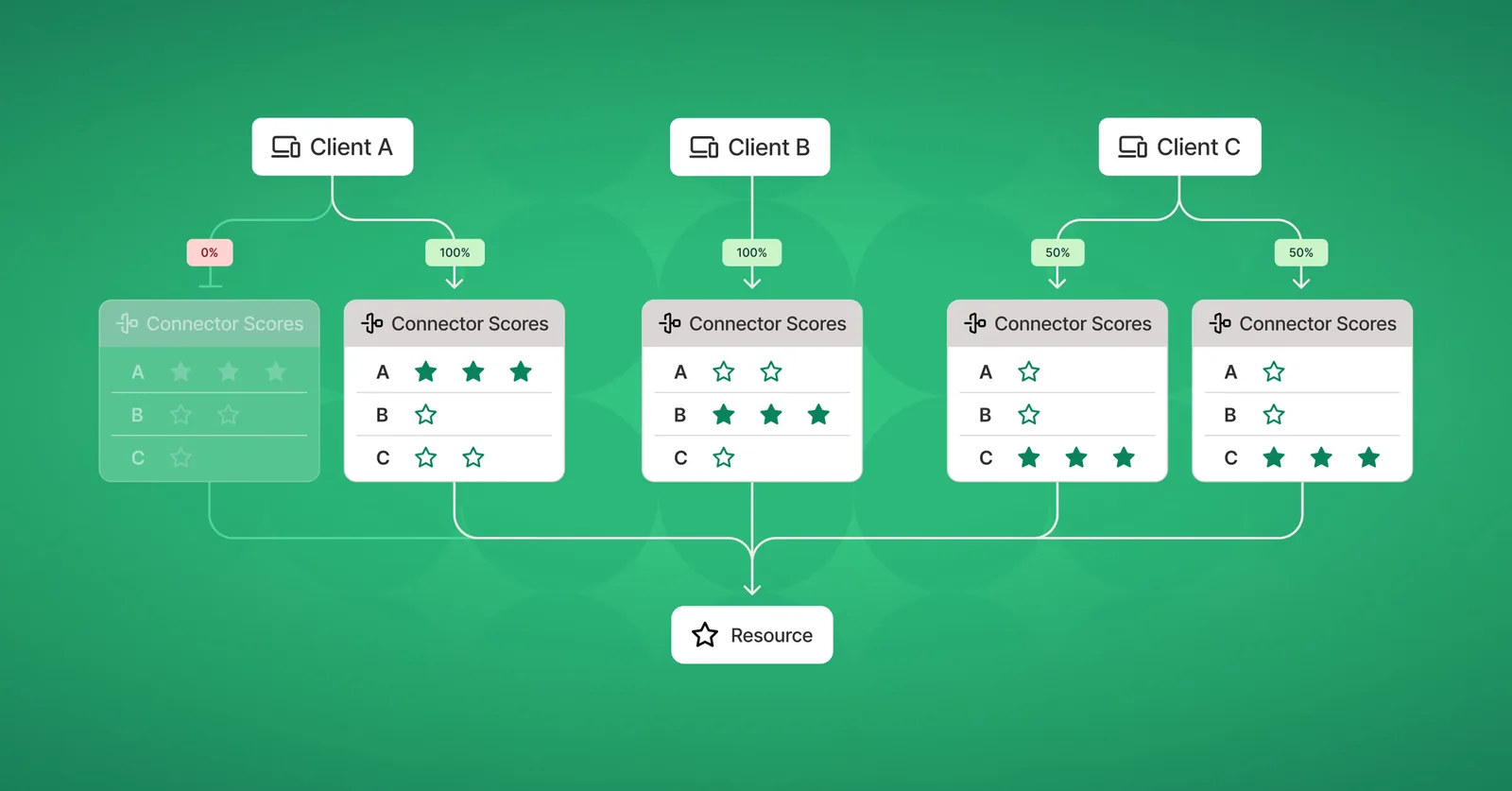
Coarse location is the signal behind MagicRoute scores today; we guess your location and keep only the precision necessary to match you to your nearest connector. We start by comparing approximate distances, because they don’t change if you don’t move, unlike latency measurements. Clients keep on using their preferred connector, so long as it’s healthy, which avoids breaking connections unnecessarily.
Since MagicRoute doesn’t rely on DERP regions any more, it also works in tailnets with custom DERP servers.
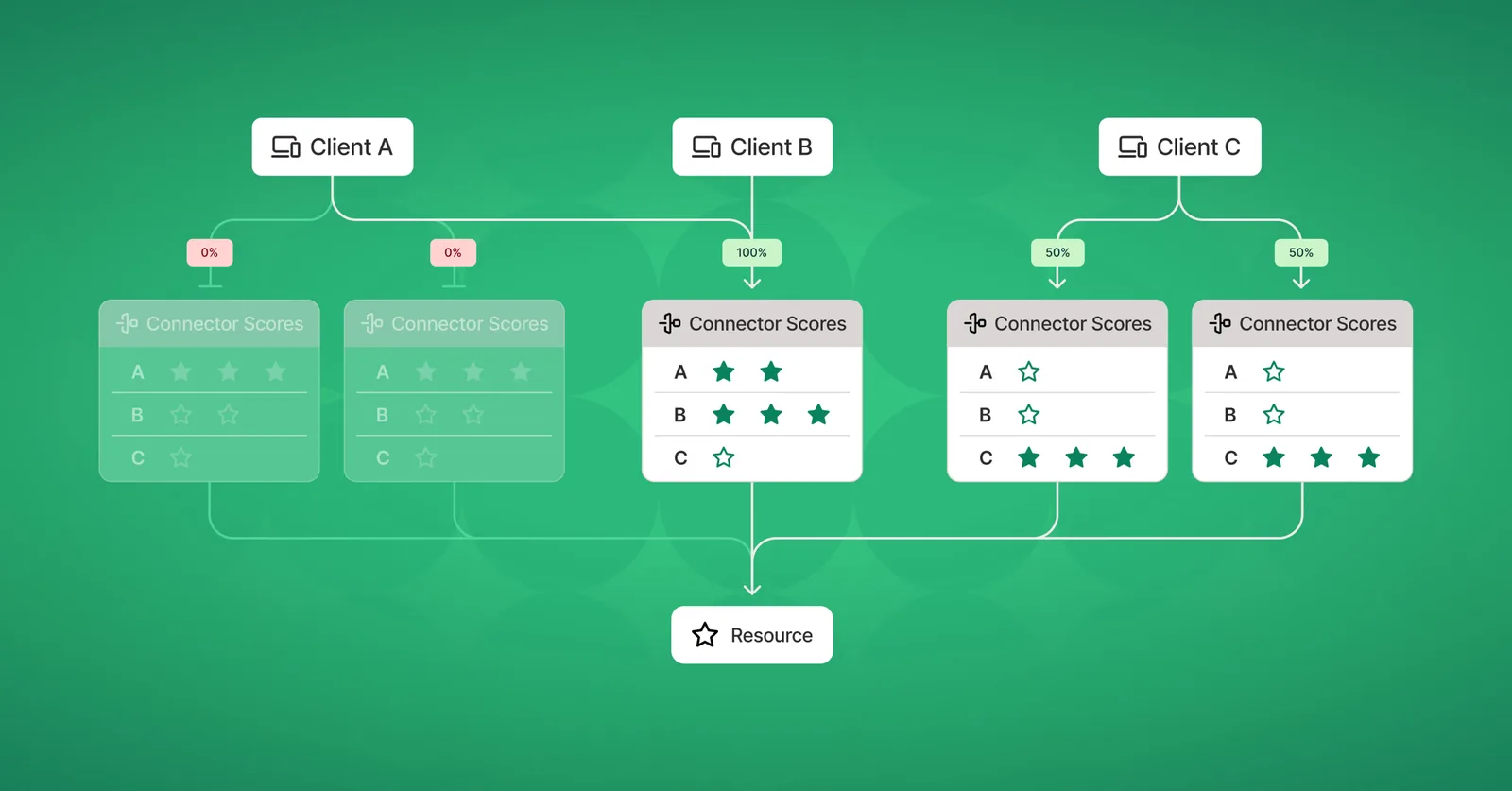
MagicRoute also affects how we handle unhealthy connectors. When a client’s preferred connector goes offline, we work down the ranked list of connectors until we find a healthy one. In this example below, both of client A’s choices are unhealthy, so it fails over to its next best choice.
Route selection in the console
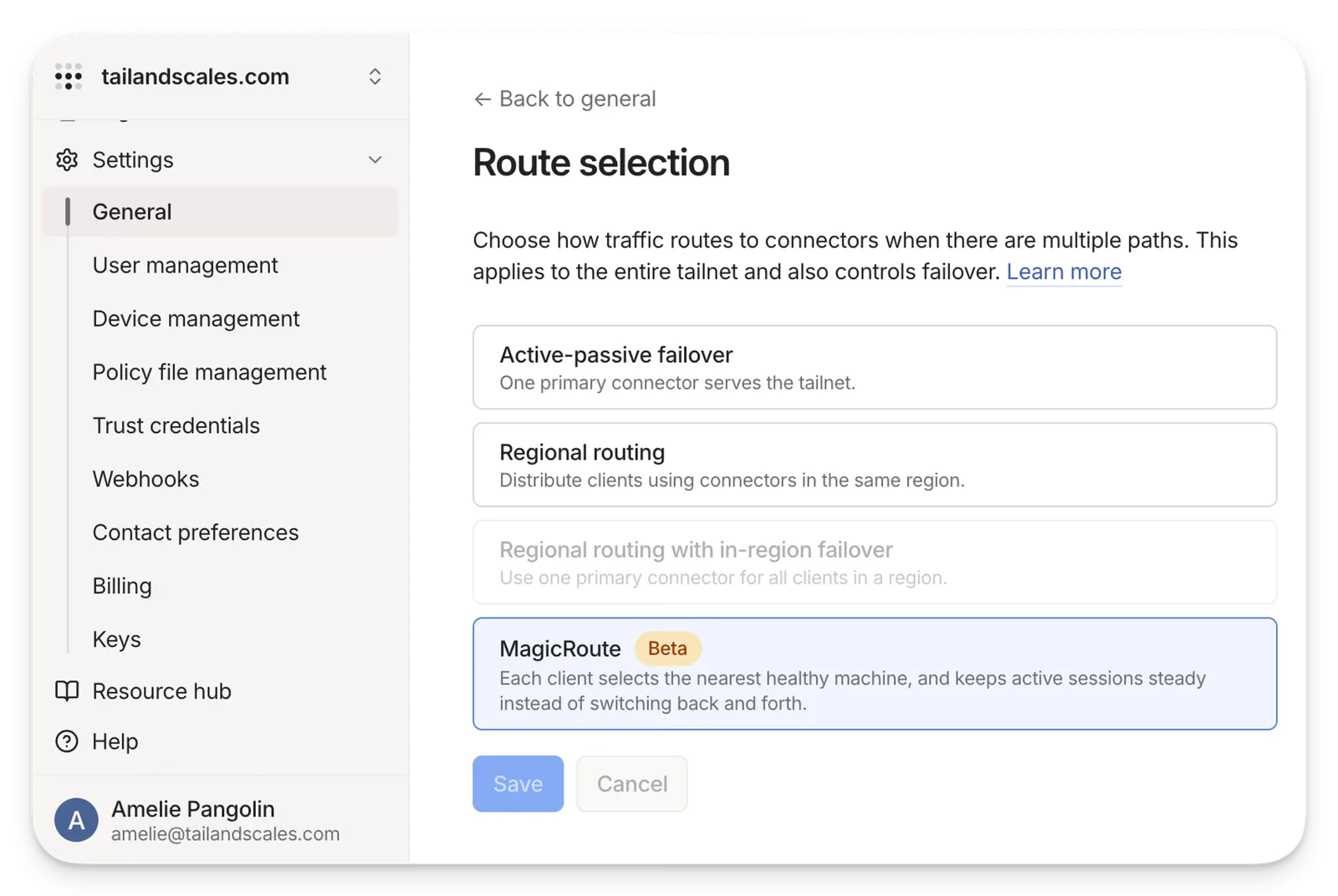
With the introduction of MagicRoute, tailnet administrators will see a change in their admin console. Instead of one switch that controls regional routing, there is now a Configure section (Settings > General > Route Selection > Configure). On Premium and Enterprise plans, you’ll now see four options:
- Active-passive failover: One primary connector serves the tailnet, with others standing by until it goes offline.
- Regional routing: Distribute clients using connectors in the same DERP region.
- Regional routing with in-region failover: Use one primary connector for all clients in a DERP region, with others standing by until their region’s primary goes offline. This option is not available without contacting support.
- MagicRoute: Each client selects the nearest healthy machine, and keeps active sessions steady instead of switching back and forth.
You can read more about all of these options at our docs page.
MagicRoute is intentionally a single option for a whole tailnet, with no opt-outs for individual connectors. Routing is difficult to fine-tune; setting rules for individual nodes may lead to unexpected interactions and bad behavior.
More magic over time
We’re improving MagicRoute as we gather your feedback. We’re looking into reachability checks, where the clients themselves ask, “Can I actually get packets to this connector?” And we’re considering additional signals for MagicRoute’s connector scoring system.
MagicRoute aims to offer a different experience. We’re naming it “Magic” to force ourselves to live up to the expectations we’re setting. It’s another step toward our ultimate mission of making safe connections effortless.
MagicRoute is in beta today for Premium and Enterprise customers. All client versions support MagicRoute for subnet routers, app connectors, and Tailscale Service hosts. Clients since version 1.86.0 support MagicRoute when suggesting recommended exit nodes.
You can read more about MagicRoute in our docs. More importantly, try out MagicRoute, and let us know how it works for you. If it could work better, send a Feedback ticket to help us make it more magical.
Originally published on
Tailscale Blog
Keep reading

 Cloudflare Blog

 Anthropic