Blazor Welcomes Open-Source Contributions from Infragistics
Microsoft and Infragistics are collaborating on Blazor through free, open source components, new .NET 11 analyzers, and developer tooling. The post Blazor Welcomes Open Source Contributions from Infragistics appeared first on .NET Blog .

We’re pleased to welcome Infragistics as an active contributor to Blazor! As part of our collaboration, Infragistics has made more than 50 of its Blazor controls free and open source, and its engineers are contributing directly to the framework. Their work includes new Blazor analyzers for .NET 11 and tooling to help you get started with their components.
Infragistics recently announced this collaboration, building on its experience developing UI components for .NET. By investing in both open-source components and Blazor itself, Infragistics is helping improve the experience for every Blazor developer, whether or not you use its controls.
Free, open-source Blazor components
The Ignite UI for Blazor open-source components include inputs, navigation, and layout controls such as Combo Box, Date Picker, Tree, Stepper, and Tile Manager. Grid Lite provides a lightweight option for displaying tabular data.
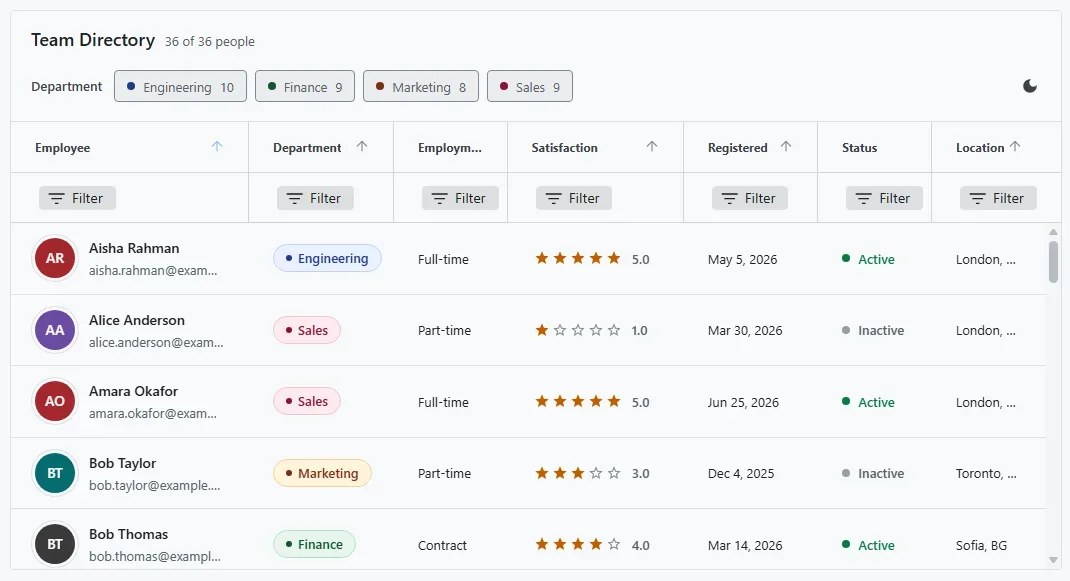
A team directory built with Ignite UI for Blazor Grid Lite, showing column filters and custom cell content.
These components are available under the MIT license for use in personal and commercial applications. You can inspect the source, report issues, and contribute improvements in the Ignite UI for Blazor repository. This is a free, open-source subset of the broader Ignite UI for Blazor offering, not a trial of the commercial suite.
To add the core open-source controls to an existing Blazor project, install the IgniteUI.Blazor.Lite NuGet package:
dotnet add package IgniteUI.Blazor.Lite
If you need Grid Lite, it is available as a separate IgniteUI.Blazor.GridLite package:
dotnet add package IgniteUI.Blazor.GridLite
Follow the repository’s setup instructions to configure the services, namespace imports, and theme for the components you use. Ignite UI components require an interactive render mode in Blazor Web Apps, and the instructions cover the supported hosting models.
Improving Blazor in .NET 11
Infragistics engineers are bringing their experience as component builders directly into Blazor. They’ve contributed a range of new analyzers for .NET 11 that help developers catch common mistakes while writing code.
For example, their analyzers flag unnecessary StateHasChanged() calls and authentication-state usage that can leave an app with stale user information.
These contributions are merged into ASP.NET Core for .NET 11. The improvements become part of the framework’s developer tooling and benefit every Blazor developer, regardless of which component library they choose.
Quality and easier setup
We’ve worked closely with Infragistics on its Blazor components to help meet a high quality bar for performance, accessibility, security, and trimmability. Those concerns matter when you’re choosing components for production apps, from keyboard and assistive technology support to publishing a trimmed Blazor WebAssembly application.
Infragistics is also contributing an Ignite UI setup scaffolder to the .NET scaffolding tools. The contribution is under review and is designed to automate package installation and application configuration.
For developers working with AI coding assistants, Infragistics has contributed the Ignite UI for Blazor skill to the .NET skills repository. The skill guides agents through package selection, service registration, theming, and render-mode requirements, including setup for apps with separate server and client projects.
Join the Blazor Community Standup
Join us and Infragistics on October 27, 2026, at 10 a.m. Pacific Time for a Blazor Community Standup about our collaboration and the free Ignite UI for Blazor components. Watch below, or join us on YouTube to ask questions in the live chat.
Build with Ignite UI and share your feedback
Explore the free Ignite UI for Blazor components and try the controls that fit your app. You can share feedback and contribute fixes in the Ignite UI repository.
We’re grateful to Infragistics for investing engineering resources in Blazor and sharing its components with the community. We welcome contributions from across the .NET ecosystem, and we look forward to continuing this work together.
The post Blazor Welcomes Open-Source Contributions from Infragistics appeared first on .NET Blog.
منتشرشده در
.NET Blog
ادامه مطالعه