Operate with confidence: check production with your coding agent
Know when something changes in production, and where to look, without adding a monitoring tool.
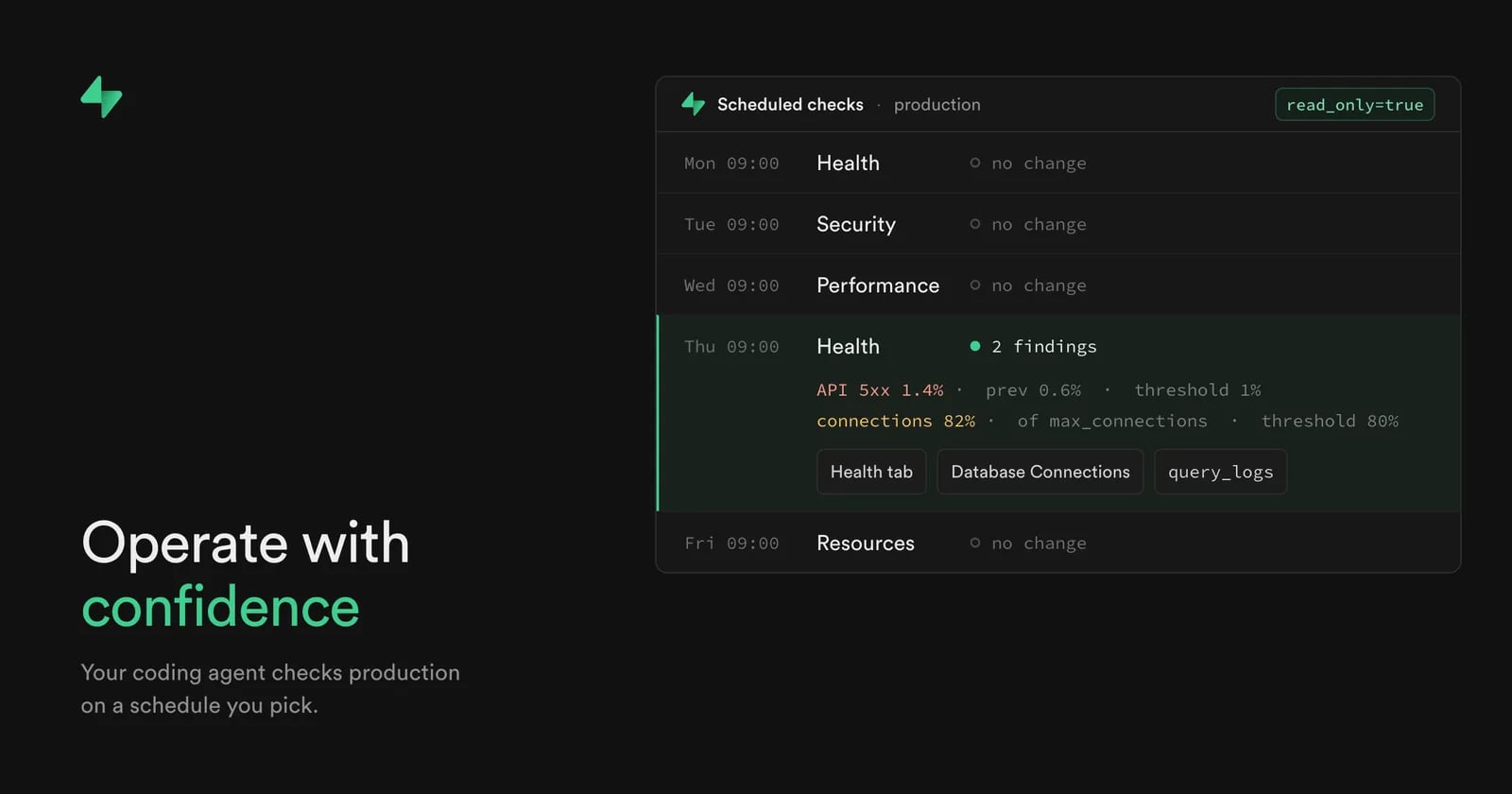
At Supabase Select, we shared our goal: a coding agent that helps you build and operate your Supabase project. We shipped tools that give it more data and knowledge. Your coding agent can now check your production Supabase project for error spikes, security issues, slow queries, and resource growth, on a schedule you pick.
Teams with apps in production often hear about a problem from their users first. Then they dig through logs and database reports to find the cause. With Agent prompts, your agent reports each new or worse problem, with the measured value and where to look next.
Run a prompt on demand, or schedule it as a Claude routine, a Codex scheduled task, or a Cursor automation. Agent prompts are one of five releases from the Operate with confidence launch, all available now. The other four help your agent find problems and show you the details in your dashboard:
query_logs: an MCP tool that runs read-only SQL on your logs- Updated agent skills: the
supabaseskill now covers debugging - Health Check Advisors: a Health tab in Advisors that flags unusually high error rates
- Database Connections: a dashboard page to find blocked or long-running queries
Agent prompts#
Agent prompts tell your agent what to check and when a change is worth reporting. Depending on the prompt, your agent reads the logs, Postgres diagnostics, or security and performance advisor findings.
The Supabase docs have four:
| Prompt | What it checks | Suggested cadence |
|---|---|---|
| Health | API and Auth server errors, error-rate spikes, connection pressure | Hourly |
| Security | Security Advisor findings, authentication and authorization failures | Daily |
| Performance | Slow queries, lock waits, long-running sessions, Performance Advisor findings | Hourly |
| Resources | Request, error, storage, table, and connection growth | Daily |
Each finding gives the measured value against its threshold and one next step. A Health finding, for example, reports that API server errors passed 1% and doubled from the previous hour, and names the log source and hour to read. The thresholds come from the public detection checks and are starting alert policies you can override.
A run reports new or worse findings, a threshold you set being crossed, and any check that can no longer run or fails for a new reason. A clean run reports nothing. To skip findings it already reported, your agent tool must save alert state between runs. Without it, the agent says it can't tell what's new.
The prompts tell the agent to ignore instructions found in log messages or query results.
Set up a scheduled check#
1. Connect the Supabase MCP server read-only
Scope the server to one project with
project_ref
, and add
read_only=true
so every query runs as a read-only Postgres user. In Claude Code, replace
abc123
with your project ref:
_10claude mcp add --scope project --transport http supabase "https://mcp.supabase.com/mcp?project_ref=abc123&read_only=true"
Then run
claude /mcp
in a regular terminal, select supabase, and choose Authenticate.
The MCP docs cover other clients and the
features
parameter, which limits the tool groups the agent gets.
2. Copy a prompt from its docs page
At the start of every run, the agent fetches the detection checks for current queries and thresholds. If the agent can't fetch them, it reports that it can't assess the project.
3. Run it once
Paste the prompt into your agent and read the report before you schedule it.
4. Schedule it
Create a Claude routine (
/schedule
in Claude Code), a Codex scheduled task, or a Cursor automation. The prompt pages have steps for all three. A scheduled run can't stop to ask for approval, so pre-approve only the read-only tools the prompt needs. On a small project, start with one prompt on a daily or weekly schedule.
5. Act on a report
Reports arrive in your agent tool. To send reports elsewhere, add a destination to the prompt, such as a Linear issue. For an error-rate finding, open the Health tab in Advisors. For connection pressure or a blocked query, open Database Connections.
query_logs#
query_logs
is a new Supabase MCP tool that runs read-only SQL against your project's logs, up to 24 hours per request, and can aggregate and join across log fields. The Health prompt uses it to compare each hour's API and Auth server errors with the hour before.
Updated agent skills#
The
supabase
agent skill now covers debugging. When your agent hits an error from your project, such as a Postgres or PostgREST error code, an empty result, or an unexpected RLS block, the skill tells it to fetch the current Supabase observability docs before it diagnoses the problem, instead of working from memory. Those docs list the health, security, performance, and resource signals to watch and how to check each one. Install the skills:
_10npx skills add supabase/agent-skills
If you already have them, run
npx skills update
.
Health Check Advisors#
The Advisors page now has a Health tab, beside Security and Performance. It flags error rates that run higher than normal across the Data API, Auth, Storage, and Edge Functions. Run the Health checks on demand from the dashboard or the Management API. For each finding, the Advisors docs say which log source to read and how to interpret the errors.
Database Connections#
Database Connections is a dashboard page that shows which sessions hold connections, which queries run long, which sit idle in a transaction or are blocked, and which session holds the lock. You can cancel a query or terminate its connection from the page, without writing SQL. It's on by default for every project, including self-hosted. The connection management docs explain when to cancel and when to terminate.
Getting started#
- Set up the Supabase MCP server and the agent skills.
- Pick one prompt from Agent prompts and run it against your project.

Originally published on
Supabase Blog
Keep reading

 AWS News Blog