
Deno 2.9 is here, headlined by
deno desktop
, a new way to build native desktop applications from the web stack you already know, with no Electron boilerplate and a single binary at the end. It’s also the easiest release yet to bring an existing Node project over:
deno install
now reads npm, pnpm, yarn, and Bun lockfiles directly, so switching your package manager to Deno takes a couple of commands, not a migration. There’s plenty more below, from CSS module imports and a much stronger test runner to faster startup and Node.js 26 compatibility.
To upgrade to Deno 2.9, run the following in your terminal:
deno upgrade
If Deno is not yet installed, run one of the following commands to install or learn how to install it here.
# Using Shell (macOS and Linux):
curl -fsSL https://deno.land/install.sh | sh

# Using PowerShell (Windows):
iwr https://deno.land/install.ps1 -useb | iex
deno desktop
Building a desktop app has usually meant pulling in Electron or Tauri, wiring up a separate toolchain, and shipping a bundle that bears little resemblance to the rest of your project.
Deno 2.9 introduces
deno desktop
. Point it at a script (or a web framework project) and it produces a native, self-contained desktop application where the UI runs in a webview, your logic runs in Deno, and the whole thing compiles down to a single distributable binary (#33441).
deno desktopis experimental in 2.9. The surface described here is stabilizing and some platform features are still landing.
The simplest app is an entrypoint that serves your UI.
Deno.serve()
inside a desktop entrypoint automatically binds to the port the webview opens, so there’s no port wiring to do:
Deno.serve(() =>
  new Response(
    "<!DOCTYPE html><h1>Hello from Deno desktop 👋</h1>",
    { headers: { "content-type": "text/html" } },
  )
);
$ deno desktop main.ts
That opens a native window rendering your page.
deno desktop
shares the same
framework detection as
deno compile: run it with no
entrypoint (or
deno desktop .
) and it auto-detects the web framework in the current directory (Next.js, Astro, Fresh, Remix, Nuxt, SvelteKit, SolidStart, TanStack Start, and Vite SSR are all supported), builds it, and wraps the result:
$ deno desktop          # auto-detect the framework in the current directory
$ deno desktop --hmr    # run with Hot Module Replacement during development
Native desktop APIs
Richer apps get a full set of native desktop APIs built right into the runtime under
Deno.*
, available immediately with no extra dependencies.
Deno.BrowserWindow
gives you programmatic control over window size, position, visibility, menus, and DevTools, and lets you bridge between the webview and Deno: bind a function in the entrypoint with
window.bind()
and call it from page JavaScript via the
bindings
namespace. There’s also
Deno.Tray
for system-tray icons and panels, and
Deno.Dock
on macOS:
const tray = new Deno.Tray();
tray.setIcon(iconBytes);
const panel = tray.attachPanel({ url: "https://localhost:8000/panel" });
panel.window.bind("doThing", async () => {/* ... */});
prompt()
,
alert()
, and
confirm()
render as native dialogs, and
Deno.autoUpdate()
wires up a polling auto-updater that applies binary patches in the background.
Webview or CEF
Every desktop app needs a browser engine to draw its UI, and
deno desktop
ships two, selected with
--backend
:
webview(the default) renders with the operating system’s built-in engine: WebView2 on Windows, WebKit on macOS and Linux. Nothing extra is bundled, so binaries stay small and launch fast. The tradeoff is that rendering follows whatever engine the host ships.cefbundles Chromium through the Chromium Embedded Framework, so every user gets the same modern engine on every platform. That adds tens of megabytes and a download at build time, but guarantees identical rendering and the latest web-platform features everywhere.
$ deno desktop main.ts                  # native webview (default)
$ deno desktop --backend cef main.ts    # bundled Chromium
Most apps are happiest on the default
webview
; reach for
cef
when you need a guaranteed-identical engine on every platform.
Distribution
Because
deno desktop
is built on the same machinery as
deno compile
, the output is a standalone binary with your code and assets embedded. The format follows the extension you pass to
--output
:
.app
and
.dmg
on macOS,
.exe
or an
.msi
installer on Windows, and
.AppImage
,
.deb
, or
.rpm
on Linux.
You don’t need a fleet of machines to ship cross-platform, though.
--target
cross-compiles the app to any supported platform and
--all-targets
builds them all in one command, so a single Linux CI runner (or your laptop) can turn out binaries for Windows, macOS, and Linux together. The Windows
.msi
and Linux
.deb
/
.rpm
installers are authored in pure Rust, so they’re produced from any host with no platform-specific packaging toolchain:
$ deno desktop --output MyApp.dmg main.ts                 # build for the host
$ deno desktop --target x86_64-pc-windows-msvc main.ts    # cross-compile to Windows
$ deno desktop --all-targets main.ts                      # build every supported target
The five supported targets match
deno compile
: Linux x64/arm64, Windows x64, and macOS x64/arm64. For smaller artifacts,
--compress
ships the runtime and UI backend as a self-extracting bundle that unpacks on first launch.
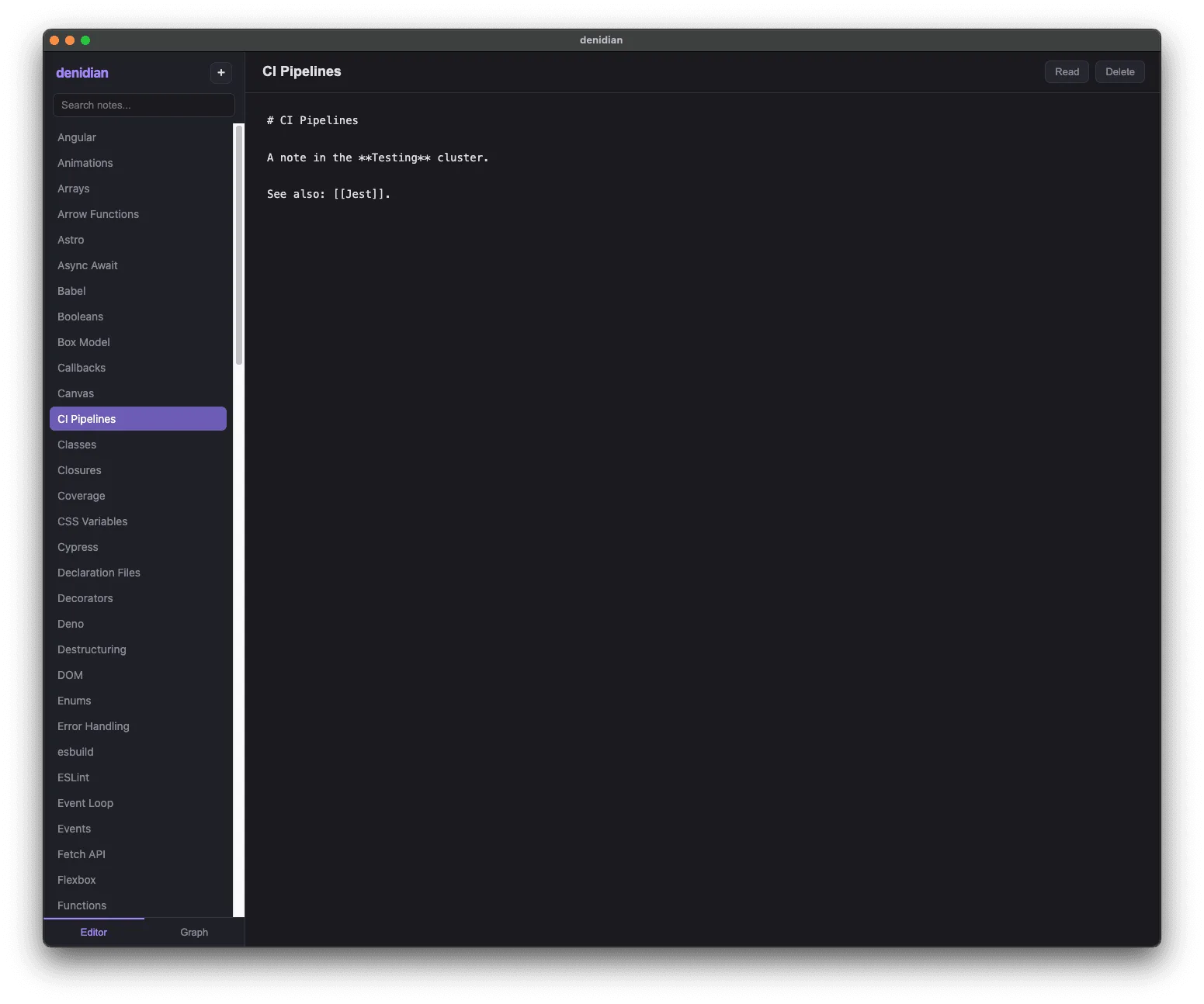
For the full guides, see the
deno desktop documentation. And for
a complete, real-world example,
denidian is a note-taking app built
with
deno desktop
:
Performance
Deno 2.9 ships broad performance gains in startup time, memory use, and HTTP throughput. The
Deno.serve
benchmarks below run three workloads at concurrency 100: a plaintext
Hello, World!
, a 1 MiB response body, and a realworld request that POSTs a JSON payload with a Bearer-auth header and echoes it back as JSON. All measured on a dedicated x86_64 Linux box against Deno 2.8.0:
lower is better
34.2 ms
v2.9
17.3 ms
Deno.serve
realworld
higher is better
56.8k req/s
v2.9
72.4k req/s
Deno.serve
plaintext
higher is better
77.0k req/s
v2.9
85.6k req/s
Deno.serve
1 MiB body
higher is better
1,617 req/s
v2.9
1,907 req/s
lower is better
142 MB
v2.9
64 MB
lower is better
197 MB
v2.9
63 MB
Deno.serve
throughput and peak RSS at concurrency 100; cold start is mean of 150
hyperfine
runs. Dedicated x86_64 Linux box, server and load generator pinned to disjoint cores,
oha
median of 3 runs.
Startup. A hello-world program now cold-starts in about half the time it took in 2.8 (
34ms
down to
17ms
). The win comes from lazy-loading
node:
globals out of the snapshot, gating the eager Node bootstrap to Node workers, a V8 code cache for residual lazy-loaded ESM modules, and a minified snapshot (#34450, #35373, #35338, #35183); on macOS, chained fixups trim additional pre-main time (#35409).
Memory. The standout this cycle is memory under load. In 2.8, resident set size grew with the workload, from roughly
94 MB
serving plaintext up to
197 MB
streaming 1 MiB bodies. In 2.9 it stays essentially flat, holding around
62 MB
no matter what the server is doing. That works out to
2.2x
less peak RSS on the realworld workload (
142 MB
down to
64 MB
) and
3.1x
less on 1 MiB bodies (
197 MB
down to
63 MB
), so the same machine can run far more concurrent
Deno.serve
instances before it runs out of headroom.
HTTP throughput.
Deno.serve
is faster across the board too: the realworld workload gains
1.27x
, plaintext
1.11x
, and 1 MiB bodies
1.18x
, helped by a new Deno-owned HTTP/1.1 serving path (#34446).
Several hot paths also moved from JavaScript into Rust this release:
crypto.subtle
(#34966) and
console
/
Deno.inspect
(#35087).
CSS module imports
Deno 2.9 supports importing CSS files as constructable stylesheets using import attributes, matching the CSS module scripts web standard (#35093):
import sheet from "./styles.css" with { type: "css" };

document.adoptedStyleSheets = [sheet];
The import evaluates to a
CSSStyleSheet
instance, so the same code runs in Deno and in the browser without a bundler step. It’s gated behind the
--unstable-raw-imports
flag in 2.9. A lone CSS import isn’t much on its own, but it’s the difference between front-end code that runs under Deno and code that trips the module loader: components and modules that import their own stylesheets now load and type-check directly, which makes testing front-end code in Deno considerably easier. Learn more about modules.
Migrating from npm, pnpm, yarn, and Bun
Moving an existing Node project to Deno is about as smooth as it gets: in most cases it’s a couple of commands. Run
deno install
to pull your dependencies and
deno task dev
to start your app, and you’re running on Deno. There’s nothing to port and nothing to rewrite. Deno reads the
package.json
, lockfile, and workspace layout you already have, and 2.9 closes the last rough edges so that even pnpm workspaces and tools that shell out to
node
work without intervention.
Your lockfile comes with you. The biggest friction in switching package managers is losing a carefully-pinned dependency graph. In 2.9 you don’t. Run
deno install
in a project that has a
package-lock.json
,
pnpm-lock.yaml
,
yarn.lock
, or
bun.lock
but no
deno.lock
, and Deno seeds a fresh
deno.lock
straight from it, carrying over the exact resolved versions and integrity hashes on that first install (#34296, #35394):
$ deno install
Seeded deno.lock from package-lock.json
There’s no re-resolution and no surprise upgrades: the versions you were running under npm are the versions you run under Deno. From there
deno install
writes a
node_modules
directory Deno can run against, and
deno task
runs the
package.json
scripts you already have, so the rest of your team can keep working the way they do.
Workspaces carry over, pnpm’s included. Deno already understands the
workspaces
field that npm, yarn, and Bun keep in
package.json
, so those monorepos work as-is. pnpm is the odd one out: it stores its workspace configuration in a separate
pnpm-workspace.yaml
that Deno doesn’t read, which used to surface as a confusing resolution error. Now Deno spots that file and migrates its
packages
,
catalog
, and
catalogs
into your
package.json
(or
deno.json
) without disturbing your comments or existing fields, then asks you
to re-run (#34993). Combined with
the catalog: protocol Deno
adopted in 2.8, your centralized, shared dependency versions keep working after
the move.
Tools that expect node keep working. Plenty of build tooling shells out to
a
node
binary directly, like Next.js’s Turbopack worker pool. When no real
node
is installed, Deno now puts a stand-in on
PATH
that forwards to itself and translates Node’s CLI arguments, so those tools run unmodified. A real
node
is never shadowed, and
DENO_DISABLE_NODE_SHIM=1
opts out (#34969).
Put together, you can drop Deno into a Node project, run your existing scripts against it, and decide how much further to take it on your own schedule. Read the guide to switching your package manager to Deno.
Dependency management
deno link and deno unlink
deno link
and
deno unlink
manage local package links from the CLI instead of hand-editing config, in the spirit of
npm link
(#34359). Point
deno link
at a local directory containing a
deno.json
with a
name
field, and it’s added to the
links
array and importable by its name everywhere in your project:
$ deno link ../my-lib
Link ../my-lib (my-lib)

$ deno unlink my-lib   # by name, or `deno unlink ../my-lib` by path
{
  "imports": {},
  "links": ["../my-lib"]
}
The
links
field itself is now stable in 2.9: it shipped under that name back
in 2.3 and was never gated behind a runtime flag, so 2.9 simply drops the
remaining “unstable” labeling
(#34996).
Learn more about deno link.
deno list
The new
deno list
subcommand prints the dependencies your project declares in
deno.json
and
package.json
and resolves their versions, the equivalent of
npm ls
/
pnpm list
, answering “what do I depend on” rather than walking the full module graph the way
deno info
does (#34972):
$ deno list
┌───────────────────────┬──────────┬──────────┐
│ Package               │ Required │ Resolved │
├───────────────────────┼──────────┼──────────┤
│ jsr:@hono/hono (hono) │ ^4       │ 4.12.23  │
├───────────────────────┼──────────┼──────────┤
│ jsr:@std/assert       │ ^1       │ 1.0.19   │
├───────────────────────┼──────────┼──────────┤
│ npm:express           │ ^5       │ 5.2.1    │
└───────────────────────┴──────────┴──────────┘
Flags narrow or widen the view:
$ deno list --depth 2        # show the tree two levels deep
$ deno list --prod           # production dependencies only
$ deno list -r               # include all workspace members
$ deno list "*eslint*"       # filter by name (wildcards supported)
Prefer package.json
For projects that keep
package.json
as their source of truth, the new
preferPackageJson
setting makes
deno add
,
deno install
, and
deno remove
manage dependencies in
package.json
instead of
deno.json
(creating one if it doesn’t exist), the equivalent of passing the
--package-json
flag added in 2.8 on every command (#35392):
{
  "preferPackageJson": true
}
deno install
also reads the
engines
field in
package.json
and warns (never
errors, matching npm) when the current Node or Deno version doesn’t satisfy a
declared constraint (#34225).
Learn more about preferPackageJson.
JSR dependencies in node_modules
When a
node_modules
directory is in use, the new
jsrDepsInNodeModules
option installs
jsr:
dependencies into it through JSR’s npm compatibility registry (
jsr:@david/dax
becomes
npm:@jsr/david__dax
, served from
npm.jsr.io
). This matches the native JSR support package managers like pnpm and npm already provide, which install JSR packages through the same npm-compat registry (#35029):
{
  "jsrDepsInNodeModules": true
}
With it on, JSR packages behave like npm dependencies on disk: the full tarball is materialized (so a package can read its own bundled assets and
import.meta.dirname
is defined), and each one is symlinked under its original
@scope/name
so external type checkers and bundlers resolve it like any other npm install. It’s opt-in and off by default; left off,
jsr:
specifiers keep
resolving over HTTPS exactly as before.
Learn more about jsrDepsInNodeModules.
Workspace node_modules
In a workspace,
deno install
now creates a
node_modules
directory inside each member and populates its
.bin
, so Node tooling run from within a member (eslint, svelte-check, astro, and so on) finds the local dependencies it expects (#34970).
Lockfile merge conflicts
A
deno.lock
containing git merge conflict markers used to be a hard error. Deno 2.9 resolves them automatically, unioning the additive sections and taking the higher version on genuine specifier conflicts, so a rebase no longer means hand-editing the lockfile (#34726).
Supply chain security
Minimum dependency age, enabled by default
A large class of npm supply-chain attacks is caught simply by waiting: a
malicious version is usually detected and unpublished within a day or two of
being released. Deno’s
min-release-age,
introduced in 2.6, refuses to install any npm package version younger than a
configured age. In 2.9 it is enabled by default with a 24-hour window, so a
freshly-published, potentially compromised version never lands in your
dependency tree the moment it appears
(#35458).
The default sits at the bottom of the
min-release-age
precedence chain, so anything you set explicitly wins. Tune or disable it in
.npmrc
:
min-release-age=72h    # wait three days instead of the 24-hour default
min-release-age=0      # opt out entirely
It also fetches the richer npm metadata that the
no-downgrade
trust policy
below relies on, so the two supply-chain guards work well together.
Learn more about .npmrc configuration.
no-downgrade trust policy
Deno 2.9 adds an opt-in npm trust policy that defends against stolen-maintainer-token attacks (#34927). Following pnpm’s design, Deno ranks how each package version was published: staged publishing (a maintainer approving with a live 2FA challenge) is the strongest signal, then trusted publishing backed by a provenance attestation, then a provenance attestation on its own.
Enable the policy with
trust-policy=no-downgrade
in
.npmrc
:
trust-policy=no-downgrade
With it on, Deno refuses to resolve a version whose trust evidence is weaker than the strongest evidence on any earlier-published version of the same package (compared by publish date). If a package has consistently shipped through trusted publishing or with provenance and a later version suddenly appears as a plain token publish (the hallmark of a compromised maintainer token, as in the August 2025 s1ngularity incident), the install becomes a hard error instead of a silent downgrade. Two escape hatches mirror pnpm:
trust-policy-ignore-after
(in minutes) skips the check for older, genuinely pre-provenance releases, and
trust-policy-exclude[]=<package>
exempts named packages.
The policy is off by default, since provenance and trusted publishing are still unevenly adopted across the registry. It builds on the
min-release-age
guard
above, which already fetches the metadata the trust check needs.
Learn more about .npmrc configuration.
Testing and coverage
Deno’s built-in test runner picks up features you used to reach for Vitest or Jest to get.
Snapshot testing
The test context now has a built-in
t.assertSnapshot()
, using the same format and serializer as
@std/testing/snapshot
, no import required (#35139):
Deno.test("renders the header", async (t) => {
  await t.assertSnapshot(renderHeader({ title: "Deno 2.9" }));
});
Snapshots are written to
__snapshots__/<test file>.snap
next to the test. On a mismatch the runner prints a diff and tells you how to update:
error: AssertionError: Snapshot does not match:

    [Diff] Actual / Expected

    {
+     value: 2,
-     value: 1,
    }

To update snapshots, run
    deno test --update-snapshots [files]...
Default-location snapshots need no read/write permissions (the runner manages them), and stale entries are pruned automatically when a full run updates them. Pass
--update-snapshots
(or
-u
) to regenerate. Snapshot testing also works through
node:test
, via
t.assert.fileSnapshot()
(#35478). Learn more about snapshot testing.
Change-aware test selection
For fast local iteration,
deno test
can run only the tests affected by your changes (#35199):
$ deno test --changed              # tests affected by uncommitted changes
$ deno test --changed=origin/main  # tests affected since branching off main
$ deno test --related=src/util.ts  # tests that depend on a specific file
Selection is dependency-aware (it walks the module graph, across workspace members) and conservative: changing your config, lockfile, import map, or
package.json
disables filtering and runs everything. It pairs naturally with a file watcher for a tight edit-test loop, or with
--changed=origin/main
in CI
to run only the tests a pull request could have affected.
Learn more about deno test.
Retries and repeats
Flaky tests can now be retried, and stability-sensitive tests can be repeated, either per-test or across the whole run (#35053):
Deno.test({
  name: "eventually consistent",
  retry: 2,
  fn: async () => {
    // re-run up to 2 more times on failure; passes if any attempt passes
  },
});
$ deno test --retry=2     # retry every failing test up to 2 times
$ deno test --repeats=5   # run each test 5 extra times; all must pass
A test that only passes after a retry is reported as
flaky
in the summary, so the signal isn’t silently lost. Per-test options take precedence over the CLI flags (including an explicit
0
to opt a test out).
Learn more about deno test.
Coverage thresholds
Coverage can now fail a run when it drops below a target, either via a flag or configured per-metric in
deno.json
(#35056):
$ deno coverage --threshold=90 coverage/
$ deno test --coverage --coverage-threshold=90
{
  "coverage": {
    "thresholds": { "lines": 90, "branches": 80, "functions": 90 }
  }
}
When the aggregate falls short, the command exits non-zero and tells you which metric missed:
Coverage threshold not met:
  - Line coverage 85.00% is below the threshold of 90.00%
Learn more about deno coverage.
Sharding with --shard
deno test --shard=<index>/<count>
splits the discovered test files into balanced groups and runs only one group, so you can fan a suite out across CI machines (#35057). It drops straight into a GitHub Actions matrix:
jobs:
  test:
    strategy:
      matrix:
        shard: [1, 2, 3]
    steps:
      - uses: denoland/setup-deno@v2
      - run: deno test --shard=${{ matrix.shard }}/3
The index is 1-based, sharding happens before
--shuffle
, and over-sharding
(more shards than files) simply leaves some shards empty and exits cleanly.
Learn more about deno test.
Parameterized tests with Deno.test.each
Deno.test.each
registers one real, independently-filterable test per case from a table of inputs (#34938):
import { assertEquals } from "jsr:@std/assert";

Deno.test.each([
  [1, 1, 2],
  [1, 2, 3],
  [2, 1, 3],
])("add(%i, %i) = %i", (a, b, expected) => {
  assertEquals(a + b, expected);
});
Array cases are spread as positional arguments; object cases are passed as a single argument and can be interpolated into the test name with
$key
:
Deno.test.each([
  { a: 1, b: 1, sum: 2 },
  { a: 2, b: 3, sum: 5 },
])("$a + $b = $sum", ({ a, b, sum }) => {
  assertEquals(a + b, sum);
});
Name templates support printf-style tokens (
%s
,
%i
/
%d
,
%f
,
%j
,
%o
),
%#
for the case index, and
$key.nested
for nested object access.
Deno.test.only.each
and
Deno.test.ignore.each
compose as you’d expect.
Learn more about Deno.test.
deno compile
deno compile
gains
--include-as-is
, which embeds a file or directory into the executable’s virtual filesystem without any module resolution or transpilation (#32417). Where
--include
runs files through the module graph,
--include-as-is
is for assets and pre-built bundles you just want available via filesystem APIs at runtime:
$ deno compile --include-as-is dist/ --allow-read server.ts
const html = Deno.readTextFileSync(import.meta.dirname + "/dist/index.html");
The two flags combine, so you can resolve some modules and embed others verbatim in the same build.
Compiled binaries also get real persistent storage. A default
Deno.openKv()
,
localStorage
, and the
caches
API now persist to a per-app directory under the platform’s app-data location instead of falling back to in-memory storage (#34618). The storage identity is the new
--app-name
flag, which defaults to the output file name, so two binaries built with the same
--app-name
share a store, and renaming a binary no longer loses its data:
$ deno compile --unstable-kv --app-name notes --output notes main.ts
Smaller binaries with --bundle. By default
deno compile
embeds your entire resolved
node_modules
tree into the binary. The new experimental
--bundle
flag instead runs your entrypoint through Deno’s bundler first (tree-shaking and emitting a single module), and embeds that, which can dramatically shrink binaries for npm-heavy projects (in the project’s own measurements, a lodash hello-world dropped from 11.6 MB to 1.5 MB). Pair it with
--minify
to shrink the embedded bundle further (#34527, #34532, #34536):
$ deno compile --bundle --minify --output app main.ts
Warning deno compile --bundle is experimental and may change.
deno compile
also picks up a
--watch
mode that rebuilds the executable when
your sources change (#34860).
Learn more about deno compile.
deno bundle
deno bundle
can now emit a rolled-up
.d.ts
alongside the bundled JavaScript with
--declaration
, inlining re-export chains into a single self-contained declaration file per entrypoint (#33838):
$ deno bundle mod.ts --outdir dist --declaration # -> dist/mod.js + dist/mod.d.ts
It also understands the object form of npm’s
package.json
browser
field when bundling with
--platform browser
, remapping or stubbing modules for browser
targets (#34407).
Learn more about deno bundle.
deno fmt
This release rebuilds Deno’s non-JS formatters on the new
lax
formatting engines, which only ever move whitespace: they never reorder, requote, or drop a token, and they pass malformed input through instead of erroring.
- Markup. HTML, XML, and SVG are now formatted by
lax-markup, and they format by default with no flag (#35174). Component formats (Vue, Svelte, Astro, Vento, Nunjucks, and Mustache) are available under--unstable-component. A 10 MB document that previously couldn’t be formatted in 15 minutes now takes about a tenth of a second. - CSS. CSS, SCSS, and Less are now formatted by
lax-css(still under--unstable-css), which fixes a long list of parse errors and value-mangling bugs (#35160). Note that the indented.sasssyntax is no longer supported. - SQL. SQL formatting (under
--unstable-sql) is now powered bylax-sql, which produces canonical, dialect-agnostic output: Postgres dollar-quoting, MySQL backticks, T-SQL brackets, and placeholders all pass through untouched (#35161).
There are also new configuration options for JavaScript and JSON formatting:
-
Sorting named imports and exports. Two new options,
sortNamedImportsandsortNamedExports, control how named specifiers are ordered withinimport/exportstatements. Both accept"caseInsensitive"(the default),"caseSensitive", and"maintain"(leave source order alone), handy for matching another tool’s ordering, e.g. Biome’s (#33313): deno.json{ "fmt": { "sortNamedImports": "maintain" } }
-
JSON trailing commas. A new
json.trailingCommasoption controls trailing commas in JSON and JSONC. It accepts"never"(the default),"always","maintain", and"jsonc"(which adds them in.jsoncfiles and omits them in.json) (#33383). -
.editorconfigsupport.deno fmtnow reads.editorconfigfiles and uses them to fill in any formatting options you haven’t set explicitly, so a shared editor config no longer drifts from how Deno formats. Precedence runs CLI flags →deno.json→.editorconfig→ built-in defaults (#34071).
deno task
deno task
grew into a much more capable build runner this release, with input-based caching, concurrency control, and several new flags.
Input-based caching
Declare a task’s inputs with
files
, and Deno skips the task entirely when nothing relevant has changed, restoring any declared
output
artifacts straight from the cache (#34509):
{
  "tasks": {
    "build": {
      "command": "deno run -A build.ts",
      "files": ["src/**/*.ts"],
      "output": ["dist/**"]
    }
  }
}
$ deno task build
Task build deno run -A build.ts
$ deno task build
Task build deno run -A build.ts (cached, inputs unchanged)
On each run Deno computes a fingerprint from the command, the contents of the files matched by
files
, the values of any environment variables you list in
env
, the fingerprints of the task’s
dependencies
, and the host OS, CPU architecture, and Deno version. If that fingerprint matches the last successful run, the task is skipped and its
output
files are restored from the cache; otherwise it runs and the cache is refreshed.
A few consequences worth knowing:
- Arguments and env are part of the key.
deno task build fooanddeno task build barcache independently, and changing a listedenvvalue invalidates the cache. - Dependencies cascade. A task re-runs when one of its
dependenciesre-ran, even if its own inputs are unchanged. - Safe by default. If the
filesglobs match nothing, the task is treated as uncacheable and always runs, so a typo can never produce a false cache hit. npm scripts and tasks without a command are never cached.
Controlling concurrency
In a workspace run,
--jobs
(short
-j
, alias
--concurrency
) caps how many tasks run at once; use
--jobs 1
to force sequential execution. It overrides the
DENO_JOBS
environment variable and defaults to the number of available CPUs (#35318).
Other flags
--if-presentexits 0 instead of erroring when the named task doesn’t exist, matching npm (#35315).--env-fileloads a dotenv file into the task’s environment without forwarding the flag to every inner command (#34508).- Exclusion groups in task-name wildcards:
deno task "test:*(!e2e|interactive)"runs everytest:*task except the excluded ones (#34506).
Node.js compatibility
Deno 2.9 advances its Node.js compatibility target to Node.js 26. The reported version moves up accordingly (#34747), and the node-compat test suite Deno runs against is bumped to 26.3.0 (#34746):
console.log(process.version); // v26.3.0
console.log(process.versions.node); // 26.3.0
Bare Node builtins now resolve without configuration:
import "fs"
and
import "path"
map to
node:fs
/
node:path
unconditionally, with no
--unstable-bare-node-builtins
flag (#33316). This also fixes a bug where a
node_modules
package could shadow a builtin; as in Node, builtins now always win, while your own
deno.json
imports
and
package.json
dependencies
mappings still take precedence.
Worth calling out changes to:
node:testgainedmock.module()andmock.timers(#35329, #33946),t.assert.fileSnapshot()(#35478) andTestContext.runOnly()(#35158), and now fails on unhandled rejections, enforces timeouts, and runs hooks in the correct order (#35297, #35393).- More runtime APIs.
process.resourceUsage()(#35468) andworker_threads.isInternalThread(#35234) are now implemented, andAsyncLocalStoragecontext is preserved acrossnode:netcallbacks (#35237). - Node-API version 10. Deno’s NAPI implementation now reports version 10
(
process.versions.napiis10), in line with Node 26 (#35270).
Learn more about Node.js compatibility.
Web Cryptography
Deno 2.9 ships a major expansion of the Web Cryptography API, implementing the Modern Algorithms in the Web Cryptography API proposal, starting with NIST’s post-quantum algorithms:
- ML-KEM (FIPS 203) key encapsulation:
"ML-KEM-512","ML-KEM-768","ML-KEM-1024"(#34447) - ML-DSA (FIPS 204) signatures:
"ML-DSA-44","ML-DSA-65","ML-DSA-87", including JWK import/export (#34448, #34914) - SLH-DSA (FIPS 205) signatures, all twelve parameter sets (#35223)
ML-KEM adds four new
crypto.subtle
methods:
encapsulateKey
/
encapsulateBits
and
decapsulateKey
/
decapsulateBits
:
const kp = await crypto.subtle.generateKey({ name: "ML-KEM-768" }, true, [
  "encapsulateBits",
  "decapsulateBits",
]);

// Sender derives a shared secret and a ciphertext to send:
const { ciphertext, sharedKey } = await crypto.subtle.encapsulateBits(
  { name: "ML-KEM-768" },
  kp.publicKey,
);

// Receiver recovers the same shared secret from the ciphertext:
const shared = await crypto.subtle.decapsulateBits(
  { name: "ML-KEM-768" },
  kp.privateKey,
  ciphertext,
);
Beyond post-quantum, 2.9 adds the
"ChaCha20-Poly1305"
AEAD cipher (#34417), the SHA-3 family and XOFs (
"SHA3-256"
/
"SHA3-384"
/
"SHA3-512"
,
"SHAKE128"
/
"SHAKE256"
, cSHAKE, TurboSHAKE, KangarooTwelve), KMAC, and Argon2 key derivation (#35223).
To check what’s available at runtime, there’s a new synchronous
SubtleCrypto.supports()
feature-detection method (#34903):
SubtleCrypto.supports("encapsulateKey", "ML-KEM-768"); // true
SubtleCrypto.supports("sign", "ML-DSA-65"); // true
SubtleCrypto.supports("digest", "SHA3-256"); // true
Under the hood, the entire
crypto.subtle
implementation was ported from JavaScript to Rust this release, trimming per-call overhead with no change in behavior (#34966). Learn more about Web Platform APIs.
Deno.serve
Two changes land in
Deno.serve
this release, one of them a behavior change.
Automatic compression is now off by default.
Deno.serve
no longer compresses response bodies automatically; it’s opt-in, a change from earlier versions (#35253, #35486). Enable it per server with
automaticCompression: true
, or process-wide with the
DENO_SERVE_AUTOMATIC_COMPRESSION=1
environment variable:
Deno.serve({ automaticCompression: true }, () => new Response(body));
Legacy abort deprecation.
Deno.serve
now emits a one-time deprecation warning when a handler relies on the legacy behavior where
request.signal
aborts on a successful response. Opt into the new behavior with
--unstable-no-legacy-abort
(#34397).
OpenTelemetry
Deno’s built-in OpenTelemetry integration gains finer control over sampling and span limits, all configured through the standard OTel environment variables:
OTEL_TRACES_SAMPLER(withOTEL_TRACES_SAMPLER_ARG) enables head-based trace sampling:always_on,always_off,traceidratio, and theparentbased_*variants are all supported, with parent decisions propagated across services (#34764).OTEL_SPAN_ATTRIBUTE_COUNT_LIMITandOTEL_SPAN_EVENT_COUNT_LIMITcap per-span attributes and events (default 128 each), recording how many were dropped (#34787, #34795).
Auto-instrumentation, which already covered
Deno.serve
,
fetch
, and
node:http
, now also traces
node:http2
clients and servers (#34510). Learn more about OpenTelemetry.
Miscellaneous
Web APIs and runtime
-
Web Locks API. Deno implements the Web Locks API, letting you coordinate access to a named resource across async tasks and workers through
navigator.locks(#31166). The lock is held for the duration of the callback and released when its promise settles:await navigator.locks.request("config", async (lock) => { // exclusive access here until this callback resolves });
The full API is supported, including
"shared"vs"exclusive"modes,ifAvailable,steal, anAbortSignal, andnavigator.locks.query()to inspect held and pending locks. -
navigator.userAgentData. Deno now implements the User-Agent Client Hints API, exposingnavigator.userAgentDatain both window and worker scopes (#34743):navigator.userAgentData.brands; // [ { brand: "Deno", version: "2" } ] navigator.userAgentData.platform; // "Linux" await navigator.userAgentData.getHighEntropyValues(["architecture"]);
-
Happy Eyeballs.
Deno.connectandDeno.connectTlsnow implement Happy Eyeballs v2 (RFC 8305), racing IPv6 and IPv4 addresses on dual-stack networks for faster, more reliable connections. It’s on by default; opt out withautoSelectFamily: falseor tune the stagger withautoSelectFamilyAttemptDelay(default 250ms) (#31726). -
fetchrequest priority.RequestInitnow accepts the Fetch-standardprioritymember ("auto","high", or"low"), validated for browser parity (#34716). -
Deno.watchFsignoreoption. File watching can now skip paths, which is handy for ignoring.gitor build output (#31582):const watcher = Deno.watchFs(".", { ignore: [".git", "build"] });
-
process.killon self without--allow-run. Sending a signal to the current process no longer requires--allow-run, since it’s equivalent to self-termination, which never needed a permission. Signalling any other process still does. This unblocks tools likesignal-exit(used by Vite) (#34382). -
Stable
--unsafe-proto. The--unstable-unsafe-protoflag now has a stable--unsafe-protoalias, and when a program crashes after touching the disabledObject.prototype.__proto__accessor, Deno suggests re-running with it (#34738, #35192).
WebAssembly
Importing a
.wasm
module’s
global
exports now yields the underlying value (e.g.
42
) instead of the raw
WebAssembly.Global
wrapper, matching the WebAssembly/ESM spec and Node (#34912).
deno watch
A new
deno watch main.ts
subcommand is a short, more discoverable alias for
deno run --watch-hmr main.ts
: it re-runs on file changes with hot module
replacement, restarting if hot replacement fails
(#35301).
Learn more about deno watch.
Acknowledgments
We couldn’t build Deno without the help of our community! Whether by answering questions in our community Discord server or reporting bugs, we are incredibly grateful for your support. In particular, we’d like to thank the following people for their contributions to Deno 2.9:
Angelo R., asuka, Bedis Nbiba, Bill Mill, Daniel Osvaldo Rahmanto, Erin of Yukis, Haruto Tanaka, John Vandenberg, Kenta Moriuchi, KnorpelSenf, Lach, likea-boss, Ly Nguyen, Manichandra, Maxwell Calkin, mehmet turac, Minh Vu, Nandhis, Nik B, Paul Browne, Platon Sterkhov, Reububble, Rizky Mirzaviandy Priambodo, sanjibani, scarf, Scott Young, Shaurya Singh, Simon Lecoq, snek, swandir, WH yang, and Zephyr Lykos.
Would you like to join the ranks of Deno contributors? Check out our contribution docs here, and we’ll see you on the list next time.
Believe it or not, the changes listed above still don’t tell you everything that got better in 2.9. You can view the full list of pull requests merged in Deno 2.9 on GitHub.
That’s all for 2.9, thanks for reading and see you in the next release.

منتشرشده در
Deno Blog
ادامه مطالعه