Full-stack observability in Grafana Cloud: More connections, richer context, and faster investigations for users and agents
Most teams have telemetry from across their stack, but connecting those signals to understand what's happening and how it affects users isn't always easy. Critical context about service dependencies, ownership, and past incidents often lives across tools, runbooks, and conversations between team members. That’s why,…
%3Aquality(90)%2F&w=3840&q=75) %3Aquality(90)%2F&w=3840&q=75)
Full-stack observability in Grafana Cloud: More connections, richer context, and faster investigations for users and agents
%3Aquality(90)%2F&w=3840&q=75)
Most teams have telemetry from across their stack, but connecting those signals to understand what's happening and how it affects users isn't always easy. Critical context about service dependencies, ownership, and past incidents often lives across tools, runbooks, and conversations between team members.
That’s why, today at ObservabilityCON 2026, we’re announcing new capabilities that advance full-stack observability across Grafana Cloud. Powering this experience is the Knowledge Graph, the runtime context layer in Grafana Cloud that brings together your system's components, their relationships, and health insights in one connected view.
We're expanding the Knowledge Graph to cover more infrastructure, applications, and user-facing signals, along with a broader range of operational context, including your service catalog, the teams on call, and lessons captured during past incidents.
Together, these connections give people and AI agents the same shared context, built on open standards, about how a system fits together, helping them to troubleshoot and find root causes faster.
“We've found that the hardest part of an investigation is rarely a lack of data. The challenge is connecting service ownership, dependencies, operational knowledge, and customer impact across a complex ecosystem,” said Neil Wilson, Senior Director of Software Engineering at LexisNexis Risk Solutions. “Entity graph relationships [on the Knowledge Graph] help make those connections visible, giving engineers and AI systems the context they need to move from data to understanding to action."
Think of Grafana Cloud as your SRE specialist: whether you work with Grafana Assistant or bring your own agent through gcx, you want that specialized expertise available when you need it, without spending the first half of an investigation reconstructing how everything fits together. That's where we're taking full-stack observability: towards faster, more reliable, and more cost-effective answers, powered by the Knowledge Graph.
A connected view of your system: making the full stack even fuller
%3Aquality(90)%2F&w=3840&q=75)
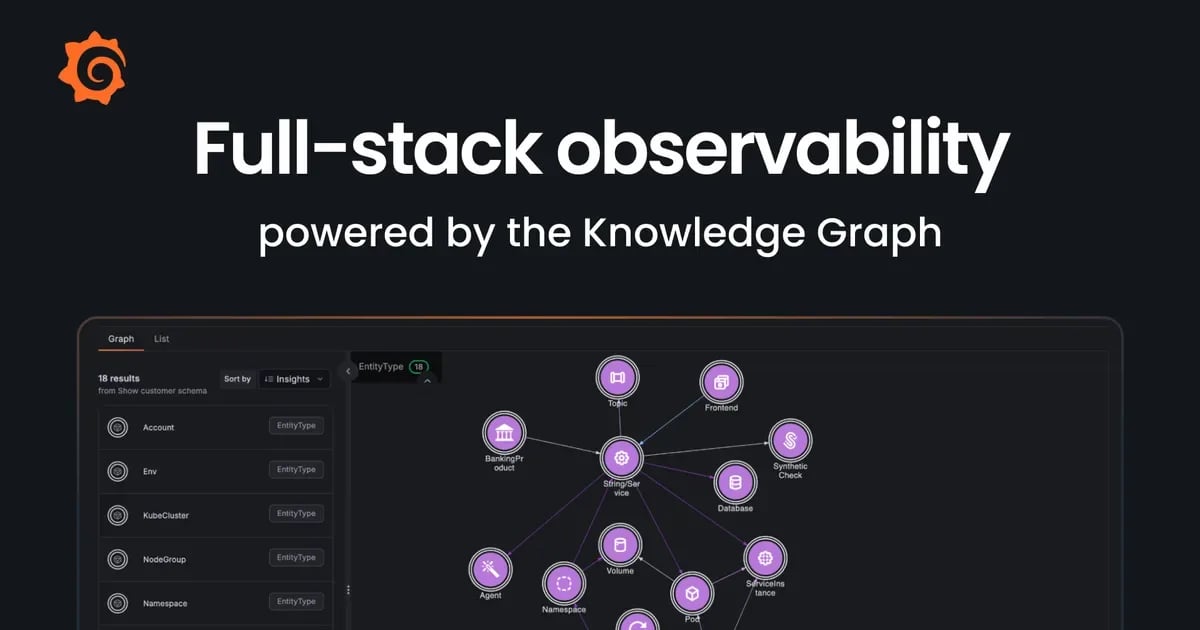
A schema view of the Knowledge Graph, showing how agents, synthetic checks, frontend components, and databases connect to services and infrastructure.
We're evolving the Knowledge Graph to be a platform capability, available in every stack, where you can curate context across Grafana Cloud.
Traditionally, the Knowledge Graph has supported Grafana Cloud Application Observability, Kubernetes Monitoring, Database Observability, and Cloud Provider Observability. These solutions automatically discover their respective entities, such as services, pods, and nodes, and map these entities and their relationships onto the Knowledge Graph. They then monitor entity health and add these insights onto the graph, highlighting everything from deviations from dynamic baselines to configuration changes.
Now we're extending that full-stack picture, bringing more of your environment into the Knowledge Graph:
- Frontend apps (generally available): Frontend Observability maps frontend apps and user-facing signals to the services and infrastructure behind them.
- Synthetic checks (public preview): Alerts from Synthetic Monitoring checks now appear alongside service health, so you can spot issues and investigate faster.
- More Google Cloud, AWS, and Azure cloud resources (generally available): Cloud Provider Observability now maps more of your Google Cloud, AWS, and Azure resources for a more complete picture of your cloud infrastructure.
- AI agents (public preview): Agent Observability maps your AI agents alongside their dependencies, so you can see how they connect to the rest of your system.
- Microsoft SQL Server databases (private preview): Database Observability now discovers SQL Server databases and maps them automatically.
With these updates, you can investigate issues across more of your stack, from a user-facing app to the services, databases, and infrastructure behind it.
Go beyond telemetry with richer context in the Knowledge Graph
Knowing how your system fits together is important, but to investigate issues effectively, you also need context that’s unique to your organization, including which teams are responsible for which services, how those services support your products and business processes, and what you've learned from past incidents.
We're bringing more of that context into the Knowledge Graph, and making it available to both engineering teams and the AI agents they work with every day.
Service context: connect services to their owners with Grafana Cloud Service Center
While your telemetry describes what’s actually running, a service catalog describes your system in terms your organization understands. Connecting the two gives an investigation a route from a deployed component to the service it belongs to, the team responsible for it, and the guidance they maintain.
The new Knowledge Graph integration with Grafana Cloud Service Center, now in private preview, brings these connections onto the graph, so you can see service ownership, on-call schedules, and runbooks alongside the components they support.
For example, let’s take Everyday Checking, an imaginary banking app powered by account management and card payments services. If account creation slows down, you need to know which deployment is affected, which team owns it, who’s on call, and where to find the account creation runbook. Having all that information connected in the Knowledge Graph gives an engineer or an agent a much more useful place to start.
Team context: add custom entities with Grafana Assistant
Your team knows things that no automatic discovery process can infer. Account management and card payments might belong to the Everyday Checking app. A group of services might support a specific online product or business process. You should be able to make those relationships available to everyone in your org via the Knowledge Graph.
That’s why we built custom entities and relationships, now generally available. They let you define rules based on your telemetry to create the entities you need, connect them to the rest of the Knowledge Graph, and attach health insights. For example, if multiple services share the label
product_line="everyday-checking"
, you can use that label to group them under a new Everyday Checking product entity. %3Aquality(90)%2F&w=3840&q=75)
An example dashboard built to assess both business and system performance, using custom entities related to a banking product.
You can also use Knowledge Graph mode in Grafana Assistant, now generally available, to help define these custom entities and relationships. Ask how to model your product, write a custom rule, or investigate a missing connection, and Assistant can guide you through the process.
Operational context: give the next investigation the benefit of the last
Some of your most useful operational knowledge is created when something goes wrong: someone tests a hypothesis and rules it out; a restart appears to help, but the errors return; a configuration change finally restores service. By the end of the investigation, the team has learned far more than the final root cause.
Through an integration with Grafana Cloud IRM, we’re bringing those lessons onto the Knowledge Graph as operational context, now in private preview. This goes beyond attaching an incident summary to a service. We’re extracting hypotheses, actions, and their outcomes from the evidence captured during investigations, and connecting them to the relevant parts of your system.
To revisit our Everyday Checking example, imagine the team tried a restart, saw the errors return, then restored account creation by reverting a database connection pool setting. The next investigation could use that history to check whether the same conditions apply, and whether another restart is worth trying. The earlier incident provides a lead to test against current telemetry.
Runtime context: give agents and people the same starting point
Each connection surfaced in the Knowledge Graph makes it possible for teams to ask more useful questions. Which services support this product? Which deployment is affected? Who owns it? What did we try the last time this happened?
People can explore those connections in Grafana Cloud. And now, with the Knowledge Graph available as runtime context for AI agents, a capability that’s generally available, Grafana Assistant and your own agents connected through gcx can work from that same shared understanding of your system.
“We had a latency alert fire, then a second alert in our downstream HPCC system. The real issue turned out to be a call to an external vendor that exhausted the connection pool at our database layer,” said LexisNexis Solutions’ Wilson. “Assistant walked down the Knowledge Graph and got us to that root cause a lot quicker, and it kept teams off paths they had already started down.”
Our new Cypher query tool also lets agents ask the Knowledge Graph direct questions about how your system connects. Cypher is a standard graph query language: you describe a pattern, such as “every service that calls this database and the pods it runs on,” and get back each match with its relationships and current health. This helps agents build on context already available to them rather than reconstruct from raw telemetry each time.
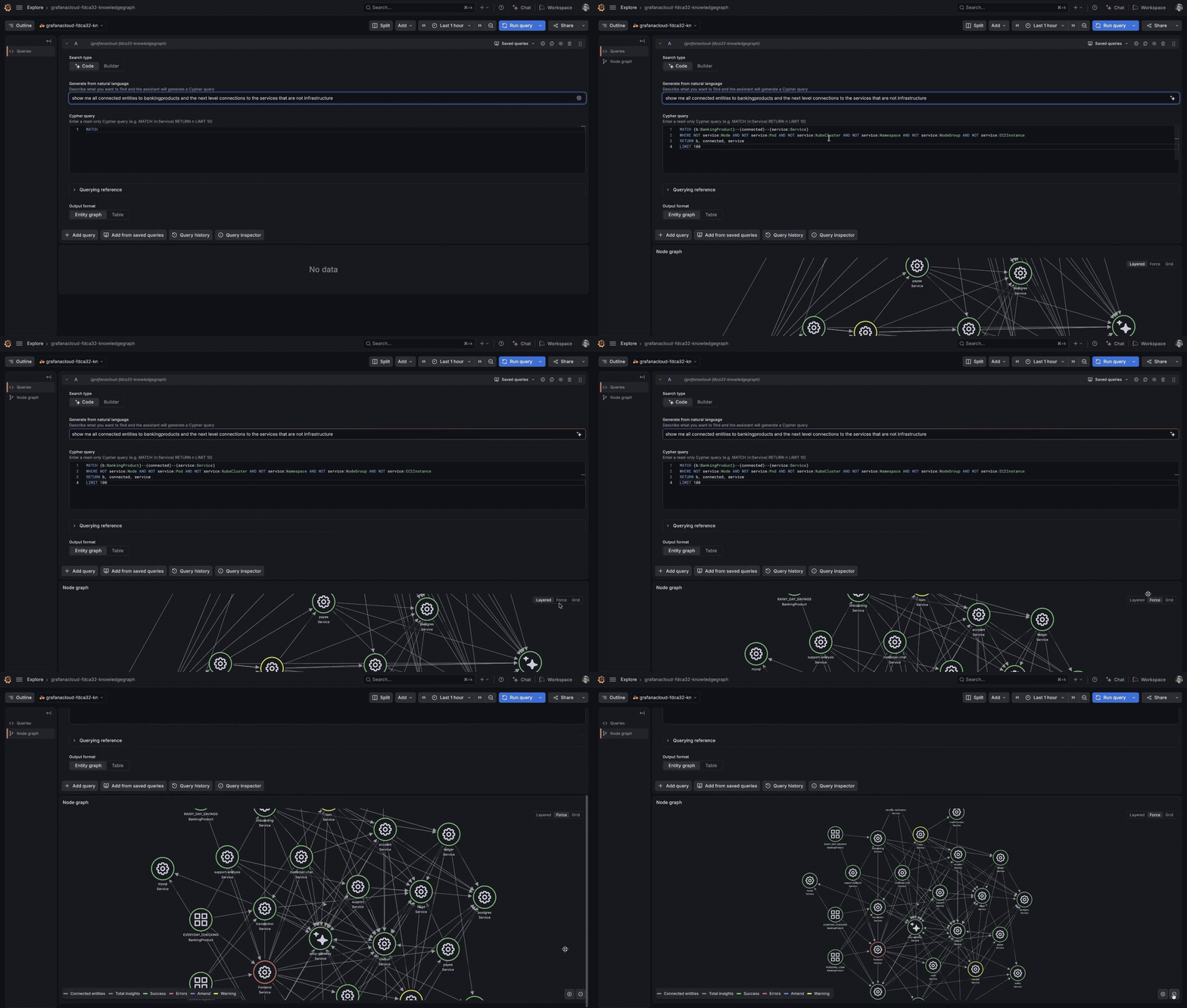
The new new Cypher query tool lets agents ask the Knowledge Graph direct questions about how your system connects.
Get started today
With more of your system and operational knowledge connected through the Knowledge Graph, you and your AI agents have a clearer picture of how everything fits together. That means you can spend less time piecing together context and find root cause faster.
Ready to get started? Ask Grafana Assistant: “How can I get more from my Knowledge Graph?” and get specific recommendations based on your stack. Note: some changes may require admin access.
You can also fill out this form to access the private previews mentioned throughout this post, including mapping Microsoft SQL Server databases to the Knowledge Graph, and learn more in our Knowledge Graph documentation.
Grafana Assistant is the easiest way to get started with metrics, logs, traces, dashboards, and more in Grafana Cloud. We have a generous forever-free tier and plans for every use case. Sign up for free now!
منتشرشده در
Grafana Labs Blog
ادامه مطالعه