Grafana Pages: Turn data into interactive experiences with the next evolution of Grafana
Teams often spend as much time preparing information as discussing it: gathering charts, checking business reports, and finding the GitHub activity that explains a change. Every follow up question can lead to yet another round of work. That's why, as part of ObservabilityCON 2026 , we're excited to introduce Grafana…

%3Aquality(90)%2F&w=3840&q=75) %3Aquality(90)%2F&w=3840&q=75)
Grafana Pages: Turn data into interactive experiences with the next evolution of Grafana
Teams often spend as much time preparing information as discussing it: gathering charts, checking business reports, and finding the GitHub activity that explains a change. Every follow-up question can lead to yet another round of work.
That's why, as part of ObservabilityCON 2026, we're excited to introduce Grafana Pages, a new feature in Grafana Cloud that gives you a canvas to describe what you need and build a live app in minutes, based on your real data, context, and interactions. From new types of visualizations to slides and even to games, the only limitation is your imagination.
With Pages, currently in public preview, you can create interactive views and tools with Grafana Assistant, using the data you already access through Grafana. There's no code and no setup; no export, upload, or deploy steps. Unlike standard dashboards, which are fixed grids of panels, you simply describe what you need, refine it through conversation, and share it with your team to explore and return to as needed.
What Pages unlocks
Pages let you build trusted, reliable, and scalable (mini) apps in the environment you know and use with Grafana Assistant by your side.
Oftentimes, broad solutions might miss a use case that’s specific to your organization. But with Pages you can easily build and own your own information hub, whether it's an incident view, a runbook, a deploy tracker, an exec readout, or a customer-facing status page.
Let's look at some ways you can build Pages today.
Build on your existing data connections
Getting an internal tool working starts with connecting it to useful data. Pages builds on the data connections you already use in Grafana, giving you a starting point for bringing operational and business information together.
Put transaction volumes beside service performance, or build a release review around production trends and relevant connected context. Spend your effort shaping the experience around the question your team needs to answer, rather than getting bogged down trying to figure out all the visualization bells and whistles.
Let colleagues answer the next question
A shared view often leads to other questions you hadn't initially considered. One person might want to know about impacts on a specific region. A second might ask when the issue started, while a third wants to know which service is driving the change.
Pages can include filters, time-range controls, and drilldowns so colleagues can explore those questions themselves. Start with an overview, narrow it to a region or service, and inspect the supporting detail—all without asking someone to prepare another report.
Reuse the work; take the idea further
Build a page once, then return to it with a new time range for the next review. Refine it through Assistant as your team discovers which comparisons and details matter.
The remix feature in Pages gives a good idea room to grow. A colleague might build a useful deployment tracker; you might see how to extend it into a broader release review. Start from their Page, add your perspective, and turn it into something neither of you had to build from scratch.
Trust what you see
A page is only useful if people believe it. Every page keeps its sources, which are the queries behind each chart and number, so you and your colleagues can check where a value came from instead of taking Assistant's word for it. To validate a page you've built, open a source in Explore mode in Grafana Cloud to run the same query over the same time range, compare it with what the Page shows, and keep digging from there.
Pages also build on the access you already have. They work with any existing data connections you have configured in Grafana Cloud, and Grafana's permissions and data source policies still apply to every request. If a page can do something beyond reading data, like sending a Slack message or making an HTTP request, Grafana shows you the destination and values to review before it runs.
See what people are building
Early internal examples show the range of experiences people are creating with Pages, from business monitoring to release tools and visual storytelling.
In this section, we'll link to some of these projects so you can check them out. We've also embedded several of the pages directly into this post so you can interact with them here, too.
Run your operations
Pages can replace the tab-hopping that comes with triage, audits, and capacity reviews. Each of these examples gathers the data, ranks what matters, and lets you act on it.
Triage. Check the health of services across the (fictional) Astronomy Shop and Bank production namespaces. Triage surfaces SLO burn, error and latency regressions, and firing alerts. Pick the most urgent service and open an investigation from the same view.
Service health. See which services are burning or have spent their SLO error budget. Select a service to drill into its traffic, error rate, p95 latency, and firing alerts over the time range you choose.
Rightsizing. Compare Kubernetes CPU and memory requests against actual usage. Find workloads that are overprovisioned or starved, see the monthly cost of fixing them, and build a patch bundle of recommended request changes.
Alert Noise Audit. Find which alert rules produce the noisiest firing episodes. Classify them as flapping, always firing, broken, or night pager. Review fixes such as pending periods or keep-firing-for settings before you apply them.
Explore your data
A page can turn a data source into something you want to look at and click through, not only read.
Observatory. Request rates, error ratios, latency, service call paths, and recent orders for the Astronomy Shop appear as an interactive star map. The busiest services glow brightest, failing calls stand out, and you can follow a single order across the sky.
The Restless Planet. Recent USGS earthquake activity becomes a scrolling story for any time window you choose. It shows how often quakes occurred, where they clustered, and how their energy was distributed. Change the window and every sentence recalculates.
Tell the story
Pages aren't limited to dashboards. Use them to present results, because the numbers stay live while the format changes.
Week in Review. A weekly review of Astronomy Shop and Bank service health, SLOs, alerts, latency, cost, and customers. It's a navigable slide deck with presenter notes, ready for a Monday meeting.
Stack Wrapped. A story-style recap of your stack's week, covering requests, latency, alerts, SLO performance, regional revenue, and cluster cost. It's built to be shared, with tap-through cards.
Just for fun
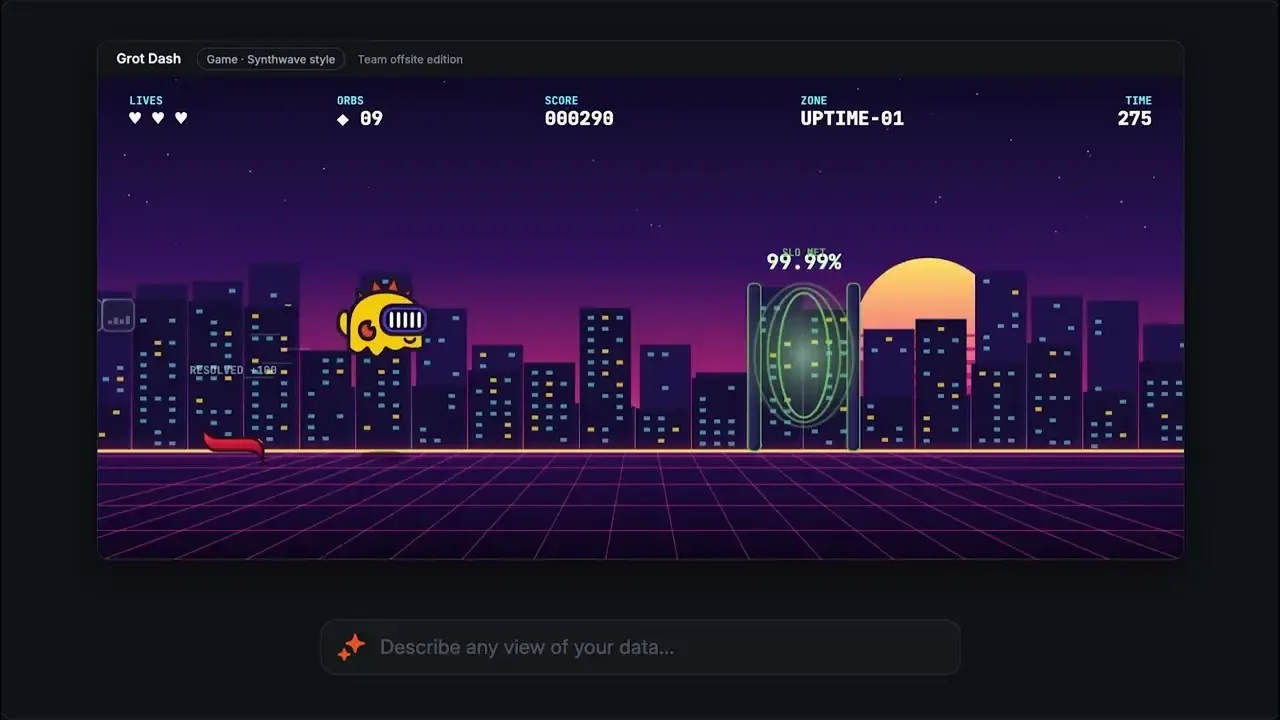
Tail Run. Fly a game-style run through one minute-by-minute stretch of a production service's latency and error data. p99 latency sets the ceiling, and error rate and median latency set the floor. You can see how the service behaved while you play.
Start with one question your team keeps asking
You can start building Pages today. We suggest you choose a recurring task that sends someone across dashboards, reports, or connected tools. Identify who needs the result and what they should be able to explore. Then describe that to Assistant, using the sources you have connected.
For example, try this prompt in Assistant:
Create a store operations page using our transaction and payment-error data. Let me compare regions, select a store, and change the time range. Show missing data clearly and include links to the sources.
Try the first version, check representative values against the source, and refine the controls with the people who will use them. A useful next request might be: “Add a comparison with the previous week and put payment errors beside the transaction trend.”
You can even turn your most viewed dashboard into a page and see what it looks like with filters and drilldowns added.
Either way, start with something that saves your team one repeated round of preparation.Create a page and keep improving it as the questions change. Your first draft takes just a few minutes, from there on you can plan longer or shorter iterations and refinements.
Grafana Assistant is the easiest way to get started with metrics, logs, traces, dashboards, and more in Grafana Cloud. We have a generous forever-free tier and plans for every use case. Sign up for free now!
منتشرشده در
Grafana Labs Blog
ادامه مطالعه